
Migrating from BigCommerce to Shopify: A 2026 Playbook
Migrating from BigCommerce to Shopify step by step: map catalog data, build a redirect map, test business rules and monitor SEO for 90 days after launch.
Your BigCommerce store is trading, your team knows its quirks, and nobody wants a relaunch that breaks pricing on a Monday morning. Yet the workarounds are stacking up. A wholesale price list needs manual checks, a complex product needs a developer for a small option change, and expanding into another market means stitching together tools that were never designed to run as one operation.
BigCommerce reported fiscal-year 2024 revenue of $332.9 million and approximately $28.2 billion in GMV in BigCommerce's investor filing. Those totals describe a platform ecosystem, not your store's future performance. A successful import can still be a failed launch if wholesale buyers see retail pricing, modifier charges drop at checkout, customer consent is missing, order history no longer matches tax lines, or high-value URLs lose their redirects.
Judge migrating from BigCommerce to Shopify by continuity, not record counts. Audit the business rules that make money: price lists, customer groups, product modifiers, locations, active discounts, integrations, taxes, and organic landing pages. Then agree on a 30, 60 and 90 day measurement view before cutover, so week-two ranking movement is not mistaken for migration damage and real damage is not waved away as normal volatility.
Table of Contents
- Where Each BigCommerce Object Lands in Shopify
- Business Rules to Rebuild and Traps to Avoid
- How to Build a Catalog Import Pipeline That Scales
- How to Build a Redirect Map That Protects Rankings
- How to Rehearse Staging and Cut Over Safely
- The 30, 60 and 90 Day SEO Monitoring Plan
- Confirm Readiness Before You Start the Move
<a id="where-each-bigcommerce-object-lands-in-shopify"></a>
Where Each BigCommerce Object Lands in Shopify
Start with a lookup, not an export. Every object below needs a destination, an approach, and a specific risk check before anyone moves data at volume.
| BigCommerce object | Shopify equivalent | Migration approach | Risk to check |
|---|---|---|---|
| Product and SKU matrix | Products with variants and options | Use SKU as the source key and map each option set | Variant count beyond option limits |
| Option sets and modifiers | Variant options, metafields or apps | Decide per modifier to keep, flatten or drop | Modifier prices lost at checkout |
| Categories | Manual or smart collections | Rebuild as collections and map each to its old category URL | Thin or duplicate collections |
| Price lists and customer groups | Customer tags, catalogs or B2B company pricing | Map each group to one Shopify pricing segment | Wholesale buyers seeing retail prices |
| Customer accounts | Customer records | Import with consent status and plan a password reset path | Missing passwords and consent gaps |
| Order history | Imported historical orders | Import for reporting and service, not for fulfillment | Tax lines and fulfillment status mismatch |
| Content pages and blog | Pages, articles and metaobjects | Migrate with titles, meta descriptions and canonicals | Lost metadata and broken internal links |
| Coupons and discounts | Shopify discounts | Recreate active offers only | Expired codes carried over |
| Storefronts and channels | Markets and sales channels | Map each storefront to a market with its currency and language | Currency and language mismatch |
| Inventory locations | Shopify locations | Map each warehouse and its stock ownership | Stock showing in the wrong location |
<a id="what-rebuild-really-means"></a>
What rebuild really means
A row marked as a rebuild means the data moves but the logic doesn't. You can import a price list as a set of numbers and still lose the rule that made a price appear only for a verified trade account. You can import every modifier value and still lose the price adjustment, required-field behaviour, or inventory effect attached to that modifier in BigCommerce.
Most failed launches don't come from missing product records. They come from logic rows. Modifiers, price lists, customer groups, and inventory locations control what a customer can buy, what they pay, and where that order is fulfilled from. If those rows are wrong, catalog counts can match perfectly while revenue, margin, and operations break on day one.
Practical rule: Don't sign off a row because records arrived. Sign it off because a real buyer scenario produced the right price, stock source, and checkout result.
<a id="the-three-decisions-for-every-row"></a>
The three decisions for every row
For each row, choose one outcome and record it. Keep as is means Shopify has a close native equivalent and a test proves the behaviour matches. Redesign means you'll reproduce the business outcome with a different Shopify mechanism, such as metafields, catalogs, Markets, Flow, Functions, or an app. Retire means the rule no longer earns its complexity, and you're deliberately removing it rather than losing it by accident.
Name an owner before any export runs. Merchandising should own products, modifiers, and collections. Commercial or sales leadership should own price lists and customer groups. Operations should own locations and order history requirements. Marketing should own content, discounts, and metadata. If a row has no named owner, it has no decision, and it shouldn't enter bulk migration.
<a id="business-rules-to-rebuild-and-traps-to-avoid"></a>
Business Rules to Rebuild and Traps to Avoid
A clean import can still produce a broken store. That's the central trap in moving from BigCommerce to Shopify. Products, customers, and orders are records. Pricing permissions, modifier logic, channel assignments, and fulfillment rules are behaviour, and behaviour rarely transfers by CSV.
BigCommerce option modifiers, category relationships, price lists, customer-group permissions, and multi-storefront behaviour don't map one-to-one to Shopify variants, metafields, catalogs, Markets, and B2B objects. You need to decide which processes you'll reproduce, which you'll redesign, and which you'll retire. I would not approve bulk migration until representative scenarios pass in staging.
<a id="six-scenarios-to-test-before-bulk-migration"></a>
Six scenarios to test before bulk migration
- Complex configurable product: Build your hardest SKU matrix, including required modifiers, price adjustments, and low-stock behaviour.
- Wholesale buyer pricing: Log in as an account with company-specific pricing and confirm retail prices never appear.
- Return against historical data: Process a service case using an imported order and check tax, totals, and fulfillment status.
- ERP inventory update: Change stock in the ERP and confirm the right Shopify location updates without overwriting other locations.
- Tax or shipping exception: Test an exempt buyer, an oversized item, or a restricted destination that your team handles today.
- Multilingual or multi-currency checkout: Complete checkout in another market and verify price, tax, duties messaging, language, and transactional email.
These scenarios expose whether your redesigned rules work together. A product test alone won't catch a pricing conflict. A pricing test alone won't catch stock being decremented from the wrong warehouse.
<a id="three-traps-and-their-fixes"></a>
Three traps and their fixes
Trap one is undocumented exceptions. Keep a written exception list for every rule you redesign, with the old behaviour, new behaviour, owner, and test evidence. Trap two is preserving obsolete complexity. Don't rebuild a modifier or price tier nobody has used commercially in recent trading without an owner justifying it. Trap three is assuming launch SEO work ends with redirects. One reported audit found 10 redirect chains and 161 redirect issues, according to an InterGrowth ecommerce technical SEO case study, which shows why post-launch measurement matters as much as setup.
Verify current B2B plan entitlements directly with Shopify before you rely on any plan-based claim, because entitlements change. Judge readiness by exception handling and process continuity, not by the percentage of records imported.
<a id="how-to-build-a-catalog-import-pipeline-that-scales"></a>
How to Build a Catalog Import Pipeline That Scales
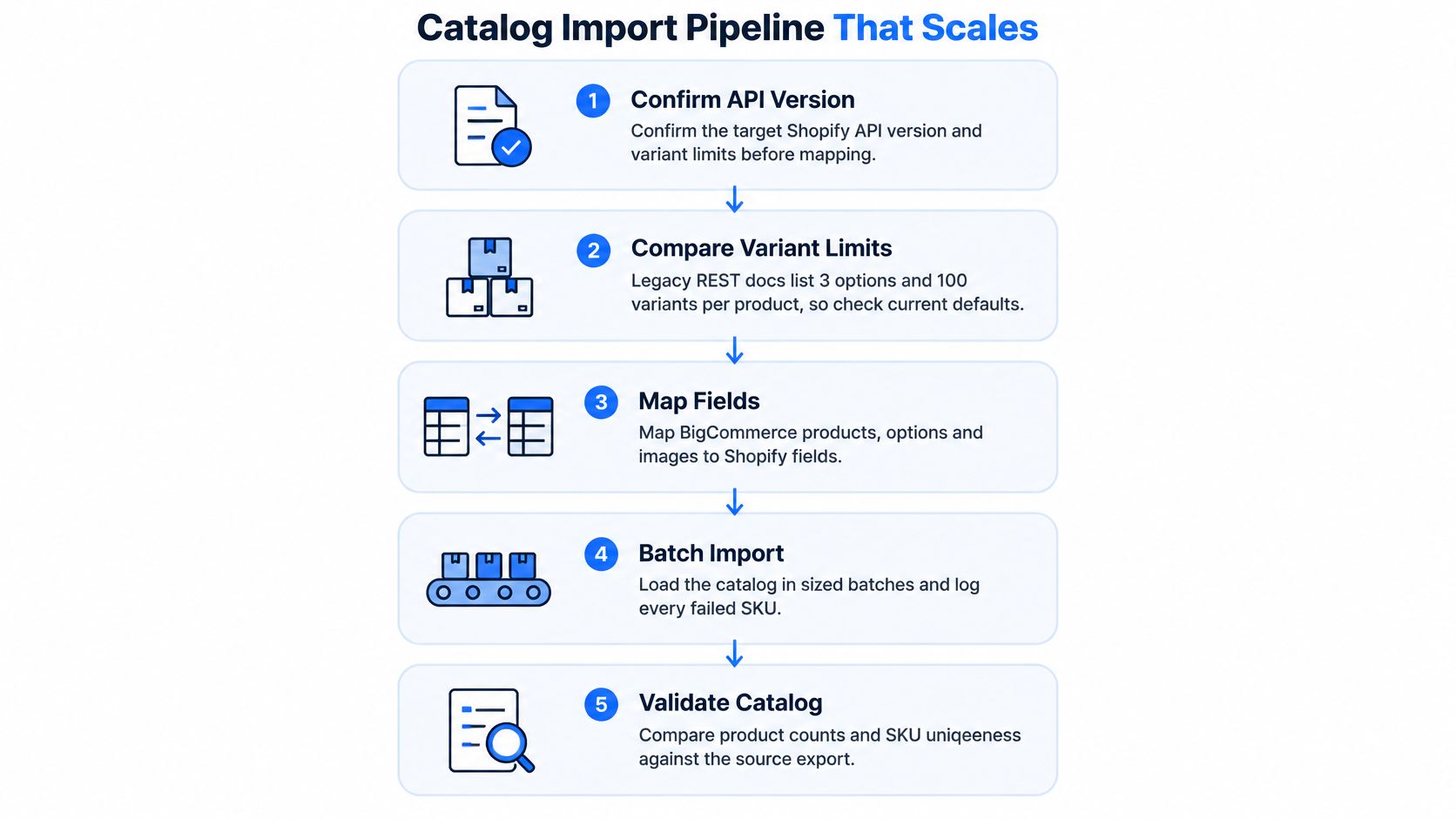
Confirm limits before you design anything. The documented legacy REST resource supports up to three options and 100 variants per product, while newer Shopify documentation describes a default limit of 2,048 variants per product, according to Shopify's product variant documentation. That discrepancy matters. A BigCommerce product with six option axes or hundreds of variant combinations will not map cleanly onto either limit, so test your real SKU matrix against the target API version and store configuration instead of assuming every product will fit.
<a id="build-the-pipeline-in-this-order"></a>
Build the pipeline in this order
- Export everything with identifiers. Pull products, variants, SKUs, prices, tax codes, inventory identifiers, option sets, modifiers, bundles, subscriptions, custom fields, locations, and media references. A missing identifier breaks every later match, reconciliation check, and delta sync.
- Assign an external source-of-truth key. Give every product, variant, customer, order, media asset, and redirect a stable key outside Shopify. That makes the pipeline idempotent, so reruns update records rather than creating duplicates. Without this, a second run doubles your catalog and you spend launch week deleting products.
- Stage and validate before loading. Check required fields, SKU uniqueness, price formats, option counts, image references, and location assignments in staging tables first. Reject bad records into an error queue with a reason your merchandising team can act on, such as "variant missing SKU" rather than a raw API error code.
- Load through GraphQL bulk operations. Shopify identifies the REST Admin API as legacy and requires new public apps to use the GraphQL Admin API. Bulk mutations are built for high-volume synchronization, while row-by-row REST imports create slow, fragile jobs that are hard to restart cleanly.
- Retry throttling with backoff. Rate limits are normal at catalog scale. Log the request, wait with increasing delay, and retry without skipping the record or restarting the full batch.
- Produce reconciliation reports. Compare source and destination counts and hashes by object type, then drill into mismatches by SKU. Your report should answer which records are missing, duplicated, changed, or intentionally retired.
- Estimate duration from variant volume. Shopify limits how many new variants very large stores can create per day, so compare your actual variant count against current API limits before scheduling the initial load, delta sync, and freeze window. A catalog that fits the per-product limits can still hit a daily creation ceiling.
A catalog isn't migrated when products are visible in the storefront. It's migrated when counts, hashes, prices, inventory ownership, and failure replay all reconcile.
Special attention belongs on option sets, modifier options, bundles, subscriptions, and custom fields, because they may need metafields, apps, or redesigned product structures. Modifier data in particular tends to arrive as a surprise: it lives outside the standard product export in BigCommerce, and discovering it after the first load means rebuilding staging tables mid-project. Teams comparing platform moves make the same mistake in other migrations, which is why our WooCommerce to Shopify migration guide also treats identifier mapping as a precondition, not cleanup. Build the pipeline so you can run it more than once, because you will need rehearsals and a final delta.
<a id="how-to-build-a-redirect-map-that-protects-rankings"></a>
How to Build a Redirect Map That Protects Rankings
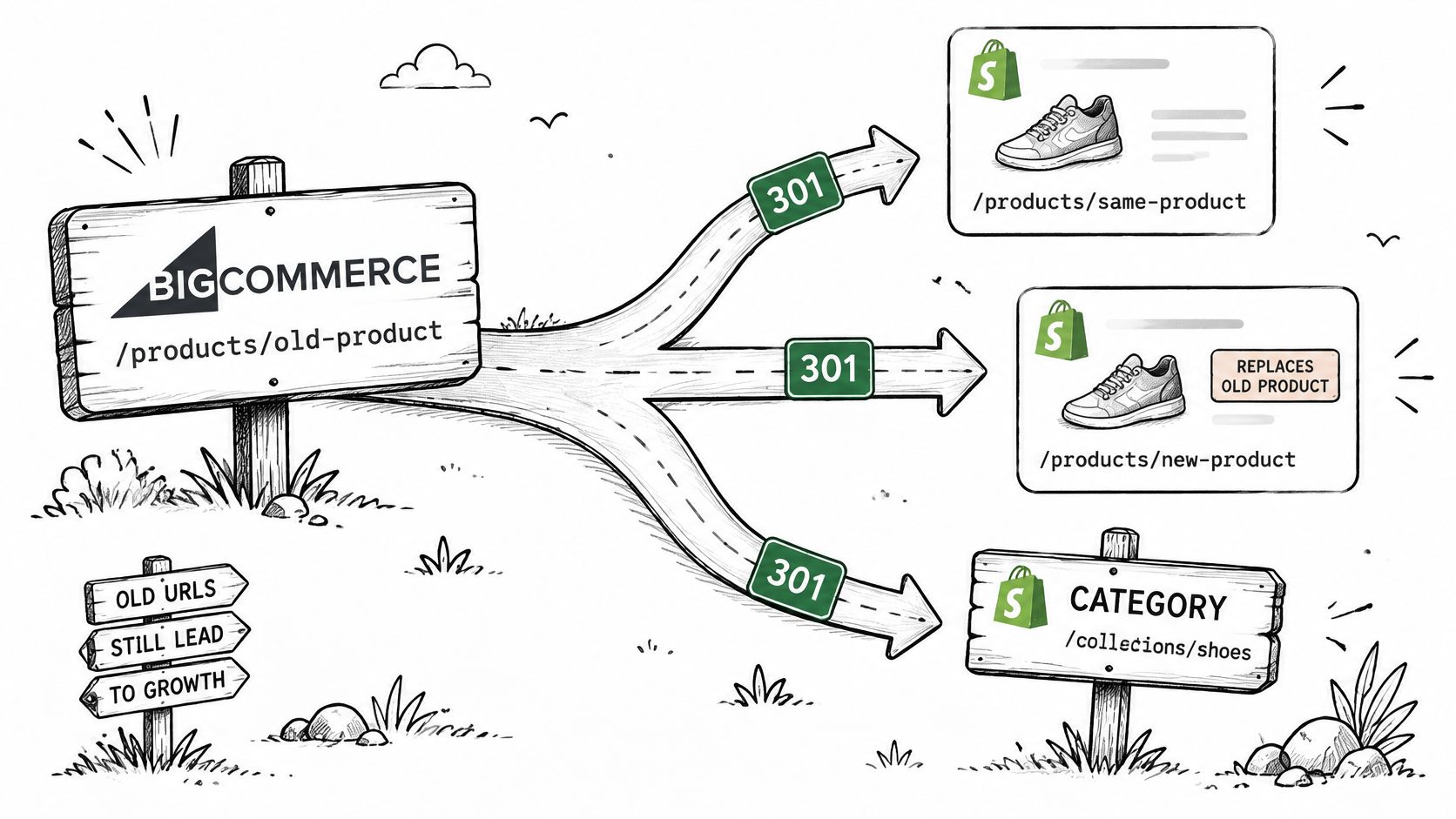
Don't give every old URL the same treatment. Give each URL type the destination and response that match its traffic, links, revenue, and current equivalent.
| URL type | Destination | Response | Check first |
|---|---|---|---|
| Product with a current equivalent | Closest Shopify product | 301 | Topical match, not the homepage |
| Discontinued product with a replacement | Replacement product | 301 | Replacement serves the same search intent |
| Discontinued product, no replacement, no links | None | 410 | Traffic and backlinks checked first |
| Category with a matching collection | Matching collection | 301 | Collection covers the same products |
| Faceted or parameter URL | Base collection via canonical, or excluded | 301 or none | Whether the URL drives traffic or indexing |
| Blog post or content page | Matching article or page | 301 | Metadata and internal links carried over |
| Media file or image URL | New CDN file | 301 where you control the old URL | Only redirect files that are linked externally |
Google recommends permanent 301 or 308 redirects, a maintained URL map, new-sitemap submission, and retaining redirects generally for at least one year, according to Google's site move documentation. Treat that as the working standard for your launch.
<a id="build-the-map-in-five-steps"></a>
Build the map in five steps
- Crawl the live store. Export indexable products, categories, faceted pages, content, blog posts, images, Search Console landing pages, and backlink targets.
- Create a one-to-one map. Every URL with traffic, links, or revenue gets its closest Shopify equivalent, with source URL, destination URL, response, and owner in one file.
- Flatten existing redirects. If an old BigCommerce redirect already points to an intermediate URL, point the original URL directly to the final Shopify destination. Chains waste crawl handling and make failures harder to trace.
- Activate redirects at launch. Load and test them before the domain moves, then activate the map as part of cutover rather than as a follow-up task.
- Submit the new sitemap. Keep redirects live for at least a year and monitor Search Console, crawl errors, landing pages, and redirect hits after launch.
The most common failure is sending many product or category URLs to the homepage. Say a discontinued trail shoe ranked for a specific use case and earned links from a review roundup. Sending that URL to the homepage discards topical relevance. Sending it to the replacement shoe or the matching trail collection gives visitors and search engines a coherent destination.
Preserving every URL isn't always optimal either. Low-value duplicates and obsolete parameter pages can be consolidated or retired after you check their backlinks, traffic, and business value. The Change of Address tool only applies when your domain or subdomain changes, not merely because your commerce platform changes.
<a id="how-to-rehearse-staging-and-cut-over-safely"></a>
How to Rehearse Staging and Cut Over Safely
Your rehearsal is the gate, not a preview. If a production-sized import can't pass commercial, operational, and SEO checks in staging, you're not ready to point the domain at Shopify.
<a id="run-the-cutover-sequence"></a>
Run the cutover sequence
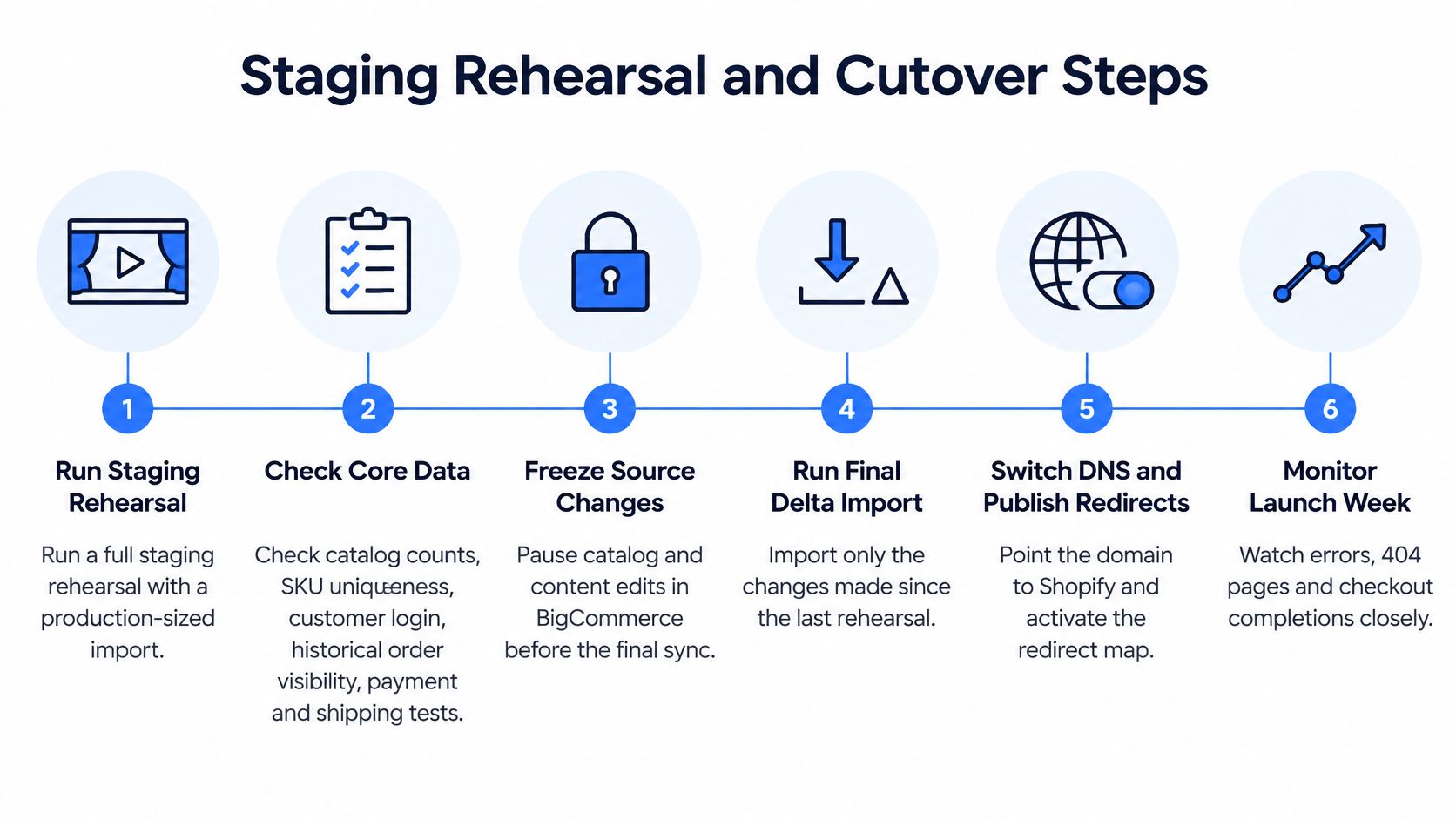
- Run a full staging rehearsal. Use production-sized data, the production theme, live integrations where safe, and the actual redirect file. A sample import won't expose variant, location, or performance problems at scale.
- Validate core behaviour. Check catalog counts, SKU uniqueness, customer login and password reset, historical order visibility, payment, tax, shipping, transactional email, ERP, PIM and OMS sync, analytics, structured data, internal links, mobile rendering, and checkout.
- Open the freeze window. Stop catalog, price, and content edits in BigCommerce, then run the final delta sync for products, customers, orders, and inventory created since rehearsal.
- Confirm reconciliation. Counts and hashes should match by object type, with every intentional difference documented. Unresolved mismatches in price, stock ownership, or customer consent are launch blockers.
- Point the domain and activate redirects. Publish the Shopify store, activate the redirect map, submit the new sitemap, and confirm canonicals point to live Shopify URLs.
- Place one low-value order. Pay, fulfil in test mode where appropriate, refund it, and verify order email, analytics purchase events, ERP status, payment settlement status, and inventory movement.
- Monitor daily for the first week. Review redirect hits, 404s, crawl errors, checkout completion, order flow, revenue, and integration error queues every day.
<a id="what-go-and-no-go-should-mean"></a>
What go and no-go should mean
A go decision needs named sign-off from ecommerce, operations, finance or tax ownership, customer service, and SEO. A no-go decision is correct if wholesale pricing is uncertain, tax calculations differ on test orders, inventory can land in the wrong location, or top landing pages lack tested redirects.
Timelines from vendor examples shouldn't set your deadline. A 2026 migration-services case-study page reported that Mahogany Smoked Meats moved from BigCommerce to Shopify in 30 days and achieved a 9.26% conversion-rate increase, according to Ethercycle's migration case study page. That's one vendor-reported outcome, not a guarantee for another catalog, integration stack, or approval process. Your schedule should follow rehearsal evidence and unresolved exceptions.
<a id="the-30-60-and-90-day-seo-monitoring-plan"></a>
The 30, 60 and 90 Day SEO Monitoring Plan
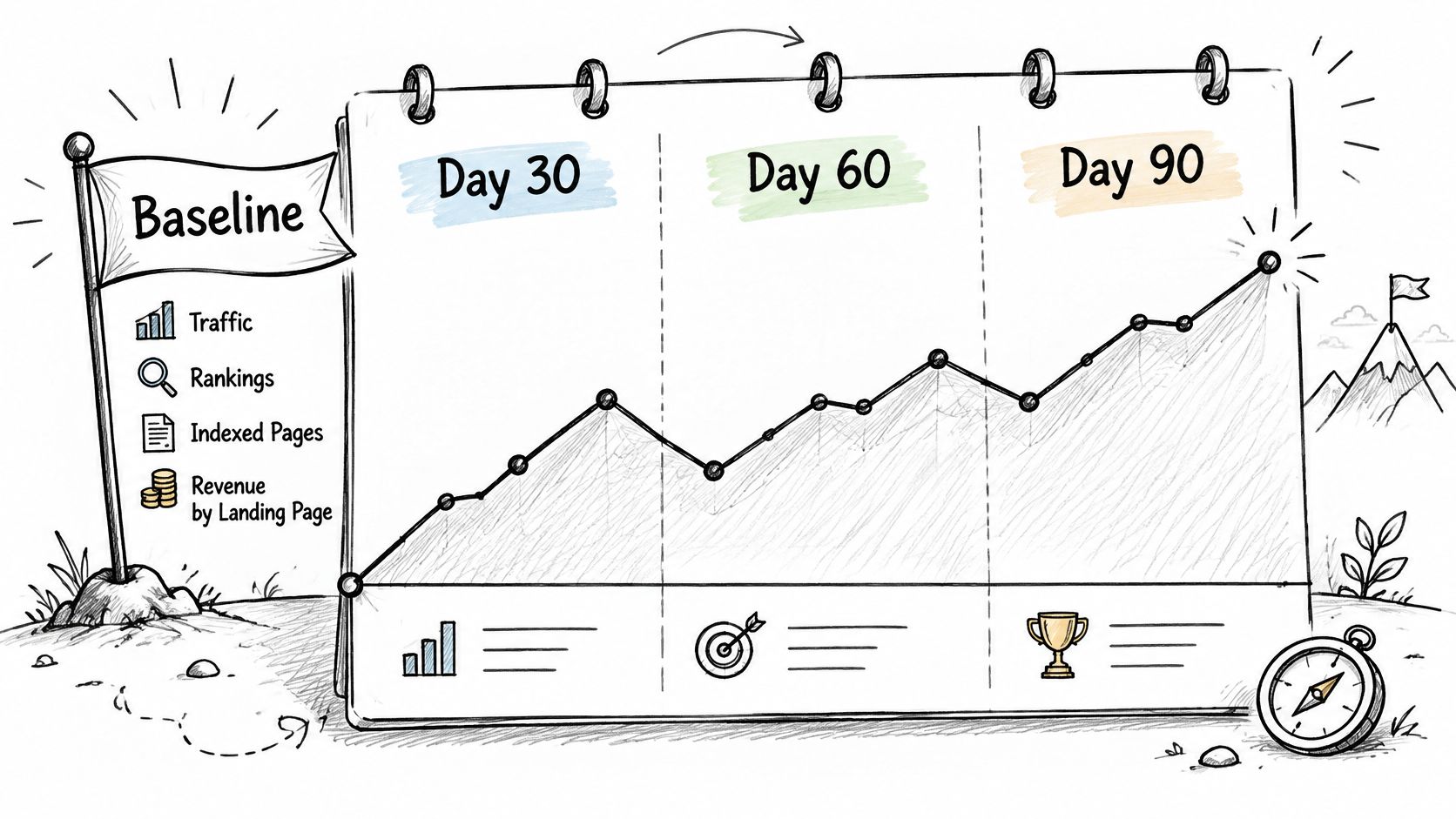
Week-one ranking drops are hard to interpret. Search engines need time to crawl new URLs, process redirects, and settle canonical choices, so early movement alone doesn't prove migration damage. You can't make that judgment without a pre-migration baseline saved before launch.
Save organic traffic, rankings, indexed URLs, crawl errors, and revenue by landing page before cutover. Compare post-launch periods with the baseline and, where seasonality matters, with the same period in the previous year. Segment everything by template and category, because a loss concentrated in one collection type points to migration damage more clearly than a small site-wide fluctuation.
| Window | What to check | Data source | Signal to act on |
|---|---|---|---|
| Days 1-7 | Redirect hits, 404s and crawl errors | Search Console and server logs | 404 spike on high-traffic old URLs |
| Week 2-4 | Indexed URLs and sitemap discovery | Search Console indexing report | Sustained drop against the old indexed count |
| Day 30 | Organic landing pages and rankings for top pre-launch pages | Analytics and rank tracking | Losses concentrated in one template or category |
| Day 60 | Redirect chains and canonical tags | Crawl tool export | Any chain longer than one hop |
| Day 90 | Revenue and conversion by landing page | Analytics against pre-migration baseline | Pages losing revenue while traffic holds steady |
<a id="separate-damage-from-volatility"></a>
Separate damage from volatility
Migration damage usually has a pattern. You'll see losses tied to a template, category, redirect rule, canonical change, or missing metadata set. Normal volatility is more scattered and doesn't align neatly with URLs you changed, consolidated, or retired.
Recovery order matters. Fix templates that lost the most revenue first, then templates that lost the most traffic. When a losing set contains duplicate or obsolete URLs, decide between consolidation and a 410 only after checking backlinks, traffic, and business value. Our Shopify SEO complete guide covers the broader on-page and technical checks your team should keep running after the migration window closes.
<a id="confirm-readiness-before-you-start-the-move"></a>
Confirm Readiness Before You Start the Move
Run this self-check this week and answer yes or no. Don't soften a gap into a partial yes, because unclear ownership becomes launch risk later.
- Named owner for every mapping row: One accountable person signs off products, pricing, locations, content, customers, orders, discounts, and markets.
- Frozen rule decisions: Every business rule is marked keep, redesign, or retire, and stakeholders signed the list before any bulk export.
- Complete URL inventory: You crawled the live BigCommerce store for indexable products, categories, content, blog posts, media, and important parameter URLs.
- Production-sized staging: Your rehearsal environment reflects real variant counts, integrations, locations, markets, and checkout behaviour.
- Saved monitoring baseline: Traffic, rankings, indexed URLs, crawl status, and revenue by landing page are exported and stored before change.
If all five are complete, schedule the rehearsal. If any mapping row has no owner or any rule has no decision, close that gap first. Our migration approach is to rebuild rather than replicate, because legacy templates rarely map cleanly to Shopify's section-based themes. For a fuller pre-project check, use our Shopify migration readiness checklist to turn those yes and no answers into scoped actions.
If your self-check exposes unclear pricing rules, integration gaps, redirect risk, or an unrealistic timeline, United Victory Technologies can scope your move before data starts moving. Our Shopify Migration Readiness Assessment uses eight questions, takes about two minutes, and provides a scoped view of data, integrations, SEO risk, and a realistic timeline. Start that conversation at United Victory Technologies so your BigCommerce to Shopify migration is planned around trading continuity, not just record counts.