
Migrating Wix to Shopify: A Data-First Guide
Master migrating Wix to Shopify with a data-first approach. Learn how to protect SEO equity, transform complex catalogs, and plan for scalable B2B growth.
The most popular advice about migrating Wix to Shopify is wrong in one important way: this isn't a visual redesign with a product import attached. It's a data schema transformation, URL change, and operating-model transition that happens to include a new theme.
Wix's scale makes the accumulated footprint easy to underestimate. Wix reported 196.7 million registered users at the end of 2020, after adding more than 31 million users during that year, and reported more than 260 million users worldwide by June 2024. Those figures describe the platform's installed base, not active ecommerce merchants, but they show why an established Wix store may carry years of customer records, orders, content, media, analytics settings, and integrations. Wix platform history and scale should inform the scope of the work, not a theme preview.
Shopify's transaction scale explains why some merchants choose a more commerce-centered platform, but it doesn't guarantee better results after migration. Shopify's gross merchandise volume rose from $119.6 billion in 2020 to $292.3 billion in 2024, according to reported Shopify merchant and GMV figures. The relevant question is whether your data, SEO signals, checkout requirements, and future business rules can move without losing their meaning.
Table of Contents
- Redefining the Scope of Your Replatforming Project
- Protecting Organic Visibility Through URL Mapping
- Executing a Flawless Catalog and Data Transformation
- Designing for Future Operating Complexity
- Managing the Cutover and Post-Launch Verification
- Securing Long-Term Growth With Specialized Partners
<a id="redefining-the-scope-of-your-replatforming-project"></a>
Redefining the Scope of Your Replatforming Project
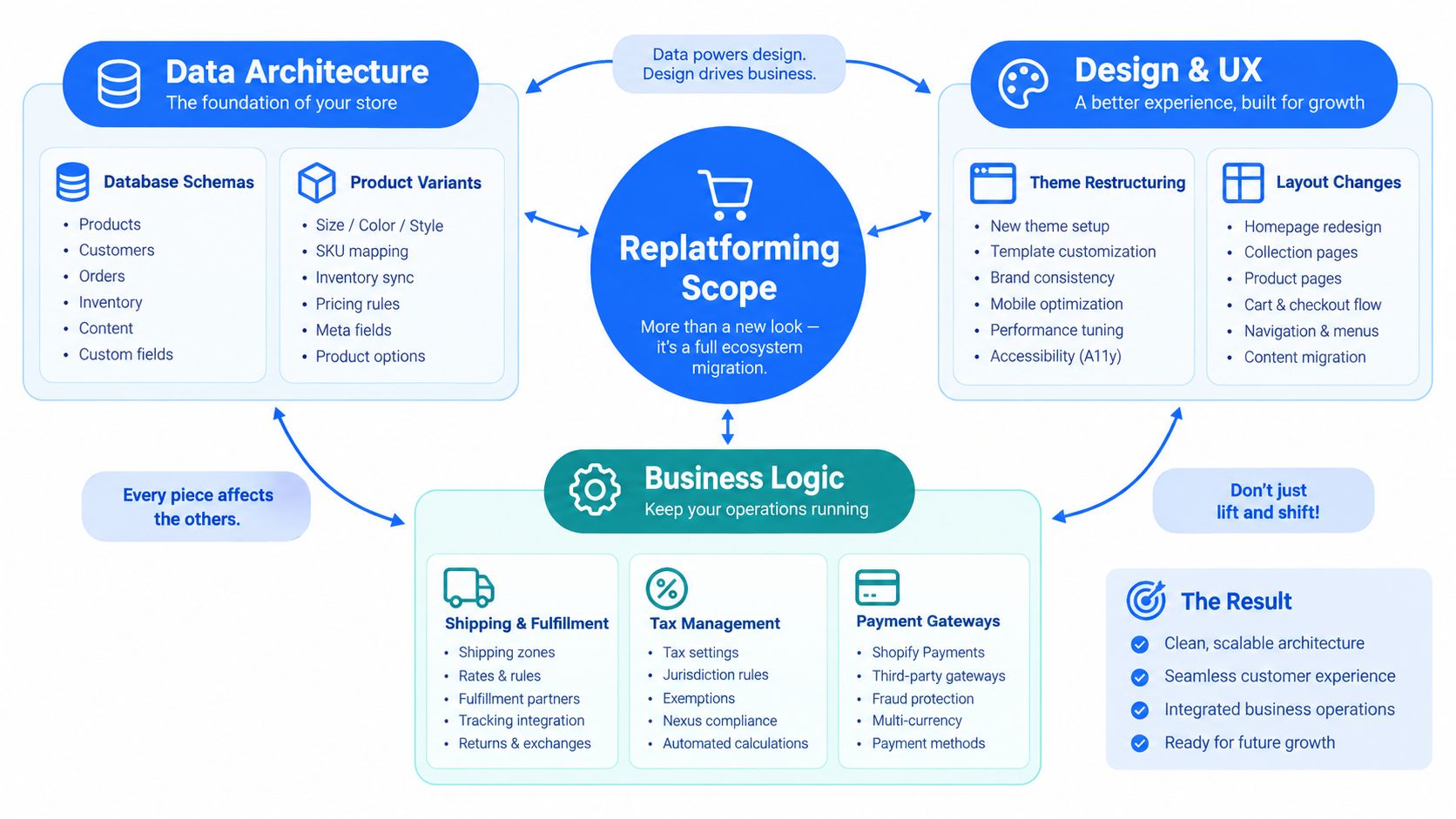
A Wix-to-Shopify migration starts with a register. Theme selection comes later, and it matters less than the structure you build first. The storefront is only one surface layer. Under it sits commercial history, customer relationships, content dependencies, tracking setups, and app logic that rarely survives a basic export in usable form.
Scope goes wrong when teams treat every record as if it has the same value. Registered Wix users, paying subscribers, and actual store customers are different groups, with different legal and operational implications. Sort customer data by business use, consent status, service need, and future relevance before you move anything. That matters even more if the Shopify build must later support B2B accounts, multiple markets, or region-specific processes.
<a id="build-an-inventory-before-choosing-a-migration-method"></a>
Build an inventory before choosing a migration method
Create one source-of-truth register that covers every asset and dependency tied to revenue, operations, or search performance:
- Commerce data: Products, options, variants, SKUs, barcodes, prices, inventory rules, collections, discounts, and fulfillment relationships.
- Customer data: Profiles, email addresses, addresses, consent status, customer segments, and account behavior.
- Order history: Order identifiers, line items, transaction status, refunds, shipping details, and customer-service requirements.
- Content and media: Pages, blogs, images, downloadable files, editorial metadata, alt text, and embedded media.
- Search data: Indexable URLs, titles, descriptions, canonicals, structured data, internal links, backlinks, and organic landing pages.
- Operational connections: Payment providers, shipping tools, tax services, ERP or CRM connections, analytics, advertising pixels, email platforms, reviews, and subscriptions.
For each dataset, define the source field, destination field, transformation rule, owner, and validation method. "Imported" is not a meaningful status. A catalog can land in Shopify while variant relationships break, images attach to the wrong child SKU, inventory rules change, or collection logic stops matching the merchandising model.
Use a simple rule. If a dataset affects customer service, fulfillment, reporting, search visibility, or revenue attribution, make an explicit migration decision for it.
<a id="separate-reconstruction-from-transformation"></a>
Separate reconstruction from transformation
Some Wix data can be extracted, cleaned, and mapped into Shopify. Other elements need reconstruction because the target platform handles them differently. Product records usually need schema mapping. Page layouts usually need fresh implementation in Shopify theme sections. Blog content, custom scripts, and app behavior often need separate treatment instead of one automated pass.
This distinction changes staffing, sequencing, and QA. A spreadsheet can describe a product, but it cannot preserve the intent behind a custom configurator, a bespoke bundle flow, or an integration that posts order data into another system. Document what gets copied, what gets transformed, what gets replaced, and what gets retired.
Teams that already keep operating docs in broader ecommerce planning and development resources should still maintain one controlled migration register for approvals and testing. The deliverable is not a populated Shopify admin. It is a reconciled commerce system with data structures, content relationships, and operating rules that still make sense after launch.
<a id="protecting-organic-visibility-through-url-mapping"></a>
Protecting Organic Visibility Through URL Mapping
A Wix to Shopify migration usually fails in search before anyone notices it in design review. Rankings drop because URL equity, metadata, canonicals, and content intent were not carried forward with the same discipline as products and orders. Treat URL mapping as an SEO continuity system, not a cleanup task at the end of launch week.
Start by crawling the live Wix site in production before anyone changes domains, templates, or navigation. Build the inventory from what search engines and users can reach, not only from platform exports. Classify each URL by role, including product, category, blog post, informational page, media asset, utility page, redirect, canonicalized page, and error. Then add the business signals that help you prioritize decisions, such as organic clicks, backlinks, revenue relevance, and indexation status when those inputs are available.
Wix exports do not reliably preserve the full SEO state you need for a move like this. Available documentation indicates that page SEO tags are not exported in a complete form, and Shopify's product CSV can carry SEO title and description fields without rebuilding the broader Wix configuration. That gap matters.
The baseline should capture the live page exactly as it exists before migration. For high-value URLs, record the current Wix path and status, page type, primary search intent, title, meta description, canonical target, headings, structured data, indexation directives, intended Shopify destination, redirect status, and final test result. Also flag any planned changes to copy, imagery, internal linking, or schema markup, because those changes can alter relevance even when the redirect itself is correct.
Shopify enforces its own path logic for products, collections, blogs, and pages. Similar page names do not guarantee a safe match. A product page that ranked for a precise query may need a different handle in Shopify, while a Wix category page may map better to a collection with revised rules for merchandising and filtering.
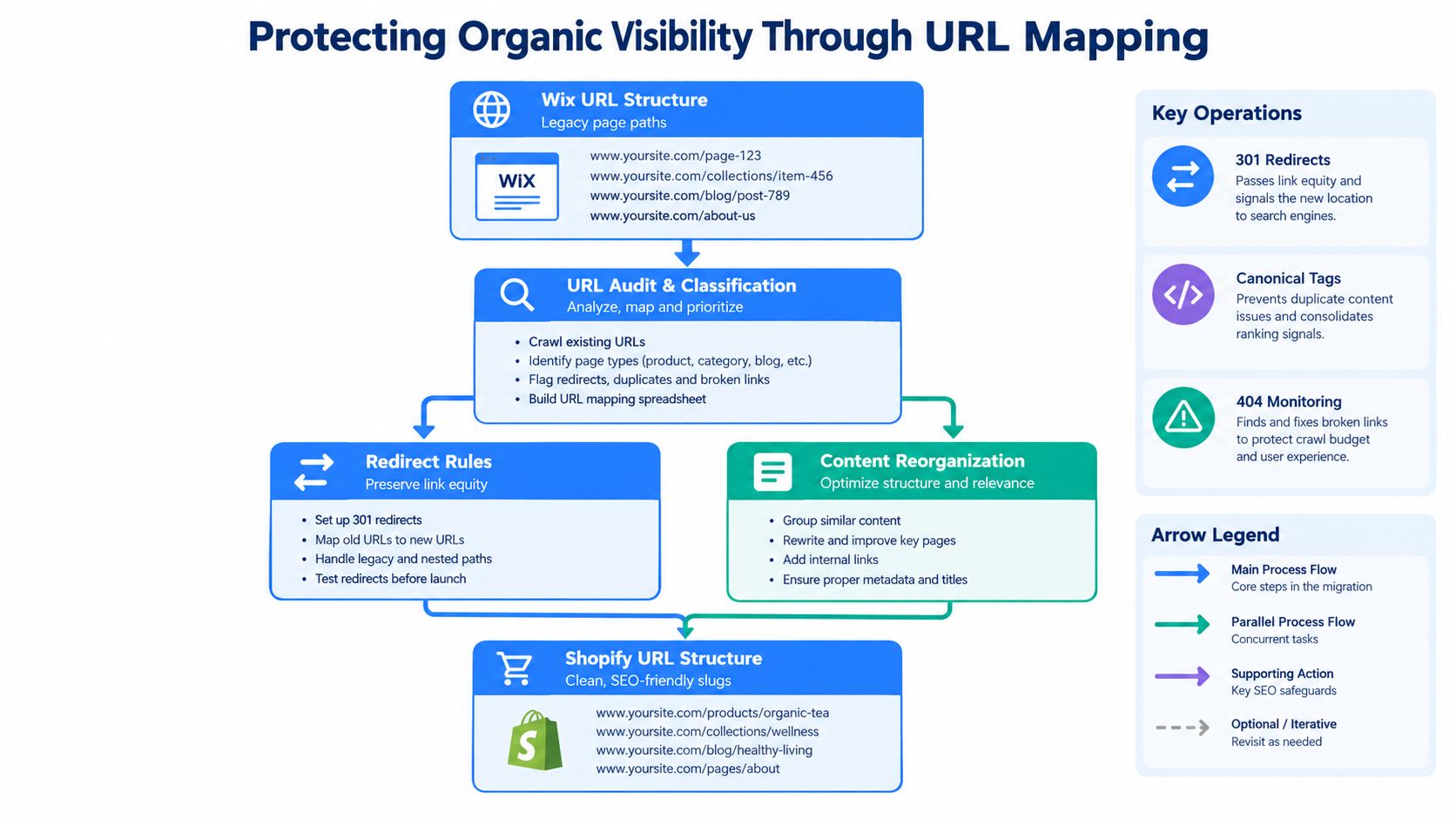
Build redirects before launch. Keep the logic strict. Each old URL should resolve to one destination that preserves the closest commercial and topical intent. Discontinued products may point to a successor item. Retired categories may point to the nearest relevant collection. Sending everything to the homepage creates a superficially tidy migration and a weak relevance signal.
Where Shopify requires a new structure, use permanent server-side 301 or 308 redirects and keep them in place long enough for search engines and external links to update. Google's site-move guidance recommends retaining redirects for at least one year and monitoring both old and new URLs after the move.
Validate the result with a crawl, not a spot check. Look for redirect chains, loops, orphaned priority pages, broken canonicals, missing titles and descriptions, wrong status codes, and destination pages that no longer satisfy the original intent.
<a id="executing-a-flawless-catalog-and-data-transformation"></a>
Executing a Flawless Catalog and Data Transformation
A product import is successful only when the destination behaves correctly. Matching row counts isn't enough. Shopify must preserve the relationships between products, variants, images, collections, inventory, pricing, and customer-facing content.
Normalize the Wix catalog before loading it into Shopify. Assign stable product handles, map Wix options to Shopify variants, standardize SKU and barcode fields, preserve price and inventory rules, and convert image URLs and alt text into compatible records. Treat every transformation as a documented rule so the team can rerun it without introducing inconsistent results.
Shopify product CSV files must use the expected headers and are limited to 15 MB. Shopify's broader CSV guidance also specifies UTF-8 encoding and a 15 MB limit for product, inventory, and customer files. Large datasets therefore need deterministic batches, stable filenames, and a log of accepted and rejected rows. These requirements are documented in Shopify's product import guidance.
<a id="use-extraction-transformation-and-reconciliation"></a>
Use extraction, transformation, and reconciliation
A dependable pipeline has five controlled stages:
- Extract: Export Wix products, customers, orders, media, content, and relevant configuration data.
- Transform: Normalize fields, handles, variants, image references, collections, and metadata into Shopify's schema.
- Load: Import products and collections, then customers and supported historical records, followed by content and media reconstruction.
- Reconcile: Compare source and destination records using stable keys and investigate every mismatch.
- Repeat safely: Make reruns idempotent so a failed batch updates the intended record instead of creating duplicates.
Run a dry import against a development store. Record rejected rows, malformed values, missing images, duplicate handles, and variant errors. Test tax behavior, inventory totals, consent status, image associations, collection membership, and order-history availability before the production load.
| Data Type | System Constraint | Validation Key |
|---|---|---|
| Product catalog | Shopify product CSV files require expected headers, UTF-8 encoding, and a 15 MB file limit | Stable product handle and SKU |
| Inventory | Large datasets need deterministic batches within Shopify's CSV limits | SKU and inventory location |
| Customers | Customer CSV files are subject to Shopify's 15 MB CSV guidance | Email address |
| Orders | Historical records need a defined import and reconciliation method | Order ID |
| Product variants | Shopify documents that stores with 500,000 or more variants, excluding Shopify Plus stores, may create no more than 10,000 new variants through CSV uploads or API within a 24-hour period | SKU, option values, and variant count |
| Media assets | Image URLs and alt text require destination-compatible records | Product handle and image association |
| URLs and content | Page, product, collection, and blog structures require separate mapping | Source URL and destination URL |
For very large catalogs, the variant constraint makes batching and API throttling part of the launch plan. A catalog freeze near cutover prevents inventory and pricing changes from splitting between Wix and Shopify while imports are still running.
<a id="designing-for-future-operating-complexity"></a>
Designing for Future Operating Complexity
A Wix to Shopify migration can look finished the day the new theme goes live and still leave the business boxed in six months later. The expensive mistakes usually sit below the storefront. Customer schema, pricing logic, market structure, tax ownership, and integration patterns decide whether the new stack can support wholesale, regional expansion, and system change without another round of rework.
That is why future operating complexity needs design decisions before launch, even when the visible experience stays simple.
A practical approach is to separate what must trade on day one from what must be possible later. Day-one scope usually covers the sellable catalog, checkout, payments, fulfillment, analytics, customer accounts, core content, and redirect coverage. Those flows have to work cleanly before the domain moves. The future-state scope is different. It asks whether today's data model can carry tomorrow's commercial rules without forcing product, customer, and reporting structures to be rebuilt.
Typical deferred capabilities fall into a few groups:
- B2B pricing: buyer-specific catalogs, payment terms, approval flows, and account hierarchies
- Regional commerce: markets, currencies, languages, local content, tax treatment, and shipping rules
- Systems synchronization: ERP, CRM, PIM, OMS, warehouse, and finance exchanges
- Buyer experiences: wholesale portals, trade accounts, gated content, and differentiated navigation
- Commercial rules: minimum order values, customer-specific discounts, and market-specific product availability
Shopify is expanding this part of the platform. Shopify's Summer ’25 Editions describes B2B Markets support for multiple B2B markets with distinct catalogs, currencies, and storefront customizations, along with VAT-number validation and tax-exemption workflows for EU and UK businesses. That does not mean every merchant should turn those features on at launch. It does mean the migration should avoid a flat customer model, improvised price logic, or market setup that makes later separation painful.
I usually advise teams to design the underlying model before they design the advanced experience. A brand can postpone a wholesale portal and still define customer type, price-list eligibility, market identifiers, and product access rules in its source data and integrations. An international rollout can wait while the team confirms that handles, inventory locations, tax configuration, and content fields will support region-specific operations.
Visual polish is easier to change than operating logic. Themes can be replaced. Customer segmentation tied to the wrong records, pricing rules hard-coded into apps, or market logic spread across manual workarounds usually ripple into checkout behavior, support processes, reporting, and back-office sync.
Keep launch stable, and keep future rules possible.
Make the decision explicit for each advanced capability. Mark it as required now, structurally supported now, or intentionally deferred. Then assign an owner and a trigger for review, such as a wholesale motion, entry into a new market, or an ERP change.
<a id="managing-the-cutover-and-post-launch-verification"></a>
Managing the Cutover and Post-Launch Verification
Cutover is the point where weak migration discipline becomes visible. If the Shopify build is treated as a theme publish, teams miss the actual risk, which is breaking URL behavior, data continuity, checkout operations, and search signals at the same time. The store needs a frozen baseline, a release candidate that has already been tested, an approved redirect map, and named owners across engineering, ecommerce, support, and SEO.
Do the prelaunch checks while the storefront is still protected. Crawl the Shopify site before the domain switches. Confirm that product, collection, content, and account templates render correctly, checkout accepts test transactions, analytics events fire in the right places, internal links resolve, canonical tags point to the intended destination URLs, and the Shopify sitemap includes the pages that should be indexed. This is not cosmetic QA. It verifies that the new schema is publishing correctly.
I also want one document that controls the release hour by hour. Not a generic launch checklist. A runbook with timestamps, owners, approval gates, rollback criteria, and evidence for each completed step.
The sequence matters. Freeze Wix catalog, content, and configuration edits when the final extraction starts. Preserve the prelaunch crawl, exports, media archive, redirect map, and configuration record. Load the final delta from the dry run, then reconcile products, customers, inventory, and orders so the target store reflects the last approved source state.
Only then should redirects go live. Permanent redirects must send valuable Wix URLs to the closest Shopify equivalent. High-intent product and collection URLs should not collapse into the homepage or a generic category page, because that wastes link equity and creates avoidable landing-page loss.
After the domain connection changes, verify the live response before declaring launch complete. DNS propagation can expose visitors to mixed states for a period, so keep the Wix environment stable until the Shopify storefront resolves as expected. Then run live commercial checks: on-site search, cart behavior, checkout, payment methods, taxes, shipping logic, order notifications, fulfillment flow, and support handoff. Validate analytics, ad platform tracking, consent behavior, and revenue attribution before traffic normalizes around bad data.
Do not decommission the old environment yet.
Google recommends monitoring old and new URLs after a move. In practice, that means checking representative URLs in Search Console, reviewing indexing status, comparing organic landing pages against the frozen baseline, and investigating crawl errors before they turn into revenue tickets.
The first post-launch crawl should test each redirect for status code, final destination, chain length, loop behavior, and topical relevance. Then crawl the live Shopify site for orphaned priority pages, broken canonicals, missing metadata, internal links still pointing to Wix, and content that published incompletely.
A successful launch is operational and discoverable. If the store can take orders but key collections are unindexed, blog URLs are orphaned, or high-value product pages resolve to irrelevant destinations, the migration is still unfinished.
<a id="securing-long-term-growth-with-specialized-partners"></a>
Securing Long-Term Growth With Specialized Partners
Internal teams can often configure a basic Shopify store. Mid-market replatforming is different because the risk sits between systems. Product data must reconcile with inventory, customer records must support service, analytics must preserve attribution, and search traffic must survive a change in URL architecture while the business keeps trading.
A specialist partner adds value by coordinating those dependencies, not by writing code in isolation. The right team can audit the source platform, define the destination schema, rebuild the customer experience, test integrations, and maintain accountability after launch. That reduces the number of handoffs where a critical assumption can disappear.
<a id="evaluate-partners-by-operating-discipline"></a>
Evaluate partners by operating discipline
Ask how the agency handles:
- Data integrity: Can it show field-level mapping, reconciliation rules, rejected-row handling, and repeatable import processes?
- SEO continuity: Does it crawl the live Wix site, capture metadata, map every valuable URL, and test redirects before cutover?
- Integration ownership: Will it document payment, tax, fulfillment, ERP, CRM, analytics, and marketing dependencies?
- Architecture decisions: Can it distinguish launch requirements from future B2B, international, and systems roadmap items?
- Post-launch control: Does the engagement include crawl audits, Search Console review, analytics validation, and remediation?
- Confidentiality: Will it protect commercial data, credentials, customer records, and internal operating details?
The partner shouldn't promise that Shopify will automatically improve every outcome. Platform scale is context, not a performance guarantee. A credible team explains what must change, what can remain familiar, and where the migration introduces risk.
<a id="favor-embedded-expertise-over-a-handoff"></a>
Favor embedded expertise over a handoff
An embedded team can work inside the brand's project tools, coordinate with marketing and operations, and preserve decisions across design, development, data, and growth work. That model matters after launch because the first production crawl often reveals issues that staging didn't reproduce, while merchandising and integration requirements continue to evolve.
The best long-term arrangement also connects migration readiness with conversion optimization, analytics quality, navigation, product detail pages, and mobile usability. Replatforming creates a clean point to fix structural problems, but those improvements still need evidence, prioritization, and controlled releases.
A specialist isn't valuable because it makes migration feel effortless. It's valuable because it makes the invisible work visible, assigns ownership, validates the result, and leaves the merchant with a system that can support the next operating model rather than only the next homepage.
United Victory Technologies offers structured Wix-to-Shopify migrations, data and SEO preservation, Shopify development, integrations, and post-launch optimization for growing ecommerce brands. If your replatforming project needs a field-level migration plan and a future-ready Shopify architecture, visit United Victory Technologies to discuss the scope.
Generated with the Outrank app