
Move from Wix to Shopify: A Practical 2026 Guide
Learn how to move from Wix to Shopify without losing SEO, data, or sales. Step-by-step migration checklist, redirect map, and launch playbook for 2026.
Your Wix store is selling, but the workarounds are piling up. Checkout changes don't fit the business, B2B pricing takes extra effort, international selling feels clumsy, or an ERP connection keeps needing attention. Moving to Shopify may address those operational limits, but a successful migration is more than a new theme: it depends on moving reliable data, mapping URLs carefully, and controlling the cutover.
Treat the project as a data and SEO migration first, then rebuild the storefront around how your team sells. That order helps prevent the failures that tend to surface late: mismatched records, broken redirects, design features that don't translate, and launch-day surprises.
Table of Contents
- Why Wix Stores Move to Shopify in 2026
- Build the Pre-Migration Inventory
- Migrate Products, Customers, and Orders
- Protect SEO With a Crawl-Derived Redirect Map
- Rebuild the Storefront on Shopify Online Store 2.0
- Cut Over on Launch Day
- Monitor and Optimize After Launch
<a id="why-wix-stores-move-to-shopify-in-2026"></a>
Why Wix Stores Move to Shopify in 2026
Wix has built a large general website-builder audience. At the end of 2025, it reported approximately 304.2 million registered users, up from 282.4 million in 2024, and reported $1.99 billion in 2025 revenue, including $583.3 million from Business Solutions. Shopify, by contrast, reported $378.441 billion in 2025 gross merchandise volume, up from $292.275 billion in 2024. These figures measure different things: registered users and platform revenue on one side, merchant transaction value on the other. They're useful context, not proof that every Wix business should switch. Wix's 2025 annual filing
The practical distinction is the platforms' operating focus. Wix serves a broad range of website needs, while Shopify's ecosystem and reporting center on commerce operations such as catalog management, checkout, payments, selling channels, and merchant workflows. Independent web-technology measurements also found Shopify more prevalent than Wix eCommerce among detected ecommerce sites, especially on mobile. Those estimates reflect detected implementations, not market revenue, and depend on crawl coverage and platform-identification methods. The 2025 Web Almanac ecommerce chapter

A move from Wix to Shopify makes sense when specific operational requirements have become persistent obstacles, not just because another platform looks more scalable. Before committing, identify what the business needs from checkout customization, B2B pricing, multi-currency selling, ERP integration, product structure, reporting, and SEO. Then test whether Shopify's architecture and the proposed integrations meet those requirements.
The migration risk isn't limited to launch day. Data drift can leave products or order records incomplete, redirect gaps can strand valuable URLs, theme parity can waste time recreating features that don't suit Shopify, and untested payment or integration settings can disrupt the launch.
<a id="build-the-pre-migration-inventory"></a>
Build the Pre-Migration Inventory
Start with an inventory, not an import. Before changing the store, gather a dependable record of every product, variant, customer, order, page, blog post, media asset, and URL. Shopify's Wix migration guidance documents exporting products from Catalog > Store products and orders from Orders. Export files still need review and transformation before they're ready for Shopify.
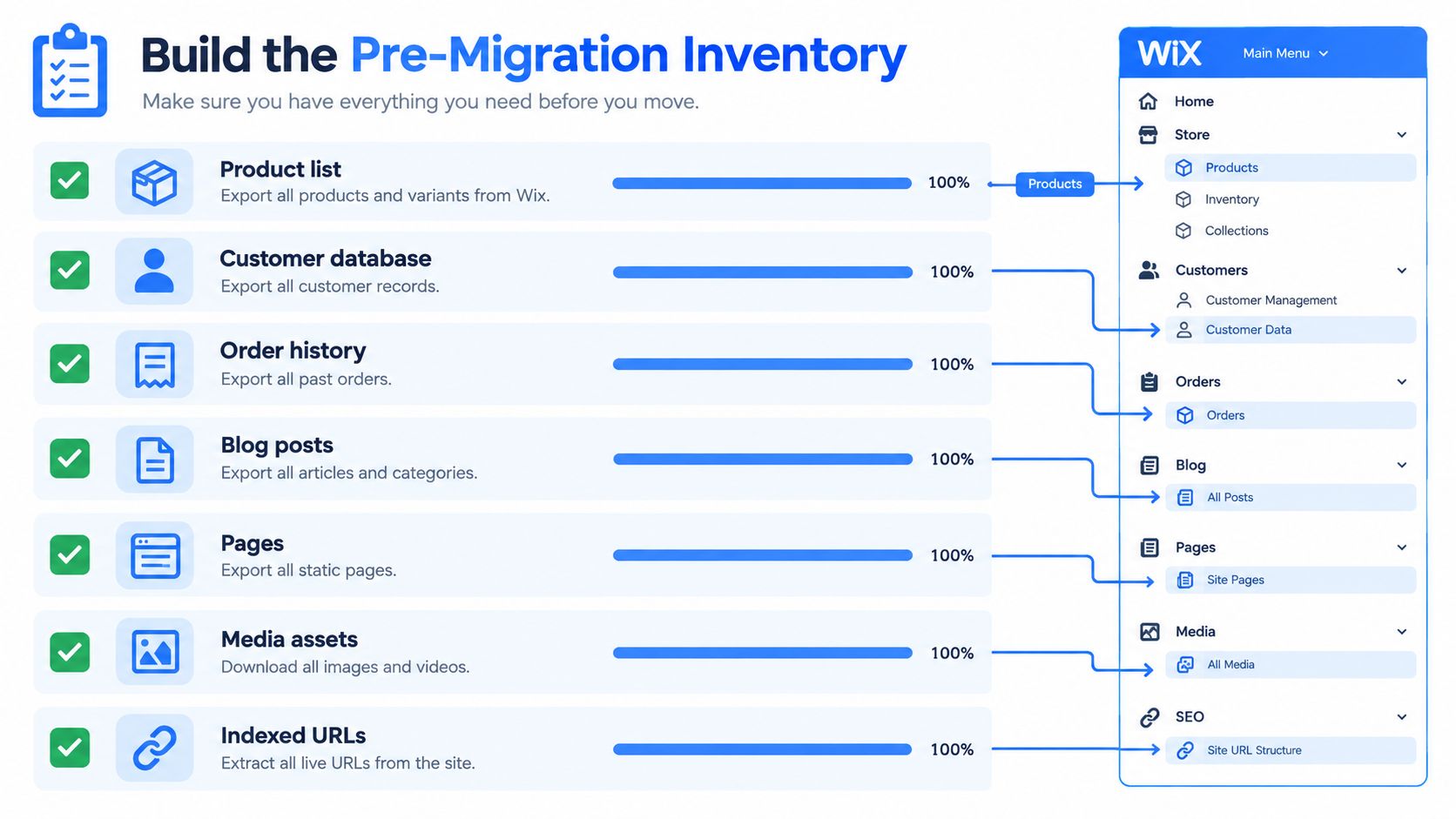
Create a working spreadsheet that records each data set, its source, expected record count, important fields, and Shopify destination. For products, include identifiers such as SKUs, option names, variants, prices, inventory, descriptions, and image references. For customers, check identifiers and contact details. For orders, record order references, timestamps, line items, and monetary totals. Note content and media separately, since a store export won't necessarily capture every asset or page relationship you need to recreate.
<a id="export-then-inspect"></a>
Export, then inspect
Download the product and order CSV files through the Wix screens above. Export customer records through the relevant customer or contacts area in your Wix dashboard, and inventory pages, blog content, and media through the available content and asset tools. Export availability and file structure can vary by Wix setup, so confirm the actual fields and record counts in the files instead of assuming an export is complete.
A file opening successfully doesn't mean the data is ready. Check for blank identifiers, inconsistent variant options, duplicated rows, malformed prices, missing images, and timestamps that need a consistent time-zone treatment. Keep the original exports unchanged, and work from copies so you can trace each transformed field back to its source.
<a id="crawl-the-live-site-as-well"></a>
Crawl the live site as well
Wix's dashboard isn't a complete SEO inventory. Crawl the live storefront and compare those results with URLs surfaced in Google Search Console and analytics. Capture product and category pages, blog posts, static pages, image URLs, and any legacy paths that still receive visits. A crawl can reveal live URLs that aren't obvious in the admin, while search and analytics data can flag pages worth preserving even if they're hard to find through navigation.
Maintain one inventory sheet as the migration's source of truth, including the owner for each data set and the result of each validation check. A structured Shopify migration readiness checklist can help your team organize the preparation. Use the finished inventory later to compare source and destination records, not just to track tasks.
<a id="migrate-products-customers-and-orders"></a>
Migrate Products, Customers, and Orders
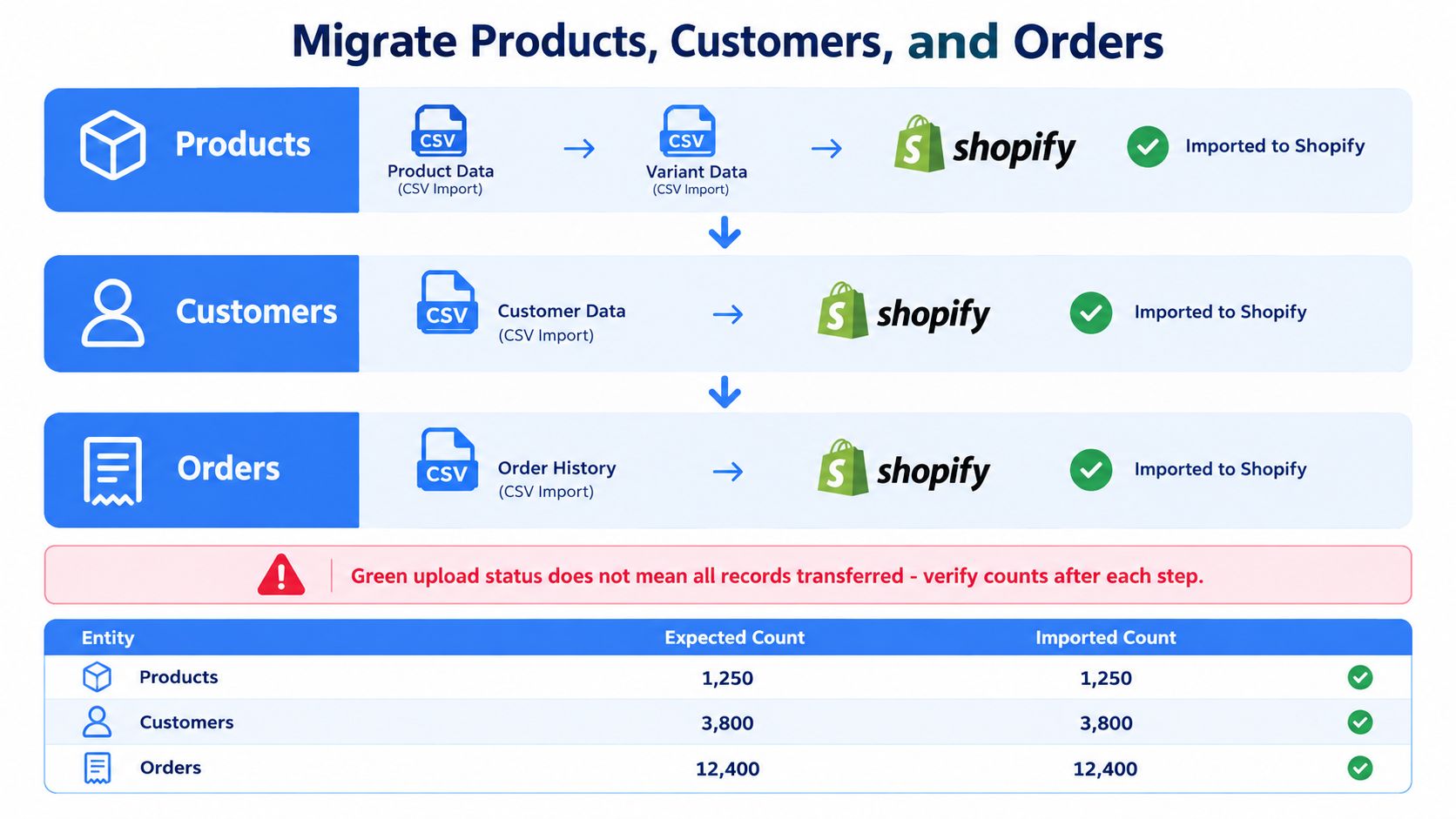
Products, customers, and orders aren't interchangeable CSV jobs. Each has a different Shopify structure and validation need. Follow a controlled sequence: normalize the source data, import products, import customers, then migrate historical orders using a method that supports order records.
<a id="prepare-the-schema-before-importing"></a>
Prepare the schema before importing
Map Wix product fields into Shopify's product schema before uploading. Confirm how titles, descriptions, SKUs, options, variants, prices, inventory, images, and collections should translate. Normalize option names and values so related variants remain grouped correctly, and make sure each sellable variant has the correct identifier and price. A successful upload can still produce incomplete or unusable listings if the source columns don't match the intended Shopify structure.
Import a test batch first, then inspect products in the storefront and admin. Check that variant combinations behave as expected, images appear with the right products, and inventory is assigned correctly. If the mapping is wrong, fix the transformation and repeat the test before proceeding with the full catalog.
<a id="treat-customers-and-orders-separately"></a>
Treat customers and orders separately
Import customers after products using the appropriate customer CSV workflow. Reconcile the customer count and review identifiers, email addresses, addresses, and other fields your team relies on. Don't assume customer credentials will work unchanged after a platform move; plan customer communications around the destination account experience.
Historical orders need separate treatment. A standard customer CSV import doesn't recreate order history, and orders generally require a dedicated import process or API-based transformation. Preserve order references, line items, timestamps, and totals in the transformation, and confirm that historical records won't distort current inventory or reporting. If support staff need to find prior purchases, test that workflow in Shopify before the store goes live.
A green upload status is not an acceptance test. It confirms that a process ran, not that every expected record arrived intact.
For each data set, compare pre- and post-import control totals. The acceptance test should show zero unexplained discrepancies in SKU count, sellable variant count, customer count, order count, and monetary totals. Test duplicate handling, maintain a source-to-Shopify ID crosswalk for connected systems, and preserve timestamps consistently. For a large catalog, split the import into deterministic batches and rehearse the full sequence before production cutover.
<a id="protect-seo-with-a-crawl-derived-redirect-map"></a>
Protect SEO With a Crawl-Derived Redirect Map
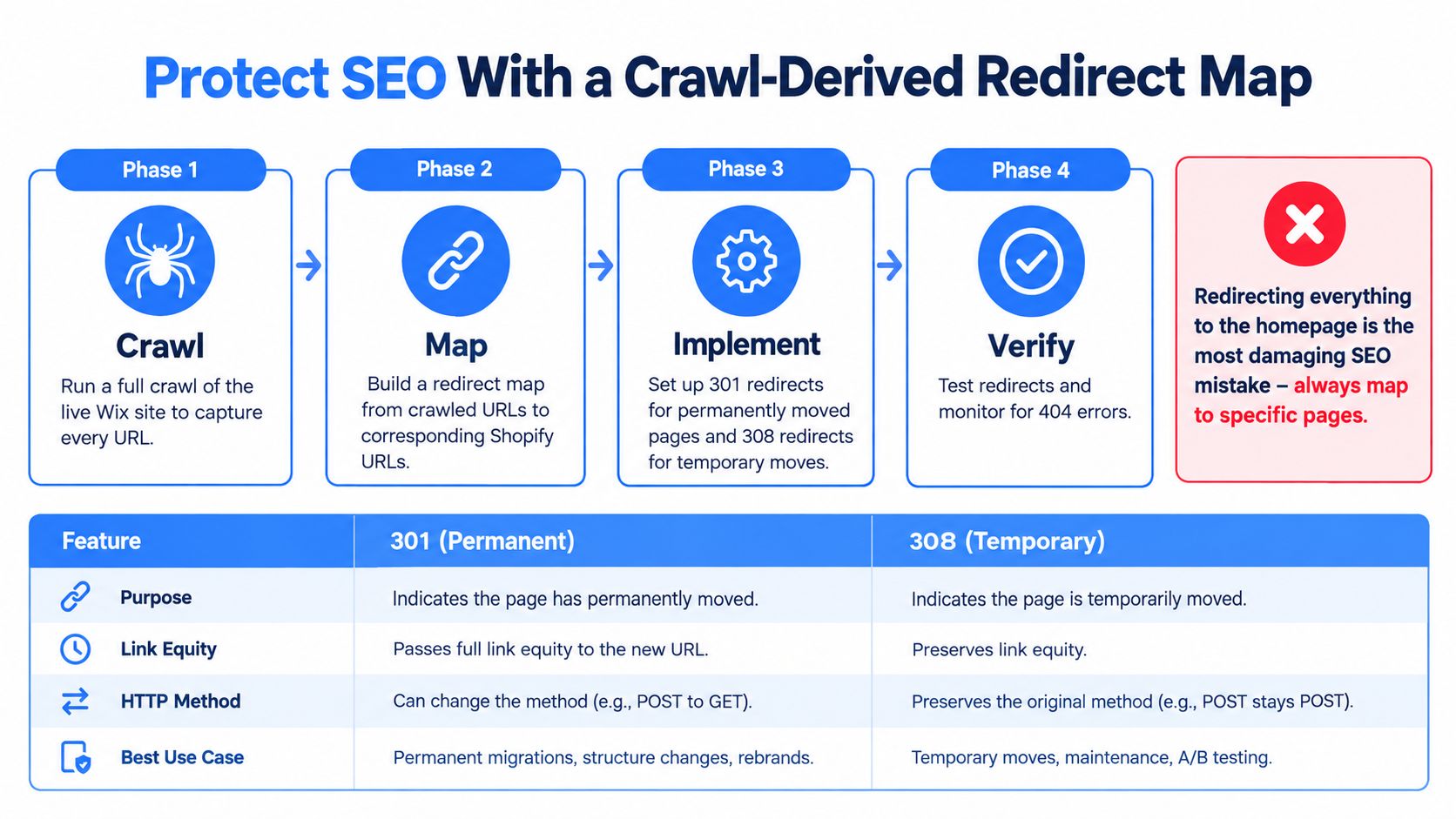
Build the redirect file from URLs the Wix site exposes, not from a short list of pages someone remembers. Crawl the site, combine that inventory with search and analytics landing pages, and map each indexable Wix URL to the closest relevant Shopify destination. Google recommends preparing a URL map and using permanent server-side redirects when URLs change. Its guidance recognizes 301 and 308 redirects as signals that a page has permanently moved. Google's site-move guidance for URL changes
<a id="map-destinations-by-relevance"></a>
Map destinations by relevance
A product URL should resolve to its equivalent product where possible; a blog post should lead to the migrated post or its closest useful replacement. Don't send every retired URL to the homepage. That breaks the connection between the old page and the destination, frustrates visitors, and discards the relevance a specific redirect is meant to preserve.
Review more than the obvious product and collection paths. Include blog posts, static pages, image URLs, filtered URLs that search engines may have crawled, and legacy redirects that Wix currently manages. Identify pages with no direct replacement and make deliberate decisions about whether to redirect to a relevant page or return an appropriate not-found response. Avoid redirect chains by mapping old URLs directly to their final Shopify destinations.
Use 301 for a page that has permanently moved. A 308 is also a permanent-move signal under Google's guidance, but it preserves the request method; choose the redirect behavior that fits the request and implementation. Don't treat redirect types as a shortcut around accurate destination mapping.
<a id="verify-before-and-after-launch"></a>
Verify before and after launch
Freeze the redirect file before cutover, then test representative URLs from every page class. Verify response codes, destination relevance, canonical tags, XML sitemaps, robots directives, internal links, structured data, and analytics annotations. Also check that Shopify's sitemap lists the intended live URLs and that the site isn't internally linking to old Wix paths.
After launch, monitor organic clicks, indexed pages, crawl errors, rankings, conversions, and revenue by landing page for several weeks. Investigate sudden losses across a URL class, such as product pages or blog posts, instead of relying on aggregate traffic alone. A practical Shopify SEO guide can support the broader technical review, but the migration-specific safeguard is a tested URL-to-URL map.
<a id="rebuild-the-storefront-on-shopify-online-store-20"></a>
Rebuild the Storefront on Shopify Online Store 2.0
A Wix theme can't be cloned into Shopify. The platforms organize page layouts and components differently, so a pixel-for-pixel recreation often consumes time without preserving the workflows that made the old store effective. Shopify's Online Store 2.0 uses sections and editable templates, which means the new storefront should be designed around Shopify's building blocks rather than treated as a skin placed over the old site.
Start by separating brand essentials from platform-specific behavior. Preserve the elements customers recognize, such as visual identity, product photography, tone, and navigation priorities. Reconsider layout choices that create friction, especially on mobile product pages or during the path from product discovery to checkout. If a Wix page depends on a page-specific section, an embedded app widget, or custom code, assume it needs a Shopify equivalent or a deliberate replacement.
<a id="choose-a-theme-based-on-the-work-it-must-do"></a>
Choose a theme based on the work it must do
A Shopify theme can be a sensible foundation when its templates and sections meet the store's needs with modest customization. A custom Online Store 2.0 build may be more appropriate when the brand needs distinct templates, complex product storytelling, or a specific content model that available themes can't support cleanly. In either case, keep editing practical for the people who'll maintain the store after launch.
Don't carry every old feature forward automatically. Audit each Wix app, widget, and code snippet by the business job it performs. Then decide whether Shopify's native tools, an app, an integration, or custom development is the right replacement. A connected ERP workflow, for example, should be validated against actual catalog, inventory, and order needs rather than represented by a decorative storefront component.
A rebuild gives the team a chance to simplify the experience, but it shouldn't become an unbounded redesign. Agree on essential page types, content responsibilities, and acceptance criteria before development. For a closer look at the platform's storefront model, see this explanation of the Shopify website builder.
<a id="cut-over-on-launch-day"></a>
Cut Over on Launch Day
Launch should follow a rehearsed sequence, not a live troubleshooting session. Keep Wix available while Shopify is built and tested. Before the switch, assign owners for the redirect file, domain change, payment configuration, analytics, customer service, and go/no-go decision.
<a id="run-the-cutover-in-order"></a>
Run the cutover in order
- Freeze changes: Lock the approved redirect map and record any late content or product changes that must be included.
- Confirm monitoring: Make sure analytics, search monitoring, error tracking, and order notifications are ready to check the Shopify site.
- Recheck commerce settings: Confirm payment providers are authorized, shipping rules are correct, and a test purchase completes the expected customer and operations workflows.
- Switch the domain: Point the domain to the verified Shopify storefront according to the team's cutover plan, with the redirect rules ready for the change.
- Test representative paths: Check the homepage, a product, a collection, a blog post, a legacy URL, and the full purchase journey on desktop and mobile.
Lower DNS time-to-live in advance if the domain setup permits it, and confirm who can make or reverse the change. Don't assume payment authorization, analytics, or integration credentials carried over from Wix.
Decide ahead of time what qualifies as a rollback. If customers can't complete purchases, payment processing fails broadly, or the storefront is serving the wrong destination, pause traffic campaigns and follow the rollback plan. If a limited set of content or redirects needs repair while orders are processing normally, fix the issue without switching platforms back. The team should know the difference before launch, not debate it under pressure.
<a id="monitor-and-optimize-after-launch"></a>
Monitor and Optimize After Launch
Keep a landing-page view of performance during the first several weeks. Track organic clicks, indexed pages, crawl errors, conversions, and revenue, and compare related page types rather than looking only at the site-wide total. A short-lived fluctuation can happen as search engines crawl changed URLs; persistent errors clustered around a template, product group, or redirect class point to a fixable structural problem.
Give the merchandiser or analyst a shared launch checklist:
- Data: Source and Shopify counts reconcile for products, sellable variants, customers, and historical orders.
- SEO: High-value URLs reach relevant destinations, and the team has checked canonical tags, sitemap coverage, and crawl errors.
- Commerce: Test purchases complete, payment and shipping behavior is correct, and order notifications reach the right people.
- Measurement: Analytics records landing pages and conversions, so the team can trace performance beyond aggregate traffic.
- Escalation: Broad checkout failures or a widespread redirect problem trigger immediate action; isolated content defects go into a prioritized repair queue.
Don't roll back because one chart moves in the wrong direction. Roll back when core buying or routing is broken and the team can't restore it safely; push through when commerce works and the remaining issues are contained, understood, and assigned. If the team can't reconcile the migration or diagnose widespread SEO and integration failures, bring in specialist help before problems spread.
United Victory Technologies provides Shopify migration, development, integration, and post-launch optimization services for established ecommerce brands. If you're preparing to move from Wix to Shopify, United Victory Technologies can help you assess the data, SEO, and integration work before cutover and build a migration plan around your store's requirements.