
Salesforce vs Shopify: How to Choose in 2026
Salesforce vs Shopify compared on licensing, TCO, headless, APIs, B2B, and migration so you can pick the right platform in 2026.
The most popular advice in any Salesforce vs Shopify debate is also the least useful: pick the cheaper license and take the checkout uplift. That advice fails in the boardroom because it confuses a headline fee with an operating model, and a vendor benchmark with your own funnel. A CFO needs to know which costs disappear, which move to another line, and which you create during transition. A CTO needs to know which rules survive standardization and which integrations break first under peak load.
Choose on those answers, not on a feature grid. Shopify becomes compelling when you can standardize catalog, pricing, and checkout and retire custom work. Salesforce Commerce Cloud stays defensible when many local rule systems, bespoke promotions, or deep CRM and service orchestration are the business, not exceptions to it.
Table of Contents
- Salesforce Commerce Cloud vs Shopify at a Glance
- Licensing and Three Year Cost
- APIs Headless and Integration Limits
- When Markets and B2B Change the Answer
- Migration Tradeoffs Worth Modeling
- Choose the Platform That Fits Your Stack
<a id="salesforce-commerce-cloud-vs-shopify-at-a-glance"></a>
Salesforce Commerce Cloud vs Shopify at a Glance
Start with the decision, not the company histories. Salesforce reported $37.9 billion in total fiscal-2025 revenue across sales, service, marketing, data, analytics, and commerce, and it does not publish a Commerce Cloud GMV figure comparable to Shopify's $378.4 billion in fiscal 2025 gross merchandise volume, so corporate revenue is not a platform scorecard, as Shopify's fiscal 2025 filing with the SEC makes clear in its own reporting.
That same filing shows why Shopify's incentives differ. Shopify reached $11.6 billion in total revenue, with merchant solutions at approximately $8.8 billion, or about 76% of revenue, and subscription solutions at roughly $2.8 billion, or 24%. Its economics follow merchant transactions, while Commerce Cloud sits inside a much broader enterprise software portfolio.
Mark the two or three rows below that match your stack today. If those rows point in different directions, you don't have a platform preference yet, you have an inventory problem.
| Criterion | Salesforce Commerce Cloud | Shopify or Shopify Plus |
|---|---|---|
| Business model | Commerce inside a broad enterprise software suite | Transaction-centered commerce platform |
| Licensing shape | Often GMV-based fees plus specialist implementation | Subscription plus apps, payments, and extensions |
| Best operating fit | Highly customized journeys and many local rule systems | Standardized DTC or mid-market workflows and faster releases |
| Checkout | Custom enterprise paths and promotion logic | Native checkout, Shop Pay, Plus checkout extensibility |
| Headless option | Storefront APIs and custom endpoints | Hydrogen headless or Online Store 2.0 themes |
| B2B and markets | Native B2B and B2C with heavier governance | Markets and Plus B2B, with middleware as rules multiply |
| Integration style | Control runtime, payload size, quotas, and timeouts | Rate limits, bulk operations, webhooks, and queues |
| Change ownership | Specialist implementers and longer release cycles | Merchant team plus apps, with less platform-specialist lock-in |
<a id="how-to-use-this-table-without-fooling-yourself"></a>
How to Use This Table Without Fooling Yourself
Don't count wins across all eight rows. Weight the rows that touch revenue or daily operations for your team. A brand that releases campaigns weekly should weight change ownership and checkout heavily, while a retailer whose service team works inside Salesforce every day should weight integration style and operating fit more than storefront convenience.
Then test the row you're most tempted to take on faith, which is usually checkout. Shopify's comparison page for Shopify vs Salesforce Commerce Cloud reports that its checkout achieved up to 36% higher conversion than Salesforce Commerce Cloud in a study commissioned by Shopify and conducted by a major global consulting firm. Treat that as directional, not as a forecast for your store.
Practical rule: A commissioned benchmark tells you where to test first. It doesn't tell you what you'll earn.
<a id="validate-checkout-on-your-own-funnel"></a>
Validate Checkout on Your Own Funnel
Run a controlled pre and post comparison and hold traffic sources and merchandising conditions steady. Measure add-to-cart rate, checkout initiation, payment completion, checkout abandonment, and net revenue per session. Split the view by mobile checkout, guest versus account flows, payment-method mix, shipping-rate calculation, and international tax handling, because a blended average hides the exact step where buyers leave.
Separate Shop Pay and repeat-customer behavior from native checkout performance. A wallet that your returning buyers already trust can lift completion without proving that a new guest journey is better. If you can't isolate that effect, you can't attribute the gain to the platform, and finance shouldn't model it as recurring uplift.
- Mobile first: Compare completion on mobile separately, since that's where form friction and payment options hurt most.
- Guest versus account: Track both paths, because forced account creation changes the result more than button styling does.
- Payment mix: Record which methods buyers choose, not just whether they paid.
- Revenue per session: Use this as the deciding metric when conversion rises but basket size falls.
Salesforce can still win this row. Where highly customized enterprise journeys, complex promotions, or deep Salesforce CRM and service orchestration outweigh checkout simplicity, a standard checkout is a constraint, not a benefit. On Shopify Plus, use checkout extensibility only for revenue-critical rules, or you'll rebuild the maintenance burden you were trying to leave.
Neither platform wins every catalog. The table tells you where your operating model leans, and the checkout test tells you whether the most quoted advantage is real for your buyers. Cost is a separate question, and it needs your numbers, not a vendor's.
<a id="licensing-and-three-year-cost"></a>
Licensing and Three Year Cost
Build a model you can rerun, don't borrow a conclusion. Salesforce Commerce Cloud can carry GMV-based licensing plus specialist implementation, integration, maintenance, and upgrade costs, while Shopify shifts spending toward apps, middleware, payment fees, and custom extensions, according to a Salesforce AppExchange comparison document that reports a three-year TCO of approximately $1.68 million for Shopify Plus versus $1.95 million for Salesforce Commerce Cloud in a modeled enterprise scenario.
That's a $270,000 difference, and its real value is corrective. It suggests the gap may be narrower than simplistic claims that Shopify is always cheaper. It isn't proof that your business saves that amount, because your GMV band, integration count, and internal salaries will move every line.
The same caution applies to speed claims. Shopify-published research claims Salesforce migrations were implemented 22% more slowly, cost 35% more to implement, and were 2.5 times less likely to launch on time. Those figures are vendor-commissioned and directional, so use them to set questions for references, not to set your budget.
| Cost bucket | Salesforce Commerce Cloud | Shopify or Shopify Plus | What to test |
|---|---|---|---|
| Platform license | Often GMV-based enterprise fee | Subscription, Plus for enterprise features | Your GMV band and contract term |
| Implementation | Specialist commerce implementation | Theme, apps, and selected custom work | Share of rules you can retire |
| Integrations | Endpoint, quota, and SI retainers | Middleware, apps, ERP and PIM builds | SKU volume and sync frequency |
| Run and change | Upgrades, patches, specialist developers | App fees plus lighter release work | Internal salary versus partner days |
| Payments | Separate from license | Merchant solutions and payment fees tied to GMV | Take rate on your mix |
| Overlap period | Keep legacy live during cutover | Run both until redirects and orders settle | Months of dual running |
| Modeled 3-year TCO example | About $1.95 million | About $1.68 million | Not a universal saving |
<a id="fill-the-sensitivity-inputs-finance-actually-owns"></a>
Fill the Sensitivity Inputs Finance Actually Owns
Put your own values against GMV, market count, integration count, internal engineering salaries, app subscriptions, payment costs, and the overlap period when both platforms run. The overlap is the line teams most often understate, because you pay for the legacy contract, the new subscription, middleware, and support in parallel until orders, returns, and redirects settle. Our breakdown of Shopify migration cost is useful for structuring those buckets before you negotiate either contract.
Assign an owner to each bucket. Platform fees sit with finance, integration and run costs sit with technology, and app sprawl usually sits with ecommerce. When nobody owns a bucket, it grows through renewals, partner retainers, and small extensions that nobody approved as a program.
In one case, United Victory Technologies migrated an apparel DTC brand from Salesforce Commerce Cloud to Shopify Plus, reducing platform total cost of ownership by 41% and increasing average order value by 12%. Read that as an example of what standardization can release, not as a rate card. A brand that rebuilds every bespoke workflow on Plus won't see the same shape of saving.
Shopify is not automatically cheaper. It becomes economically compelling when you standardize workflows and reduce customization, while highly bespoke operations can still justify Salesforce despite a higher platform fee.
Rerun the table with your GMV before you choose. If the saving only appears when you assume zero middleware, zero overlap, and no custom extensions, you don't have a saving yet. You have a best case that needs a sensitivity range beside it.
<a id="apis-headless-and-integration-limits"></a>
APIs Headless and Integration Limits
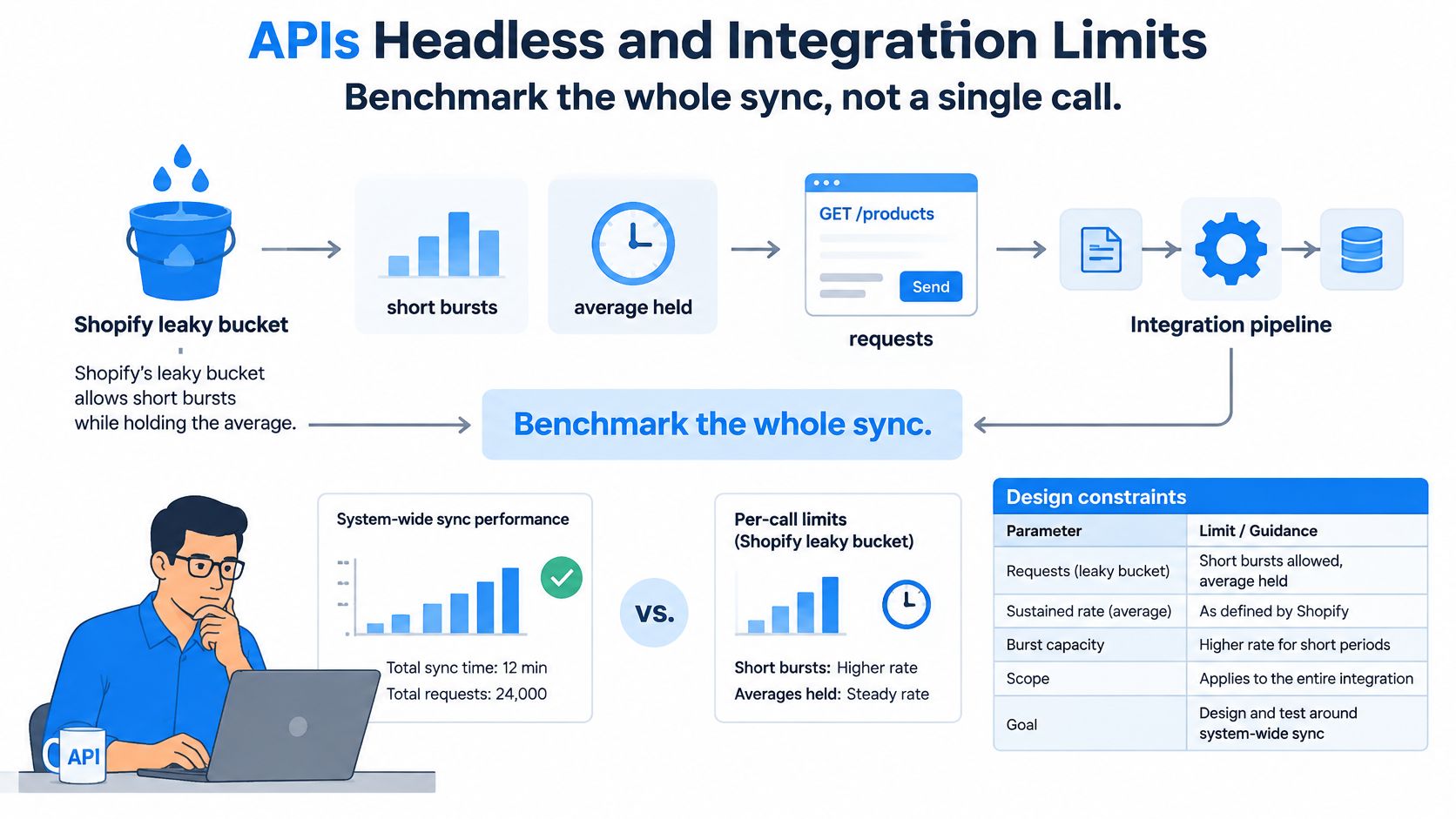
Benchmark the whole sync, not a single call. An isolated product fetch tells you almost nothing about a catalog publish at peak, an ERP backlog after an outage, or a price update that has to land before a campaign starts.
Shopify's REST Admin API rate limits documentation sets documented limits of 2 requests per second for standard stores, 4 for Advanced Shopify, and 20 for Shopify Plus, with HTTP 429 responses beyond the limit and a leaky-bucket model that permits short bursts while enforcing an average rate. Salesforce Commerce API custom endpoints document a default 60-second runtime, configurable up to 120 seconds, with a 5 MiB maximum request body for the relevant storefront API path.
| Constraint | Shopify | Salesforce Commerce Cloud |
|---|---|---|
| Request rate, standard stores | 2 requests per second | Set by endpoint quota and runtime controls |
| Request rate, Advanced Shopify | 4 requests per second | Set by endpoint quota and runtime controls |
| Request rate, Shopify Plus | 20 requests per second | Set by endpoint quota and runtime controls |
| Throttle behavior | HTTP 429 beyond limit; leaky bucket allows short bursts | Control quota consumption and timeout behavior per endpoint |
| Endpoint runtime | Managed through request pacing, bulk operations, and queues | 60 seconds default, configurable up to 120 seconds |
| Maximum request body | Managed through bulk operations and batched GraphQL requests | 5 MiB on the relevant storefront API path |
<a id="design-rules-each-limit-forces"></a>
Design Rules Each Limit Forces
On Shopify, pace catalog, customer, order, and ERP synchronization instead of firing bursts and hoping the bucket absorbs them. Prefer GraphQL where appropriate, bulk operations, webhooks, queues, idempotent upserts, and retry with backoff. Idempotency matters most during replay, because a retried order or inventory update must not create a duplicate record.
On Salesforce, control endpoint runtime, payload size, quota consumption, and timeout behavior explicitly. Batch payloads under the body limit, set timeouts deliberately rather than accepting defaults, and instrument quota use so a slow downstream ERP doesn't consume your window unnoticed. Both platforms punish integrations that were designed around happy-path latency.
<a id="define-a-passing-test-before-you-sign"></a>
Define a Passing Test Before You Sign
Load the test with your expected SKU count, variant volume, order backlog, peak-event concurrency, and ERP latency. A passing result shows acceptable synchronization lag and safe replay after 429s, timeouts, or partial failures. If the vendor demo only proves a clean sync of a small sample catalog, it hasn't proved your integration.
Headless deserves the same discipline. Hydrogen or a custom storefront is justified only when the experience can't live in Online Store 2.0 sections, because a theme keeps releases faster and puts page changes back with merchants. On Plus, reserve checkout extensibility, Shopify Functions, and B2B features for rules that earn their complexity.
A headless rebuild that copies every legacy template recreates specialist dependency under a new name. Before signing, run the checklist with real volumes, kill a connection mid-sync, replay the queue, and confirm that storefront, ERP, and OMS agree on price, stock, and order state.
<a id="when-markets-and-b2b-change-the-answer"></a>
When Markets and B2B Change the Answer
Feature checkboxes won't settle this part of the Salesforce vs Shopify decision. Both platforms can claim multi-currency, catalogs, account pricing, APIs, and regional stores, and none of those claims tells you where simple administration stops being enough.
Use a working hypothesis and test it against your tax, catalog, fulfillment, and organizational model. ForteNext's Salesforce Commerce Cloud vs Shopify analysis notes industry commentary suggesting Shopify Markets is often adequate for expansion across roughly two to eight markets, while Salesforce may remain stronger where merchants manage ten or more markets with locally overridden business logic.
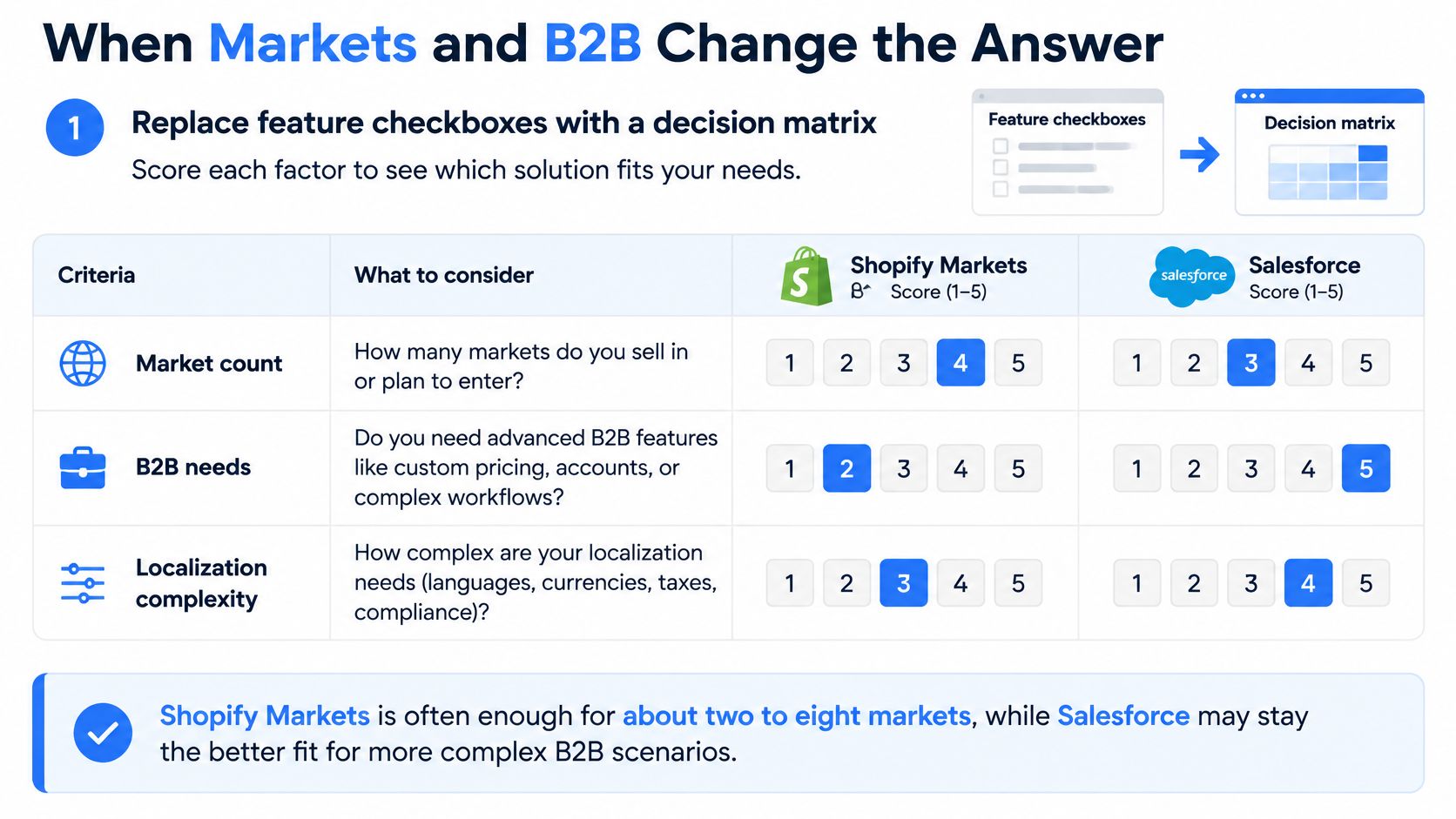
Count rule systems, not just countries. Twelve markets sharing one catalog, centralized pricing, and light localization can be simpler than four markets where each country owns assortment, tax treatment, fulfillment logic, and promotions. That's the threshold that changes the platform answer.
| Situation | Threshold to check | Lean Shopify or Plus | Lean Salesforce or heavy custom |
|---|---|---|---|
| International expansion | About 2 to 8 markets vs 10 or more | Shared catalog and central pricing | Locally overridden logic per market |
| Localization depth | Language and currency vs assortment and tax rules | Markets with limited local exceptions | Country-specific catalogs and fulfillment rules |
| B2B accounts | Price lists and company accounts | Native Plus B2B covers the buyer flow | Deep hierarchies and approval chains |
| Promotions | Shared campaigns vs contract exceptions | Standard discounts and Functions | Highly custom promotion orchestration |
| System of record | PIM and ERP already stable | Integrate and keep Shopify thin | Commerce must own the business rules |
<a id="four-patterns-worth-scoring-honestly"></a>
Four Patterns Worth Scoring Honestly
Say a DTC brand expands to a handful of markets with one catalog and central pricing. Rebuild natively with Shopify Markets, keep localization to language, currency, duties, and domains, and retire market-specific workarounds that existed only because the old platform required them.
Say a retailer runs ten storefronts where local teams override promotions, assortments, and fulfillment rules. That's many rule systems, not a Markets configuration exercise. You either accept heavier Plus architecture and middleware, or you keep Commerce Cloud and fund the governance that local autonomy requires.
A hybrid wholesaler with contract price lists and buyer roles sits in between. Native Plus B2B may cover company accounts and price lists, which is why it's worth checking what Shopify Plus is for against your actual buyer flow. Deep account hierarchies and approval chains are the point where native features end and partner-built process begins.
An industrial seller whose ERP already owns pricing shouldn't move that logic into commerce at all. Integrate the ERP or PIM as the system of record, keep the storefront thin, and retire duplicate pricing rules. Salesforce describes Commerce Cloud as supporting both B2B and B2C, but that broad statement doesn't reveal implementation effort or governance complexity, so ask who owns the rule after launch.
Scoring test: If a capability needs a named local owner, an approval chain, and an exception process, it's a rule system. Price it as one.
Before you move on, count your markets, localization depth, account complexity, ERP and PIM ownership, and promotion exceptions. Those five counts predict your build better than any checklist of supported features.
<a id="migration-tradeoffs-worth-modeling"></a>
Migration Tradeoffs Worth Modeling
Treat migration as a design choice, not a lift-and-shift. The objects that must move with integrity are products and variants, pricing, customer accounts, order history, pages, blogs, media, URLs, and a redirect map built to protect organic revenue.
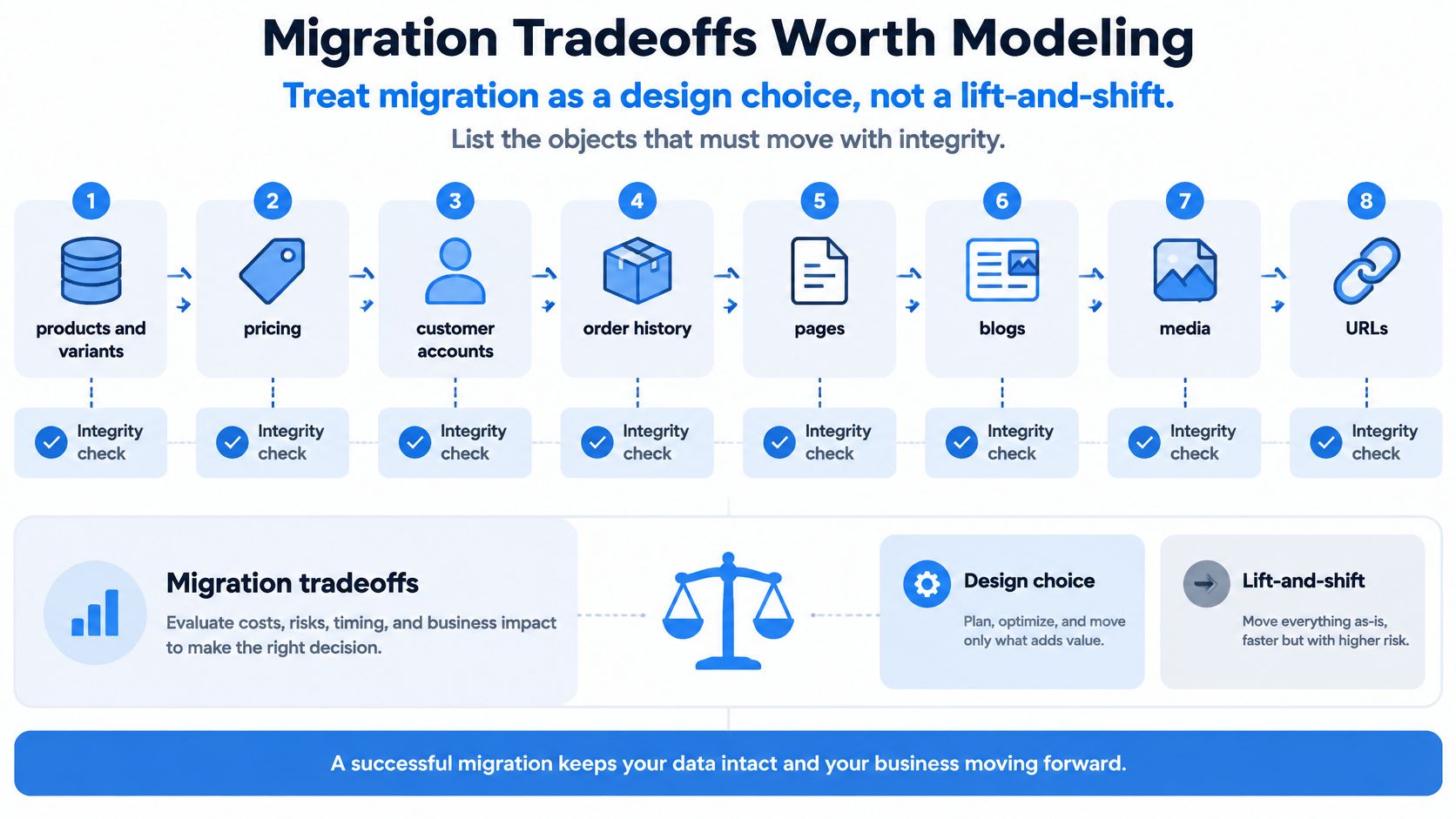
Rebuild the UX for section-based Online Store 2.0 themes rather than copying legacy templates. A copied template imports old constraints into a system designed for merchant-edited sections, and your team loses the release speed that justified the move. United Victory Technologies offers migration from Salesforce Commerce Cloud to Shopify, enabling faster releases with less dependency on specialist developers, and that outcome depends on rebuilding the experience, not replicating it.
<a id="sort-every-capability-into-three-piles"></a>
Sort Every Capability Into Three Piles
- Rebuild natively on Plus: Keep storefront, checkout, and standard B2B or discount rules inside Shopify where merchants can change them without a deployment.
- Integrate: Leave pricing, inventory, fulfillment, and customer master data with ERP, PIM, CRM, or OMS when those systems already own them well.
- Deliberately retire: Drop promotions, page types, and approval steps that nobody can tie to revenue, compliance, or a contractual promise.
The gains are faster releases and less dependence on Commerce Cloud specialists when workflows are standardized. The losses are journeys that needed deep Salesforce CRM or service orchestration, plus the weeks when both platforms run and your team supports two sets of exceptions. Name both sides in the business case, because a migration plan that only lists gains won't survive its first steering meeting.
Risks concentrate in three places. SEO gaps appear when high-value URLs lack redirects or land on thinner pages, customer data arrives partially and support absorbs the damage, and checkout rules get reimplemented so heavily that performance returns to the old burden. Our Salesforce Commerce Cloud to Shopify migration guide sets out that sequencing in more detail for teams scoping the move.
<a id="a-cutover-sequence-you-can-rehearse"></a>
A Cutover Sequence You Can Rehearse
Work in this order: 1. inventory data and integrations, 2. decide native versus integrate versus retire, 3. map URLs and content, 4. prove ERP sync under peak volume, 5. rehearse checkout rules that change revenue, 6. launch with redirects and a rollback window. Each step produces an artifact another team can check, which is what makes the sequence auditable.
A Commerce Cloud to Shopify migration shortens release cycles when custom code isn't rebuilt one for one. Consider the three piles in your final decision, as they describe the operating model you'll live with after launch day.
<a id="choose-the-platform-that-fits-your-stack"></a>
Choose the Platform That Fits Your Stack
Stay on Salesforce Commerce Cloud when ten or more markets need local business rules, promotions and account hierarchies are bespoke, or commerce must stay orchestrated with Salesforce CRM and service. That choice is coherent if your team accepts specialist cost as the price of control. It's incoherent if you're paying for flexibility your merchants never use.
Choose Shopify or Shopify Plus when catalog, pricing, and checkout can be standardized, Markets cover a modest set of countries, and the business wants faster releases with apps and a thinner custom layer. The saving comes from retired complexity, so protect it by refusing to rebuild exceptions that don't defend margin.
Choose Plus specifically when you need B2B company accounts, checkout extensibility, Functions, or expansion stores. Keep that custom work limited to rules that protect revenue, and let standard features carry everything else. Buying Plus and then rebuilding a bespoke platform inside it gives you both bills and neither advantage.
If your stack is mixed, don't force one slogan onto it. Go native for the storefront, integrate ERP and PIM where they already own the truth, and retire the rest. That's a legitimate architecture, and it's usually the honest answer for hybrid B2B and DTC operations.
For a merchant leaning toward Shopify, the only next step is a short readiness pass before any build starts. United Victory Technologies offers a Shopify Migration Readiness Assessment with eight questions that takes about two minutes and provides a scoped view of data, integrations, SEO risk, and a realistic timeline. Use it to confirm the verdict from your own tables, and enterprise teams can speak with a Shopify Expert under a confidential engagement if the scope needs a second set of eyes.
If your own cost model and rule-system count point toward Shopify, get the migration scoped before you commit budget to a build. Visit United Victory Technologies to run the eight-question readiness assessment and see your data, integration, and SEO exposure laid out with a realistic timeline. You'll know whether to move, stay, or phase the work, and you'll have the numbers to defend that call to finance and technology together.