
Transfer Wix to Shopify: A Practical Migration Playbook
Transfer Wix to Shopify without losing SEO, sales, or customer data. Step-by-step guide covering products, URLs, themes, and launch verification.
A founder usually notices the problem while trying to make a change that should be simple: update a product option, preserve a customer's order history, or find where an old Wix page points. The catalog, customer records, content, and URLs don't come out as one neat package. When you transfer Wix to Shopify, you're converting data and rebuilding how the store works, not just swapping themes.
That distinction matters most for an established brand. A successful move depends on preparing the catalog, deciding what to do with historical records and integrations, rebuilding the storefront for Shopify, and protecting the URLs customers and search engines already know. The import is only one part of the job. The work between systems is where migrations either stay controlled or become launch-day surprises.
Table of Contents
- Why a Wix to Shopify Move Is Harder Than the Sales Pitch Suggests
- Preparing Your Store Before You Touch an Export Button
- Migrating Products, Customers, Orders, and Content
- Mapping URLs and Protecting SEO Through the Move
- Rebuilding Your Theme on Online Store 2.0
- Integrations and Customers the Final Step Before Launch
- Verifying the Move and Catching the Elbow
<a id="why-a-wix-to-shopify-move-is-harder-than-the-sales-pitch-suggests"></a>
Why a Wix to Shopify Move Is Harder Than the Sales Pitch Suggests
The first surprise is often that one export won't capture everything a store needs to keep operating. Shopify's Wix migration documentation describes commonly migrated data that includes products, customers, fulfilled historical orders, and reviews. It also documents two main routes: export Wix data to CSV files for import, or use Shopify's first-party Store Migration app, which the documentation describes as being in early access. Neither route should be mistaken for a complete copy of a working business.
The harder work sits in the seams. Some assets and behaviors don't transfer as data at all: legacy Wix code needs to be replaced or rebuilt, template-level behavior may need to be recreated in Shopify, Wix app-dependent features need Shopify equivalents, and hosting-level integrations have to be reconnected or redesigned. A migrated product record won't bring along the business rules or storefront behavior that made it useful.
<a id="treat-the-move-as-a-conversion"></a>
Treat the move as a conversion
Start by asking what each part of the Wix store represents in Shopify. A product may need option restructuring. A customer record needs to remain useful to support and marketing teams. Historical orders need to be accessible without confusing current inventory or reporting. A high-value Wix URL needs a relevant Shopify destination, not an arbitrary redirect.
That's why the apparent simplicity of a migration app can be misleading. It may move supported records efficiently, but it can't decide whether two collections should be consolidated, how regional pricing should work, or how a custom interaction should behave on a new theme. Those are business and implementation decisions.
Practical rule: Don't approve a migration based only on a successful sample import. Approve it when the team can explain how catalog, customer, order, content, integration, and URL needs will be handled.
This guide is for founders and ecommerce leads who've outgrown a site builder and need a controlled replatform, not for someone choosing a platform for a brand-new store. Before work begins, set a scope that includes planning, implementation, validation, and post-launch support. A Shopify migration cost planning guide can help frame the resourcing conversation around the work involved, rather than treating the transfer tool as the whole budget.
<a id="preparing-your-store-before-you-touch-an-export-button"></a>
Preparing Your Store Before You Touch an Export Button
Preparation starts with an inventory, not a file export. Build a view of what the Wix store contains and how customers and search engines reach it. Export the product library, collect the URLs for products, collections, pages, blog posts, and important landing pages, and review customer and order records for regional or currency-sensitive requirements.
Don't treat the URL list as an SEO task for later. It's an inventory of live business assets. Product pages may earn organic visits, old campaign pages may still have backlinks, and blog posts may bring in customers before they ever see the catalog. You need to know what exists before deciding what to preserve, combine, or retire.
<a id="make-catalog-decisions-before-migration"></a>
Make catalog decisions before migration
Use the audit to settle the choices that will otherwise interrupt import work. Decide whether to consolidate product lines, which collections still serve a clear purpose, how to standardize product names and SKUs, and how to represent options that currently mix attributes such as size, color, or material. Flag regional prices and any product whose structure may not match Shopify's import workflow.
Then map the systems around the store. Identify where email marketing, subscriptions, accounting, reviews, and other operational tools will live after the move. For each integration, name an owner and confirm what must be configured or tested. A tool that appears in a Wix workflow may be doing important work behind the scenes, such as passing customer consent or subscription details between systems.
<a id="prepare-shopify-as-a-real-destination"></a>
Prepare Shopify as a real destination
Set up the Shopify store before importing so the records have a defined place to land. Choose an Online Store 2.0 theme based on catalog needs and editable sections, then decide whether the store's operational requirements call for Shopify or Shopify Plus. Configure the planned sales channel, domain, markets, and storefront structure early enough for the migration team to work against the intended setup.
A checklist is useful only if it assigns decisions to people. Name who owns product normalization, URL mapping, integration setup, and final approval before the project starts.
A Shopify migration readiness checklist can help your team turn this preparation into assigned work. Keep the Wix store available while the new storefront is being built and checked. Export only after you've documented what the data should look like on the Shopify side.
<a id="migrating-products-customers-orders-and-content"></a>
Migrating Products, Customers, Orders, and Content
Shopify's Store Migration app offers a first-party route for supported Wix data, but its documented scope and constraints matter. The app workflow covers products, customers, fulfilled historical orders, and reviews. Shopify documents two important product limitations: products with more than three options can't have those options imported through the documented app workflow, and location-specific prices aren't supported. Shopify says prices are automatically set to the product's highest price in that situation.
Those are data-model constraints, not small import errors. A product organized around size, color, material, and packaging may need its options redesigned before transfer. A catalog with regional prices needs a clear Shopify pricing plan instead of an assumption that the old setup will carry over unchanged.
<a id="choose-the-route-based-on-the-catalog"></a>
Choose the route based on the catalog
For products that fit the supported workflow, the Store Migration app may reduce manual handling. Shopify also allows Wix product exports to be filtered to all products, selected products, or filtered products. That makes it possible to migrate a portion of the catalog first, check the results, and continue in stages rather than pushing every product through one undifferentiated import.
CSV export and import is the other documented route. It gives the team direct control over the file and can suit catalogs that need careful cleanup or don't fit the app workflow. The trade-off is that someone must own field mapping, option normalization, image checks, and import validation. A file that imports without an error can still contain incorrect assignments or incomplete details.
<a id="treat-imported-as-a-narrow-status"></a>
Treat “imported” as a narrow status
Customers, fulfilled order history, and reviews each need their own validation. Confirm that the records needed by customer support are available and that the team understands what historical data the chosen method brings across. Then handle pages, blog posts, and media as separate migration work, with their destinations and presentation checked in Shopify.
Wix's migration guidance for moving from Shopify to Wix describes a different migration direction, but illustrates an important operational point: platform transfers have historically been scoped by entity type and record volume. Don't assume a successful product import means customers, orders, coupons, content, reviews, and SEO details are all accounted for. Keep a separate completion status for each data group, and don't close the migration until the people who use that data have checked it.
<a id="mapping-urls-and-protecting-seo-through-the-move"></a>
Mapping URLs and Protecting SEO Through the Move
Build the redirect map before the domain switch. Google's site-move guidance for URL changes recommends preparing URL mapping in advance, using permanent redirects such as 301 or 308, verifying old and new properties separately in Search Console, and submitting the new sitemap after launch. The practical implication is straightforward: decide where each valuable Wix URL will go while the old site is still easy to inspect.
Crawl the Wix storefront and preserve URLs for products, collections, pages, blogs, images, and high-value landing pages. Match each indexable URL to its intended Shopify destination. Keep the same path where it still fits the new structure; when it doesn't, map it to the closest equivalent that serves the same user need. Don't send unrelated legacy pages to the homepage just because it's convenient.
<a id="make-the-redirect-map-specific"></a>
Make the redirect map specific
A useful map records the old URL, the new destination, the redirect decision, and a validation status. Review it for missing destinations, chains, and loops before launch. A redirect chain can make search engines and customers travel through unnecessary steps; a loop can prevent them from reaching the page at all.
| URL class | Recommended redirect | Why this approach works |
|---|---|---|
| Product with a direct Shopify equivalent | Redirect to that product page | Preserves the closest match for shoppers and search engines |
| Collection with a corresponding Shopify collection | Redirect to the equivalent collection | Keeps category intent and browsing paths intact |
| Blog post or content page that remains relevant | Redirect to the matching post or page | Preserves access to useful information and existing links |
| Retired page with no direct equivalent | Redirect to the closest relevant destination, or leave an appropriate not-found response | Avoids misleading visitors with an unrelated homepage redirect |
| Several legacy pages intentionally consolidated into one destination | Redirect each source to the consolidated page | Gives users one meaningful destination while documenting the consolidation |
<a id="validate-more-than-the-redirect-status"></a>
Validate more than the redirect status
A redirect map alone doesn't ensure the new site is technically sound. Check canonical tags, robots directives, structured data, pagination, hreflang or the relevant market setup, internal links, and the XML sitemap. Rewrite internal links so Shopify pages don't point back to old Wix URLs, and confirm that the new sitemap contains the intended destinations.
SEO launch gate: Every indexable legacy URL with backlinks or organic sessions should either reach one relevant permanent destination or remain live with an equivalent canonical destination.
On launch, verify old and new properties separately in Search Console, then submit the Shopify sitemap. Monitor crawl errors, indexed-page counts, impressions, clicks, rankings, and revenue by landing page over the weeks that follow. Google notes that site moves take time because its systems must recrawl and process URL changes, so use the data to find specific failures rather than treating early fluctuation alone as proof that the migration failed.
<a id="rebuilding-your-theme-on-online-store-20"></a>
Rebuilding Your Theme on Online Store 2.0
A Wix template is a reference for the brand, not a specification that Shopify must copy. A direct replica can preserve old layout problems while adding new theme complexity. Rebuild the experience around the Shopify catalog and the shopping tasks customers need to complete.
Consider a Wix homepage with a large hero image, a collection page with editorial tiles, and product pages that place material details deep in the description. On Shopify, the hero can become an editable section with a focused call to action; collection tiles can lead into clearer navigation; and material or care details can become structured product information displayed through the theme. The brand can remain recognizable without reproducing every old layout choice.
<a id="design-for-the-new-catalog"></a>
Design for the new catalog
Choose a free or paid Online Store 2.0 theme based on what the store needs to edit and support, not just its preview. Plan navigation and search around how customers browse the catalog. Rebuild the homepage and product detail pages with mobile use in mind, and check image hierarchy, option selection, shipping information, and calls to action on small screens.
Use the rebuild to address friction that the old template may have hidden. If shoppers struggle to find a product family, simplify the menu. If product details are hard to scan, make important attributes visible where customers make their decisions. Avoid adding theme sections or apps just to mimic Wix behavior that no longer serves the store.
For a practical foundation, work through the decisions in this guide to building a Shopify store. The strongest rebuilds keep the brand's visual cues but give Shopify's section-based structure room to do its job.
<a id="integrations-and-customers-the-final-step-before-launch"></a>
Integrations and Customers the Final Step Before Launch
A storefront can look finished while the operating stack is still disconnected. Before launch, assign an owner to each integration that affects selling, fulfillment, customer communication, or reporting. Review email marketing, subscriptions, reviews, analytics, payment gateways, shipping, tax, and any ERP, CRM, or PIM connection. Test the actual flow into and out of Shopify, not just whether an app appears as installed.
Customer experience needs the same care. Tell existing customers what will change about signing in, and explain any password reset required by the account migration. Confirm that support staff can find the order history they need for returns and service requests. Treat subscriptions, gift cards, and store credit as separate work items, since they may require dedicated migration or operational handling rather than a simple customer import.
<a id="bring-every-owner-into-the-launch-plan"></a>
Bring every owner into the launch plan
Keep a single launch-week checklist that connects teams instead of splitting the work into isolated platform tasks:
- Catalog owner: Confirm products, option structure, pricing, collections, and key images.
- Customer support lead: Verify customer records, historical order access, account messaging, and the process for returns.
- Marketing owner: Reconnect email, reviews, analytics, and any customer-facing subscription communication.
- Operations lead: Check payments, shipping, tax, and the systems that receive or send product and order data.
- SEO owner: Validate redirects, canonical behavior, internal links, and the sitemap.
- Launch lead: Confirm a named person is responsible for final approval and issue triage.
The important shift is from “the files imported” to “the business can operate.” If a team can't identify who owns an integration or customer-data exception, keep that item open rather than assuming it will sort itself out after launch.
<a id="verifying-the-move-and-catching-the-elbow"></a>
Verifying the Move and Catching the Elbow
A clean import doesn't prove the migration worked. The test that matters is whether customers reach the right pages, staff can serve them, systems record the right activity, and search engines can process the URL changes. Google notes that search systems need time to recrawl and process a site move, so verification must continue after launch rather than ending when the domain points to Shopify.
<a id="keep-a-post-launch-watchlist"></a>
Keep a post-launch watchlist
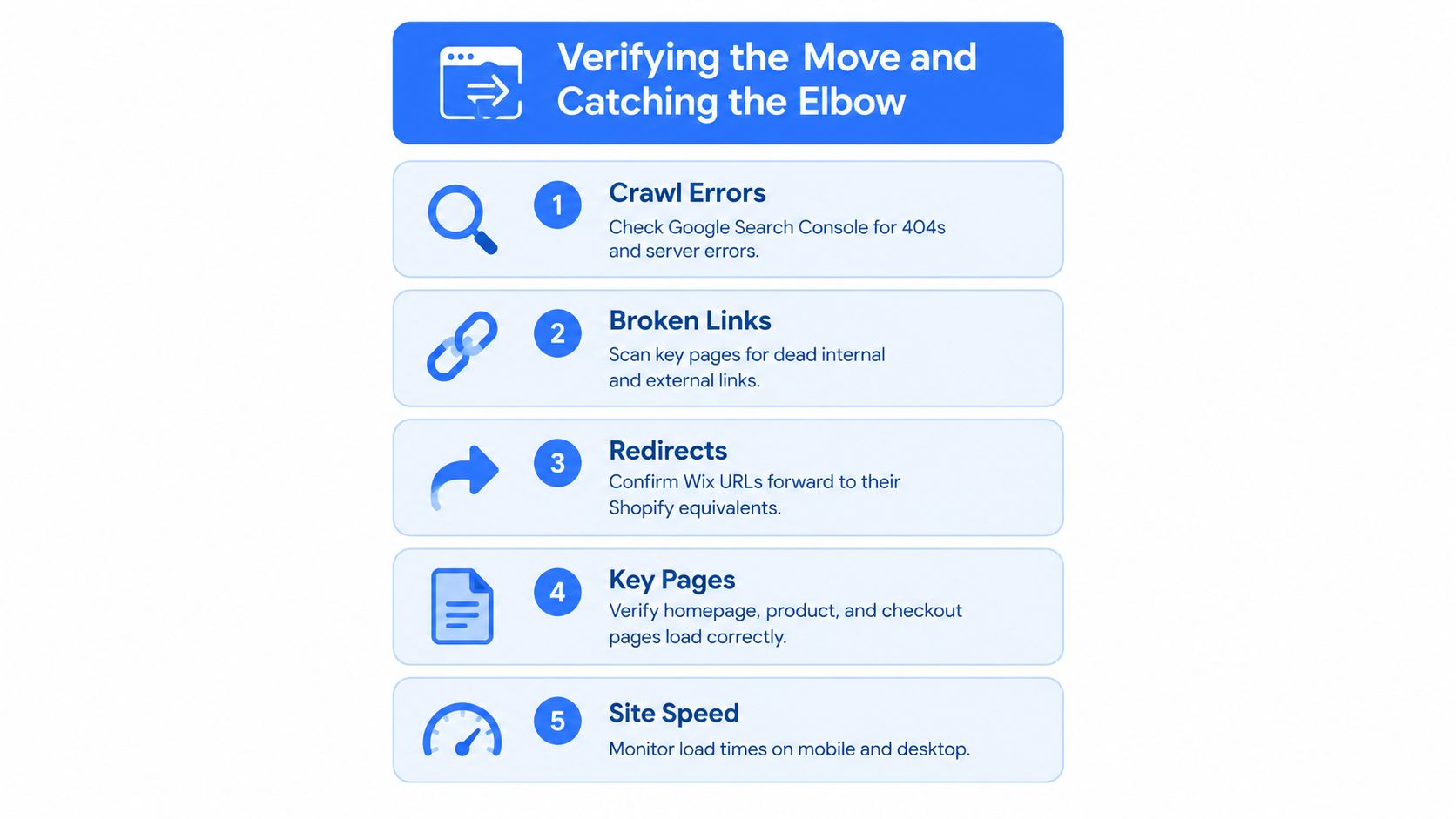
Check Search Console for crawl errors and inspect the redirect coverage report for missing or misdirected URLs. Scan key storefront pages for broken internal links, missing images or alt text, and unexpected canonical or structured-data issues. Verify analytics and conversion events with real test journeys, including product browsing and checkout.
Track indexed-page counts, impressions, clicks, rankings, conversion rate, and revenue by landing page. These signals help distinguish a technical problem from normal processing time, and they show whether customers can still arrive through the pages that matter. Give the team a named owner for each issue, with a clear path from detection to fix.
<a id="definition-of-done"></a>
Definition of done
Don't close the project because the storefront looks right. Close it when the team has checked the full operating picture:
- Products, options, prices, and collections are verified.
- Customer records and needed order history are accessible.
- Integrations and customer-facing account changes have been tested.
- Legacy URLs resolve to relevant destinations, with chains and loops removed.
- Key pages, internal links, analytics, and conversion tracking work.
- Search visibility and landing-page performance are being monitored.
Redirect coverage is the launch gate; post-launch verification is how you confirm the gate held. If errors appear, fix the affected records or destinations, then check that the correction works for customers and crawlers.
United Victory Technologies helps established brands plan and deliver Shopify migrations, including data and content transfer, redirect mapping, integrations, and Online Store 2.0 development. If you're preparing to transfer Wix to Shopify, United Victory Technologies can help your team assess the migration scope and build a launch plan around data integrity, SEO continuity, and day-to-day operations.