
Transferring from Wix to Shopify: A Complete Migration Guide
Transferring From Wix to Shopify. Learn how to move from Wix to Shopify without losing data, SEO, or sales. Step-by-step migration guide
You usually feel the break before you name it. The store still works, orders still come through, but the Wix setup that once felt simple has started to slow everything down, catalog changes take too much effort, the checkout feels boxed in, and every “we'll fix it later” starts looking like a migration plan.
Transferring from Wix to Shopify is rarely a cosmetic decision. It's a replatforming move, which means most of the work lives in four places at once: data, SEO continuity, storefront rebuild, and post-launch verification. Treating it like a CSV import is how teams end up with broken URLs, partial history, and a new theme that looks fine but doesn't operate like a commerce system.
Table of Contents
- Why Moving From Wix to Shopify Is a Replatform, Not a Theme Swap
- Wix vs Shopify Commerce Architecture
- Exporting and Importing Products, Customers, and Orders
- Handling Media, Images, and Content Assets
- URL Engineering and Redirect Mapping for SEO Continuity
- Rebuilding the Storefront on a Shopify Section-Based Theme
- Launch Checklist and Post-Launch Verification
<a id="why-moving-from-wix-to-shopify-is-a-replatform-not-a-theme-swap"></a>
Why Moving From Wix to Shopify Is a Replatform, Not a Theme Swap
A brand usually does not leave Wix for fun. The move shows up after the catalog gets harder to manage, checkout needs more control, or the team starts fighting the platform instead of using it. Shopify's history matters here, because it was built around commerce operations from the start, while Wix began as a website builder and later expanded into ecommerce, so the two systems were never built on the same logic Wix eCommerce platform tracking and migration context.
When brands first start transferring from Wix to Shopify, they usually fixate on the visible layer. They want the homepage to look familiar and the product pages to feel the same, then assume the rest will sort itself out. That is where the project slips, because a migration touches products, variants, customers, orders, content, analytics, applications, and integrations, not just design.
Practical rule: if the move does not change how the team manages catalog data, fulfillment, and reporting, the planning is too shallow.
The cleanest way to judge the work is as four parallel workstreams. Data has to move accurately. SEO continuity has to preserve discoverability. UX rebuild has to fit Shopify's section-based theme model. Post-launch measurement has to prove the site still performs after DNS cutover. If one of those gets pushed to “after launch,” launch day becomes the start of cleanup.
Expectations also need to stay realistic. Third-party platform tracking shows that Wix-to-Shopify movement is an established pattern, with one dataset recording 9,762 companies moving from Wix eCommerce to Shopify and another reporting 3,094 transfers, equal to 15.0% of migrations to Shopify in its measured period. Those figures are estimates rather than an official census, but they point to a familiar pattern, growing merchants outgrow page-builder-centered architecture and move toward more specialized commerce control.
For a mid-market brand, the project is on track when inventory, URL mapping, and theme decisions are moving together. It is off track when the team is designing pages before it has reconciled products and redirects. For cost planning, the migration conversation should start with scope and risk, not with a template swap. A useful starting point is a structured budget discussion like this Shopify migration cost guide, because the hidden work is usually where the spend sits.
<a id="wix-vs-shopify-commerce-architecture"></a>
Wix vs Shopify Commerce Architecture
Wix and Shopify both sell the idea of an online store, but they solve different problems. Wix is optimized for general-purpose site building with ecommerce layered in. Shopify is built around commerce primitives, catalog operations, checkout flow, sales channels, and the systems that support them. That difference shows up everywhere, from how URLs are structured to how extensively the checkout can be shaped.
<a id="where-the-operating-model-changes"></a>
Where the operating model changes
Wix gives merchants broad page-building flexibility, which is useful early on. Shopify gives merchants a commerce-first operating model, which matters once the store has enough volume, complexity, or operational dependencies that the admin screen has to support more than content publishing. That's why transferring from Wix to Shopify changes more than the platform logo. It changes who controls the catalog, how orders are handled, and where growth work happens.
| Dimension | Wix | Shopify |
|---|---|---|
| Commerce foundation | General-purpose website builder with ecommerce added later | Commerce-first platform built for product catalogs, checkout, payments, fulfillment, and sales channels |
| URL control | Flexible for site building, but less aligned with Shopify-style commerce paths | Structured around commerce paths like products, collections, and pages |
| Checkout ownership | More limited commerce control | Owned checkout with deeper operational and conversion control |
| App ecosystem | Broad, but not always commerce-specific | Large app ecosystem with many commerce-specific tools |
| Operations | Strong for publishing and simpler storefronts | Better suited to product operations, fulfillment, and connected systems |
<a id="why-that-matters-in-practice"></a>
Why that matters in practice
The practical impact is not theoretical. A Wix merchant who grows into variants, operational integrations, or more serious reporting needs starts to feel the architecture working against them. Shopify's model makes product handling, fulfillment, sales channels, and supporting apps feel native rather than bolted on. That's why this isn't a template decision. It's an operating-model decision.
Shopify wins when the store needs structure, not just flexibility.
This is also where URL ownership and checkout control become strategic. If the team wants cleaner commerce paths and more meaningful ownership of the purchase flow, Shopify is built for that. If the team mainly wants to publish pages quickly, Wix still fits that brief. The issue is that many merchants need both, and only one of the two platforms is designed with commerce as the center of gravity.
For stakeholders, the simplest framing is this. Wix helps you launch a site. Shopify helps you run a store.
<a id="exporting-and-importing-products-customers-and-orders"></a>
Exporting and Importing Products, Customers, and Orders
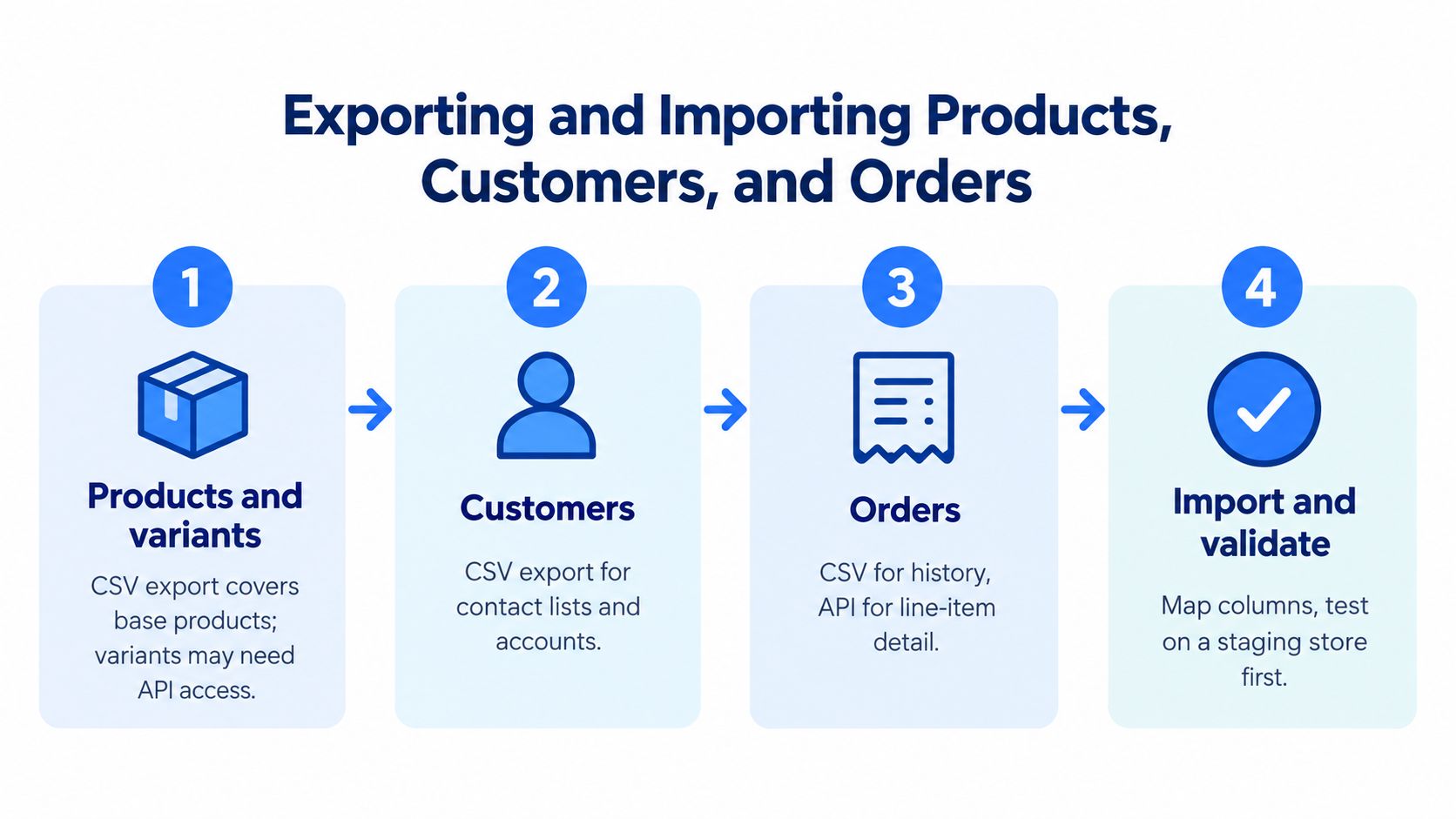
Start the data work before anyone touches a new theme. A Wix-to-Shopify migration usually begins with CSV exports and imports, but that only works cleanly after the team has normalized the source fields. Skip that step and the import may still finish while variants, reports, and historical records land in the wrong shape.
<a id="start-with-the-records-that-define-the-business"></a>
Start with the records that define the business
Build an inventory of Wix products, variants, customers, orders, pages, blog content, media, metadata, and integrations before any export. Shopify's migration guidance for Wix makes the limit clear, manual copying and CSV import are available, but some Wix data will not move through CSV alone Shopify migration from Wix guidance. That matters most for operational fields, not just what appears on the screen.
The fields that usually need normalization are SKU, handle, variant option names, tax class, inventory location, and customer email. These are not cosmetic details. They decide whether records land where they should, whether reports reconcile, and whether support teams can find the right customer or order after launch.
<a id="know-what-does-not-transfer-cleanly"></a>
Know what does not transfer cleanly
Customer passwords and payment credentials are not transferable. The new store needs an activation or password-reset flow instead of a promise that old credentials can be copied over. Order, refund, tax, shipping, and customer-order relationships also need line-by-line reconciliation because IDs and status values do not always map cleanly across systems.
Operational rule: if a field affects money, identity, or fulfillment, validate it after import, even when the CSV looks complete.
Run a dry import in a development store or password-protected store before cutover. Compare record counts. Reconcile financial totals. Check support-facing history before launch. That is the difference between data that imported and data the team can actually use.
CSV is transport, not the finish line. The real job is shaping the data so Shopify can operate on it without gaps in variants, customers, or orders.
<a id="handling-media-images-and-content-assets"></a>
Handling Media, Images, and Content Assets
Media is where migrations get sloppy fast. Teams remember products and redirects, then discover after launch that half the image URLs are stale, the hero banners are cropped badly, and downloadable assets still live in the old environment. That creates broken pages, slower load times, and avoidable SEO drift.
<a id="inventory-the-asset-layer-before-you-rebuild-pages"></a>
Inventory the asset layer before you rebuild pages
Wix-hosted images, blog media, and PDF downloads need a full inventory before anything moves. Some teams re-host assets on Shopify, others use a CDN, but either way the goal is the same, stable URLs and clean delivery after launch. If the old asset URLs stay embedded in product descriptions or blog posts, they can break the moment Wix is decommissioned.
Alt text, filenames, and image dimensions matter too. Alt text supports accessibility and can preserve context for search engines. Filenames and dimensions help avoid weird image handling later, especially when a theme changes how image containers behave.
<a id="re-cut-the-creative-for-shopify-dont-force-a-pixel-transfer"></a>
Re-cut the creative for Shopify, don't force a pixel transfer
A section-based Shopify theme is not a Wix template with a different logo. It expects content blocks, modular layouts, and images that fit the new structure. A hero banner that worked inside Wix's builder may need to be re-cropped for Shopify's section layout. A product gallery might need a different aspect ratio. That's not wasted work, it's the rebuild.
If a visual only works when squeezed into the old layout, it's usually the layout that needs to change.
The same logic applies to downloadable files and blog assets. They should be tracked like any other content dependency, with every asset mapped to its new destination before launch. That keeps broken image URLs out of the live site and saves the team from cleaning up media one page at a time after the switch.
A practical media migration is less about preserving the old page exactly and more about preserving the asset's role in the page. That's the piece many teams miss when they move too quickly.
<a id="url-engineering-and-redirect-mapping-for-seo-continuity"></a>
URL Engineering and Redirect Mapping for SEO Continuity
SEO continuity depends more on URL engineering than on page text. That's the part teams underestimate. Migrations often preserve product copy and blog articles, then lose search visibility because the old paths no longer resolve and the redirect logic was rushed.
Google's guidance on site moves with URL changes is clear, prepare the URL map before the move and implement permanent server-side redirects from old URLs to their new equivalents Google site move guidance. That advice matters because a 2025 analysis cited by migration research found that approximately 60% of migrations produced measurable organic-traffic losses, and a separate study of 892 migrations reported that recovering pre-migration traffic took an average of 523 days, with 17% of sites not recovering within 1,000 days migration SEO analysis. Those numbers are not Wix-only, but they show why redirect work isn't optional.
<a id="build-the-map-before-launch"></a>
Build the map before launch
The workflow starts with a crawl of the Wix site to capture every indexable URL. Then Search Console landing-page data gets joined to that inventory so the team can spot the URLs that matter most commercially. From there, each old URL gets mapped to exactly one Shopify destination for products, collections, pages, and blog posts.
Shopify creates redirects in its URL redirect manager, where the old path is matched to the final new path. The goal is simple, old intent in, correct destination out. The failure modes are also simple, blanket redirects to the homepage, redirect chains, and destination pages that don't satisfy the original query intent.
<a id="test-representative-urls-not-just-the-obvious-ones"></a>
Test representative URLs, not just the obvious ones
The team should validate discontinued products, faceted URLs, parameterized URLs, canonical pages, blog posts, and mobile variants with automated status checks and browser tests. After DNS cutover, Search Console should be watched for 404s, crawl anomalies, indexing changes, sitemap coverage, landing-page sessions, and conversion changes. If previously indexed URLs start returning errors, redirects need to be added quickly.
Practical rule: a redirect map is only good if it reflects real search intent, not just URL shape.
If the domain itself changes, Google also recommends its Change of Address tool, but a same-domain Wix-to-Shopify move still needs the same level of redirect discipline. That's the point. The platform move may be internal, but the search engine only sees URLs, destinations, and response codes.
<a id="rebuilding-the-storefront-on-a-shopify-section-based-theme"></a>
Rebuilding the Storefront on a Shopify Section-Based Theme
Cloning the Wix layout pixel for pixel is usually the wrong move. It preserves the old structure instead of using Shopify's strengths, and that's a missed opportunity. A section-based theme gives the team editable blocks, modular layouts, and a storefront that can evolve without another rebuild every time the content changes.
<a id="rethink-the-homepage-and-collection-pages"></a>
Rethink the homepage and collection pages
The homepage should be designed as a set of editable sections, not a static poster. That means the team can swap a hero module, add featured collections, surface proof points, and adjust promotional content without rewriting the template. On collection pages, filters and merchandising logic should be used to help shoppers narrow product sets quickly instead of forcing them to scroll through a long grid.
<a id="treat-the-product-detail-page-like-a-buying-tool"></a>
Treat the product detail page like a buying tool
A strong PDP on Shopify should do more than mirror the Wix design. It should combine rich media, variant clarity, supporting content, and the flexibility to add modules where the product needs explanation. If the catalog is complex, the new theme should also leave room for metafields and structured content instead of turning every product page into the same template with different copy pasted in.
Checkout is the one area where the platform's own strengths should be left intact. Shopify's owned checkout is part of the reason merchants move. Trying to force a Wix visual language into that step usually creates friction instead of confidence.
Design rule: rebuild for behavior, not nostalgia.
A good migration agency will push back when the request is “make it look exactly the same.” That request usually hides the underlying problem, a fear of change rather than a design strategy. A better brief is “preserve brand recognition, improve usability, and use Shopify's theme system properly.”
If the team needs help deciding what to keep, what to drop, and what to rebuild, a practical starting point is this agency selection guide. The point isn't to outsource taste. It's to make sure the new store is built for commerce instead of nostalgia.
<a id="launch-checklist-and-post-launch-verification"></a>
Launch Checklist and Post-Launch Verification
Launch day should feel controlled, not heroic. Before traffic moves, freeze edits on Wix, run the final delta export to capture late product, customer, order, and content changes, and validate the Shopify store in a password-protected state. DNS cutover only belongs at the end, after data, redirects, and theme behavior have all been checked in staging.
<a id="what-to-verify-before-and-after-cutover"></a>
What to verify before and after cutover
- Freeze edits on Wix: stop catalog and content changes so the final export does not miss late updates.
- Run the final delta export: capture the last changes made after the dry run.
- Confirm checkout and email flows: test the purchase path, fulfillment notifications, password reset emails, and transactional messages.
- Check analytics and Search Console: make sure tracking is firing and search visibility can be monitored from day one.
- Review redirect coverage: sample old URLs, especially high-value pages, and confirm they resolve correctly.
- Reconcile revenue and inventory: compare store activity and stock positions after launch, then fix mismatches quickly.
As noted earlier, payment credentials cannot be copied over, so the post-launch customer login journey needs to be deliberate. Test the password-reset email end to end, then ask support to verify order history for a few real customers so you can confirm that the handoff between storefront, account access, and service tools is working the way the team will need it to work on a busy day.
A launch checklist should also force a final pass on the practical basics before cutover. Use a migration readiness checklist to pressure-test that sequence before the switch. If the store goes live with a broken redirect, a missing tracking tag, or a login issue, those problems will show up immediately in search, support, and conversion data.
<a id="keep-a-30-60-and-90-day-watchlist"></a>
Keep a 30, 60, and 90-day watchlist
The first month is about finding breakage. The next two checkpoints are about proving the store is stable. Search Console errors, 404 spikes, inventory desync, and payment provider mismatches tend to show up early, while revenue reconciliation tells you whether the new store is behaving like the old one or better.
A migration is not finished when the site goes live. It is finished when customers can buy without friction, support can see the right history, and reporting matches the business enough to trust.