
How to Migrate from Magento to Shopify the Right Way
Learn how to migrate from Magento to Shopify without losing SEO, data, or revenue. Step-by-step guide covering data, redirects, and launch checklist.
You're staring at a Magento store that still makes money, but every quarter feels heavier than the last. The catalog is messy, the integrations are old, the SEO team is nervous, and someone in leadership wants Shopify because it sounds faster, cleaner, and easier to scale. That's exactly the moment to stop thinking about a “platform switch” and start treating the project like a controlled site move.
Table of Contents
- Why a Magento to Shopify Move Is a Controlled Site Move, Not a Simple Import
- Inventorying Everything That Has to Survive the Migration
- Mapping Magento Data Into Shopify's Models
- Building a Redirect Plan That Protects Revenue and Rankings
- Deciding What Becomes Native, What Stays Custom, and What Moves to Integrations
- Pre-Launch QA, Rehearsal, and the Cutover Plan
- Launch Day, Post-Launch Monitoring, and the First 90 Days
<a id="why-a-magento-to-shopify-move-is-a-controlled-site-move-not-a-simple-import"></a>
Why a Magento to Shopify Move Is a Controlled Site Move, Not a Simple Import
Quarter-end pressure turns replatforming into a shortcut. The license renewal is close, the theme is brittle, the ERP team says the connector is “mostly fine,” and someone suggests a Shopify theme plus a CSV upload will cover the rest. That is how stores lose rankings, break orders, and spend months cleaning up preventable mistakes.
Magento's history makes the case. Adobe announced the acquisition of Magento Commerce on May 21, 2018, Reuters reported the deal value at $1.68 billion in cash in its acquisition coverage, and the deal closed on June 19, 2018, bringing Magento into Adobe Experience Cloud alongside content, marketing, analytics, commerce, order management, and business-intelligence capabilities. Adobe also said Magento's ecosystem included more than 300,000 developers, 800 technology partners, and 350 systems integrators. You are migrating an implementation with layers of extensions, partners, and business logic, not just a catalog and a checkout flow. Treat it that way from the start, and bring in experienced Shopify Plus agencies if your team does not have that migration depth in-house.
<a id="start-with-the-system-not-the-theme"></a>
Start with the system, not the theme
The first mistake is design-first thinking. A new homepage can wait. Discovery cannot. If you do not map what lives inside Magento, customer groups, custom pricing, tax rules, approval steps, and the small workflows that keep finance and operations moving will slip through the cracks.
Practical rule: if someone says, “We'll figure that out after launch,” the migration team is already behind.
Start by identifying what the store depends on, then decide what stays, what gets rebuilt, and what gets retired. That means examining the actual implementation, not the Magento label. A store that grew through years of custom modules, B2B rules, and third-party integrations needs a controlled plan because the business usually depends on functions nobody documented properly.
The key question is direct. What has to survive, what should be redesigned for Shopify, and what should be left behind because it no longer earns its keep?
<a id="inventorying-everything-that-has-to-survive-the-migration"></a>
Inventorying Everything That Has to Survive the Migration
A Magento audit has to be wider than the merchandising team expects and more concrete than the IT team usually documents. You're not just counting SKUs. You're identifying the assets and dependencies that keep the store searchable, buyable, and supportable after cutover.
<a id="what-to-inventory-first"></a>
What to inventory first
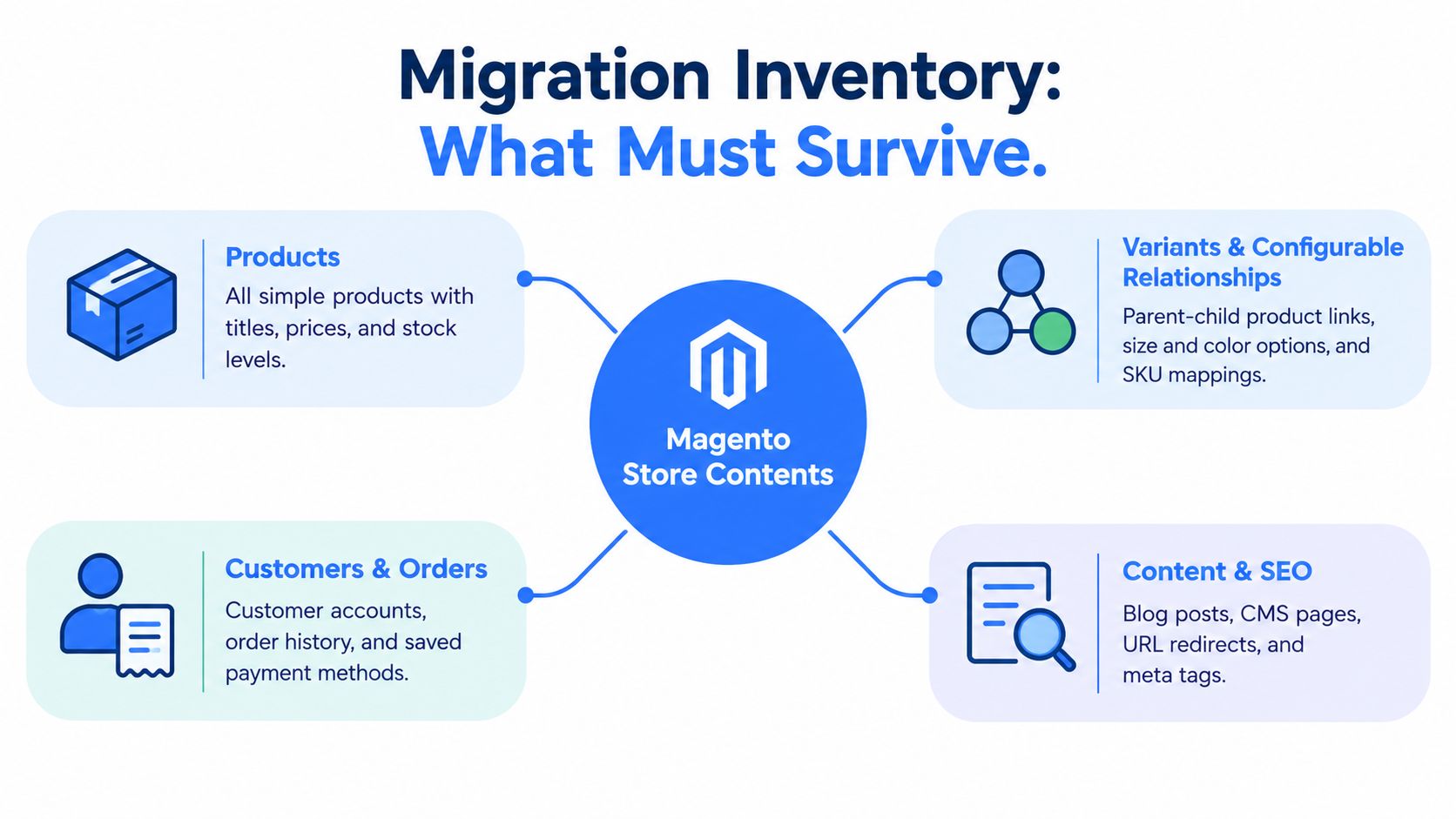
Start with the obvious layers, then move into the hidden ones. Products and variants come first, but they're not the whole story. You need customer accounts, historical orders, CMS pages, blog content, images, canonical URLs, metadata, internal links, analytics tags, feeds, and every external integration that touches ERP, PIM, OMS, CRM, tax, payment, or shipping.
The historical context matters here. Adobe's description of Magento's ecosystem, with its large developer and partner base, is a warning sign that the store may depend on a lot more than standard commerce features. A custom pricing rule or approval flow can be buried in a module, an integration, or a theme override.
<a id="the-buckets-teams-underestimate"></a>
The buckets teams underestimate
The most dangerous omissions usually sit in the middle, not at the edges. Merchandising remembers products. Finance remembers orders. SEO remembers URLs. Operations remembers integrations. What gets missed are the relationship layers, configurable-product links, parent-child mappings, media tied to variants, tax behavior by market, and customer-specific pricing.
A practical inventory worksheet should include these rows:
- Catalog structure: simple products, configurable products, bundled items, attributes, and variant relationships.
- Commerce history: customers, orders, refunds, cancellations, and account notes.
- Content and SEO: CMS pages, blog posts, metadata, redirects, internal links, and structured data.
- Operational systems: ERP, PIM, OMS, CRM, shipping, payment, tax, and feed connections.
Practical rule: if a process needs a second system to work in Magento, assume it still needs a second system in Shopify until proven otherwise.
The point of inventory isn't to preserve everything. It's to expose the actual migration surface area before anyone starts exporting data. Once the store is mapped in full, you can decide what deserves a one-to-one transfer and what should be redesigned around Shopify's model.
<a id="mapping-magento-data-into-shopifys-models"></a>
Mapping Magento Data Into Shopify's Models
Once the inventory is clean, translation starts. Magento and Shopify do not model commerce the same way, so a straight copy usually breaks something important. Reshape the data around Shopify's structure and protect the relationships that keep the store usable.
<a id="products-variants-and-customer-history"></a>
Products, variants, and customer history
Magento configurable products rarely map cleanly to Shopify variants when custom options or bundled logic are involved. Keep the buying experience intact. Freeze the export schema, define how each configurable product becomes a Shopify product and variant set, and decide where custom behavior belongs if Shopify does not handle it natively.
Customer accounts and historical orders need a clear identity strategy before import day. Decide how customers will be matched, how duplicates will be resolved, and how much order history support teams need for reorders and service work. For content, move CMS pages and blog posts into Shopify's online store structure with metadata and internal links preserved.
<a id="batch-size-file-limits-and-variant-math"></a>
Batch size, file limits, and variant math
Shopify's CSV product importer has a 15 MB limit per file according to Shopify's help documentation on CSV imports, so large catalogs need controlled batches and resumable jobs with reconciliation counts. Shopify's variant limits documentation also says that stores with at least 500,000 variants, excluding Shopify Plus stores, cannot create more than 10,000 new variants through CSV or API in a 24-hour period. That is a planning constraint, not a corner case. See Shopify's help docs on CSV product import and variant limits.
Use that reality to shape the migration sequence:
- Freeze the schema so the export stops changing while data is loading.
- Transform configurable products into Shopify products and variants.
- Migrate customers and orders with a defined identity strategy.
- Upload media and content after the catalog structure is stable.
- Reconnect ERP, PIM, and OMS systems after the model is mapped.
- Run a final delta migration right before launch.
- Reconcile totals by SKU, variant, customer, order, inventory, price, tax, and fulfillment status.
Practical rule: if the source data cannot be counted, it cannot be trusted.
Do not assume Magento extensions have Shopify equivalents. Subscriptions, returns, layered navigation, gift cards, and custom pricing logic often look simple in Magento and behave very differently in Shopify. If the import succeeds but the business rules do not, the migration has failed.
<a id="building-a-redirect-plan-that-protects-revenue-and-rankings"></a>
Building a Redirect Plan That Protects Revenue and Rankings
On too many migration projects, the redirect map is a last-week export pasted into a spreadsheet and imported the night before DNS cutover. That is how you lose traffic on the URLs that used to pay the bills.
Treat the redirect map as the bridge between old discoverability and new discoverability. If the bridge is weak, rankings and revenue fall through it.
<a id="decide-which-urls-deserve-a-one-to-one-path"></a>
Decide which URLs deserve a one-to-one path
Google's site-move guidance is clear. Build an old-to-new URL mapping, use server-side permanent redirects, preferably HTTP 301 or 308, submit the new XML sitemap in Search Console, and keep redirects in place for as long as possible, generally at least one year. In a Magento-to-Shopify migration, that means exporting the legacy URL inventory before launch and mapping product, category, CMS, blog, and other indexable URLs to their closest Shopify destinations. The practical takeaway is simple, redirects are a long-lived asset, not a launch-week task. See Google's guidance on site migration with URL changes.
The key question is which URLs deserve which destination. Rank legacy pages by organic traffic, revenue, rankings, backlinks, indexation, and customer journeys. High-value product pages usually deserve a one-to-one destination. Old category pages can consolidate into a broader collection. Broken or obsolete pages may deserve a controlled 404 or 410 instead of a misleading home page redirect.
<a id="redirect-decision-matrix-for-legacy-magento-urls"></a>
Redirect decision matrix for legacy Magento URLs
| Legacy URL Profile | Recommended Destination | Status Code | Notes |
|---|---|---|---|
| High-traffic product page with current equivalent | Closest Shopify product page | 301 | Preserve intent and avoid chains |
| Category page with strong organic value | Relevant Shopify collection | 301 | Keep topical relevance tight |
| CMS or blog page with ongoing backlinks | Matching content page | 301 | Preserve copy, links, and metadata where possible |
| Discontinued product with no substitute | Relevant collection or a controlled 404 | 301 or 404 | Don't send intent to the homepage |
| Obsolete URL with no traffic or links | Controlled 404 or 410 | 404 or 410 | Don't waste redirect surface area |
Content parity matters here. A redirect that lands on a page with stripped copy, missing internal links, or weaker metadata can still lose performance. Test for redirect chains, loops, missing mappings, and accidental homepage targets before launch. If the final destination doesn't match the original intent, the redirect is technically valid and commercially wrong.
<a id="deciding-what-becomes-native-what-stays-custom-and-what-moves-to-integrations"></a>
Deciding What Becomes Native, What Stays Custom, and What Moves to Integrations
Magento migrations fail when teams try to recreate every old behavior inside Shopify. Some of those behaviors are real requirements. Many are just custom workarounds that should not survive the move. Treat this as an operating-model decision, not a rebuild exercise.
<a id="use-a-capability-matrix-not-a-wish-list"></a>
Use a capability matrix, not a wish list
Sort every major requirement into four buckets: native Shopify, configurable through admin or Shopify Functions, custom or app-based, and external systems like ERP, PIM, or OMS. Do this before development starts. Custom pricing, layered navigation, subscriptions, gift cards, returns, and B2B workflows all need a clear home.
Hybrid B2B/B2C merchants need extra discipline. Shopify Plus documentation shows that advanced B2B capabilities, including unlimited catalogs, direct assignment to companies and locations, deposits, partial payments, and payment requests per fulfillment, are plan-dependent rather than universal. Design and test those flows deliberately instead of assuming Shopify will match Magento out of the box. If you need a business framing point while you scope the work, use Shopify migration cost to weigh the trade-offs before development starts.
<a id="keep-the-right-things-out-of-shopify-core"></a>
Keep the right things out of Shopify core
Some rules belong outside the storefront. Pricing, tax, fulfillment exceptions, and customer-specific approvals often belong in the ERP or OMS, where the source of truth already lives.
International commerce adds another layer of decisions. Tax validation, currency, language, market-specific catalogs, and fulfillment rules need to be settled before launch, not patched after the first customer complaint. If a rule changes by market or customer type, document it now.
Practical rule: if a requirement is expensive to test in production, it is too late to discover it in production.
Aim for a cleaner operating model that preserves what matters and removes what does not.
<a id="pre-launch-qa-rehearsal-and-the-cutover-plan"></a>
Pre-Launch QA, Rehearsal, and the Cutover Plan
The week before launch is where good migrations stop being theoretical. Here the store proves it can operate. If you skip the rehearsal, you're betting live revenue on assumptions nobody has fully tested.
<a id="validate-the-whole-chain-not-just-the-storefront"></a>
Validate the whole chain, not just the storefront
QA needs to cover redirects end-to-end, integration endpoints, checkout behavior, analytics tags, and order flow through ERP and OMS. Don't let teams test their own favorite layers in isolation. The catalog team checks products, the operations team checks fulfillment, and the marketing team checks tracking. Everyone should also verify what happens when their own system fails.
A full dress rehearsal should include a fake cutover on a cloned environment. Run the export delta, switch the launch sequence, validate the redirect import, test the payment flow, confirm the order sync, and decide in advance what triggers rollback. Missing a webhook in a rehearsal is annoying. Missing it on launch day is expensive.
<a id="who-needs-to-be-on-the-launch-bridge"></a>
Who needs to be on the launch bridge
- Project owner: keeps the sequence moving and owns the go or no-go call.
- Developer or platform lead: handles theme, data, and integration issues.
- Operations lead: checks ERP, OMS, fulfillment, and inventory sync.
- Marketing or SEO lead: validates redirects, metadata, and analytics.
- Customer support lead: watches early account, order, and pricing tickets.
A practical rehearsal also needs documentation that's short enough to use under pressure. One person should own each dependency, and every dependency should have a test result attached before DNS changes. Pair that with the Shopify migration readiness checklist so the launch team isn't improvising from memory.
A clean cutover is mostly about sequence. Load the final delta, confirm the redirects, switch traffic, submit the sitemap, then verify that the core systems are reading and writing correctly.
<a id="launch-day-post-launch-monitoring-and-the-first-90-days"></a>
Launch Day, Post-Launch Monitoring, and the First 90 Days
Launch day isn't the finish line. It's the first live test of the entire migration. If the store flips cleanly but the systems behind it don't, the business will feel the breakage immediately.
<a id="the-launch-day-sequence-that-matters"></a>
The launch-day sequence that matters
Start with the final redirect check. Then confirm sitemap submission, robots.txt validation, Search Console verification, payment gateway cutover, and ERP plus CRM reconciliation. Don't let the team declare success just because the home page loads. The store needs to accept orders, route data, and preserve search visibility at the same time.
After launch, watch the signals that tell you whether the move is stabilizing or slipping. That means indexing coverage, crawl errors, organic clicks, impressions, conversion rate at product, cart, and checkout steps, ERP and OMS sync errors, and customer support tickets tied to accounts, orders, or pricing. Search Console and analytics should be read together, not in isolation, because traffic patterns and technical errors tell different parts of the story.
<a id="the-first-30-60-and-90-days"></a>
The first 30, 60, and 90 days
In the first 30 days, focus on crawl and indexing health. In the next 30, focus on order integrity, fulfillment accuracy, and customer service friction. In the final 30, audit whether the redirected traffic and recreated content are behaving like the old store or better.
Redirects should stay live well beyond launch. Treat them as a permanent data asset, not a temporary cleanup task. That matters most for older links from publishers, affiliates, social posts, and internal systems that won't be updated quickly.
The first three months tell you whether the migration was a controlled site move or just a prettier interface on a broken foundation. Keep the monitoring strict, keep the fixes disciplined, and don't let anyone reclassify unresolved issues as “normal.”
United Victory Technologies builds Magento to Shopify migrations for brands that can't afford to lose SEO equity, integrations, or operating continuity. If you need a team that treats redirects, data mapping, and B2B complexity like production risks instead of checkbox tasks, visit United Victory Technologies and start the conversation.