
Migrating from Magento to Shopify: A Step-by-Step Guide
Migrating from Magento to Shopify without losing SEO, orders or customers: a step-by-step plan for data, redirects, logins and UX rebuilds.
You're staring at a Magento admin that still takes orders, but every patch, extension update, and hosting change feels risky. Your team knows the catalog works, customers can log in, and Google sends steady traffic, so replacing the platform sounds like breaking three things to fix one. That's the right instinct. Migrating from Magento to Shopify doesn't usually fail on the product import. It fails on customer identity, B2B architecture, and redirects and reconciliation, which is why those three should be your acceptance criteria from day one.
Shopify can clearly handle scale. Its 2025 SEC filing reported $378.4 billion in gross merchandise volume for 2025, up 29% from $292.3 billion in 2024. That doesn't guarantee your result, but it removes the question of whether the platform can support serious volume. Your job is proving your catalog, pricing, accounts, and URLs survive the move.
Table of Contents
- Magento Objects and Where They Land on Shopify
- Which B2B and Payment Workflows Stay Native
- How to Inventory Your Store and Define the Shopify Model
- How to Build a Redirect Map That Protects Rankings
- Moving Customers and Orders Without Breaking Logins
- Rebuilding the Storefront for Section-Based Themes
- Rehearse and Cut Over Only After Reconciliation
<a id="magento-objects-and-where-they-land-on-shopify"></a>
Magento Objects and Where They Land on Shopify
Start with one practical question. Which Magento object becomes what on Shopify, and which rows need a design decision before anyone imports a file?
The history matters because unsupported software changes the risk calculation. Adobe's security bulletin states Adobe ended security support for Magento Commerce 1.14 and Magento Open Source 1 in June 2020, with final security patches released at that time. Magento 2 and Adobe Commerce remain live choices, so treat the move as a data migration with design decisions attached. Customers, orders, metadata, tax and payment settings, and tested redirects all have to survive it.
<a id="reading-the-mapping-by-risk"></a>
Reading the mapping by risk
Simple products are the easy win. SKU, price, description, and images move in bulk by CSV or API into a product with one default variant. CMS pages are low risk too, provided you keep handles and titles intact.
Configurable products need more care. A Magento parent with size and color children becomes one Shopify product, and those attributes become option names with variants underneath. Categories become collections, usually rebuilt as rule-based smart collections driven by tags, type, or vendor rather than a copied tree. That is a deliberate choice: the category structure you inherited from Magento is rarely the one worth freezing into Shopify.
The rows that fail migrations sit lower on the table. Custom options like engraving text or file uploads, grouped and bundled products, and CMS blocks and widgets have no clean equivalent, so each one needs a chosen pattern: theme rebuild, app, or Shopify Functions. Customer groups and tier pricing differ again. Forcing them into an import file just bakes the wrong model in.
| Magento object | Shopify equivalent | Migration method | Redesign risk |
|---|---|---|---|
| Simple product with SKU, price and images | Product with one default variant | Bulk CSV or API import | Low |
| Configurable product (size, colour) | Product with variants and option names | Map attributes to options, then import | Medium |
| Category tree | Collections (rule-based or manual) | Rebuild as smart collections | Medium |
| CMS page | Online Store page | Import content and keep the handle | Low |
| CMS block or widget | Theme section or metafield | Rebuild in the theme | High |
| Custom options (text, file upload) | Product options or line item properties | Recreate with an app or theme code | High |
| Grouped or bundled product | Bundle app or Shopify Functions | Rebuild and test | High |
| Customer account | Customer account | Import profile; reset or reactivate login | Medium |
| Customer group and tier pricing | Company catalogs or customer segments (B2B) | Redesign, see the B2B workflows section | High |
| Order history | Historical orders | Specialised import path | Medium |
| Reviews and ratings | Review app data | Export and import through the app | Medium |
Practical rule: Low-risk rows can move in bulk. High-risk rows need an owner, a chosen pattern, and a test case before the first import runs.
Two rows on that table decide whether the launch works for real customers. Customer accounts import as profiles, so plan how logins get reset or reactivated before anyone announces the new store. Order history needs a specialised import path, not another bulk CSV, and it should reconcile to the cent before cutover.
<a id="which-b2b-and-payment-workflows-stay-native"></a>
Which B2B and Payment Workflows Stay Native
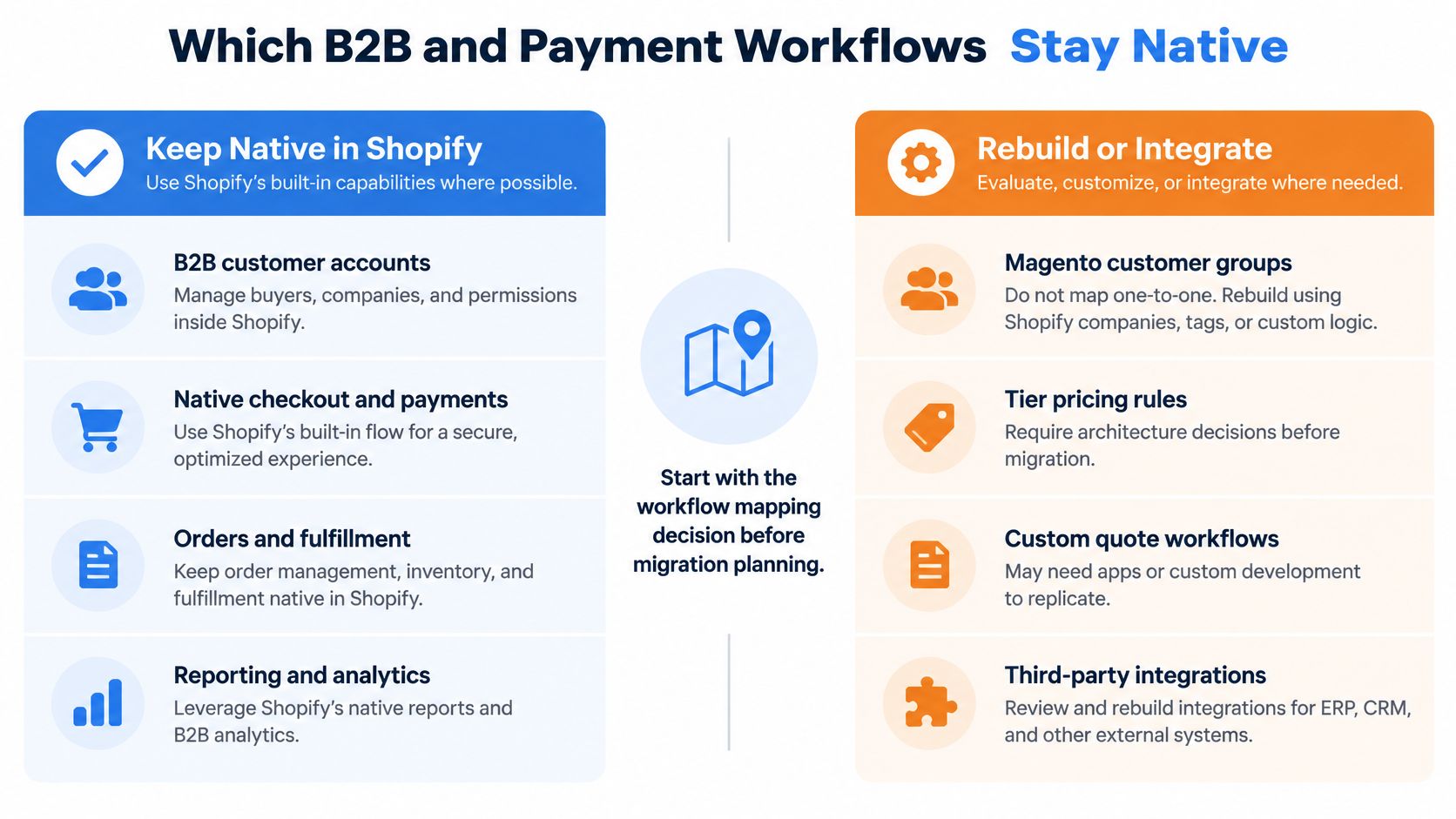
Don't treat Shopify B2B as a direct replacement for Magento customer groups. It's an architecture decision, and you need to settle it before catalog and customer work starts, because pricing, catalogs, and checkout rules shape both.
Shopify's B2B considerations documentation identifies incompatible B2B features, including accelerated checkouts such as Shop Pay, Apple Pay, Google Pay, and Amazon Pay. If wholesale buyers rely on those payment methods today, that incompatibility isn't a footnote. It's revenue exposed at checkout. B2B market setup and catalog assignment are also separate configuration steps, so international B2B isn't just data you import once.
<a id="test-every-revenue-critical-workflow-by-market"></a>
Test every revenue critical workflow by market
Build a test list for each market you sell into, then assign every workflow a home.
- Payment terms and approvals: Test net terms, draft orders, and who can approve a company purchase.
- Account specific catalogs: Check negotiated prices, quantity rules, and which products a company location can see.
- Sales rep ordering: Confirm a rep can order on behalf of an account without breaking tax or inventory allocation.
- Tax and multi-currency pricing: Validate exemptions, currency rounding, and price lists by market.
- Mixed B2B and B2C carts: Test what happens when retail and wholesale rules collide in one store.
For each workflow you've got three choices. Keep it native in Shopify, move it to your ERP, PIM, or OMS, or rebuild it with a custom extension or Function. I would score that choice on five measures before committing: gross margin impact, B2B checkout completion, order entry labour, integration failure rate, and revenue exposed to unsupported payment methods.
A lower maintenance platform can still cost more if negotiated pricing or procurement needs constant workarounds. That's why a phased, market by market cutover is often safer, with Magento kept running for a division that can't move yet. If you need Shopify Plus depth for this decision, review what a Shopify Plus developer should cover before you lock the architecture.
<a id="how-to-inventory-your-store-and-define-the-shopify-model"></a>
How to Inventory Your Store and Define the Shopify Model
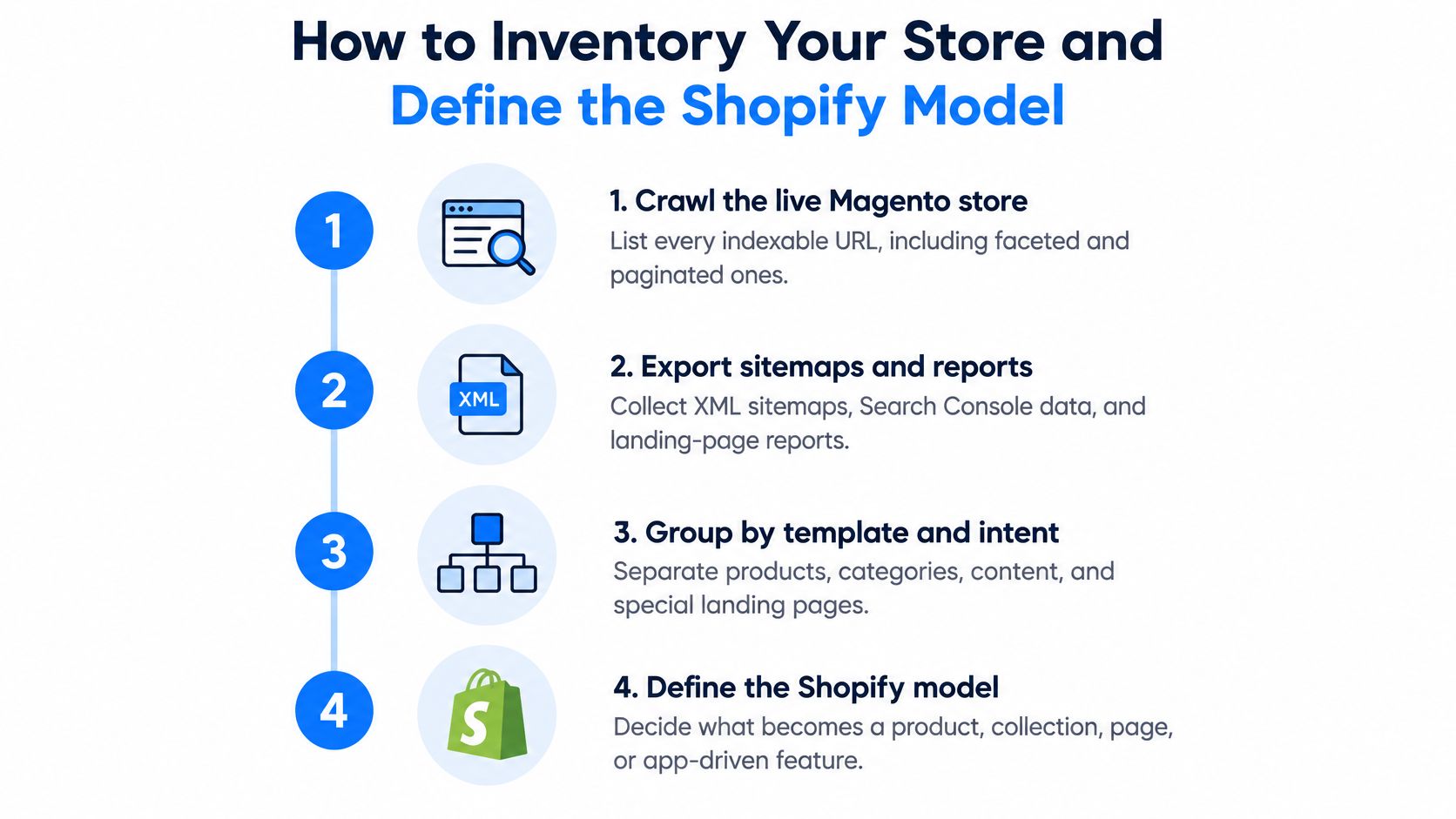
Treat the inventory as a controlled transformation, not a CSV upload. You're defining what your store is before you define how you'll move it.
<a id="run-the-inventory-in-order"></a>
Run the inventory in order
- Crawl the live Magento store. List every indexable URL, including faceted and paginated pages, because the crawl becomes the source for redirects and content decisions.
- Export sitemaps, Search Console, and analytics. XML sitemaps show what you intended to publish. Search Console and landing page reports show what Google and shoppers use.
- Pull backlink data. A discontinued product with strong links still needs a destination, even if it no longer earns revenue.
- Inventory the catalog in detail. Count products, configurable relationships, custom options, bundles, grouped products, attributes, and media. Note which attributes shoppers filter by and which are only internal.
- Count customers, orders, and content. Separate registered customers from guest orders, and list CMS pages, blog posts, PDFs, and downloadable files.
- Document every integration. Write down ERP, PIM, CRM, tax, payment, shipping, email, reviews, loyalty, and subscription connections, plus the owner and sync direction for each.
- Define the canonical Shopify model. Mark each feature keep, rebuild, or drop, then confirm how categories, variants, metafields, and collections will work on Shopify.
Before you call the inventory done, walk through a structured Shopify migration readiness checklist so gaps in data, integrations, and SEO risk surface while they're still cheap to fix.
<a id="set-the-reconciliation-rule-now"></a>
Set the reconciliation rule now
Record counts and financial totals must match between Magento and the rehearsal store. Product count, variant count, customer count, order count, and order value all need a source number and a Shopify number side by side.
That's not fussy QA. Independent migration guidance from Syslabs warns that only 36% of data-migration projects remain within forecasted budget and 46% finish on time. Reconciliation and exception lists are how you avoid discovering missing variants or broken ERP syncs during launch week.
Say you've got a hypothetical 20,000 SKU catalog and the crawl returns more indexable URLs than products. That's normal once category paths, filters, blog content, and legacy aliases are included. It's also why the URL inventory comes first. If you count only products, you'll under scope redirects, content rebuilding, and QA by a wide margin.
<a id="how-to-build-a-redirect-map-that-protects-rankings"></a>
How to Build a Redirect Map That Protects Rankings
Every valuable old URL needs a relevant new destination. Not a homepage. Not a vague category. The closest matching product, collection, page, or file a shopper would accept as the same thing.
Export the complete Magento URL history, not just current product pages. Discontinued products, CMS pages, PDFs, images, legacy aliases, and faceted URLs that earned links all carry equity. The stakes justify the effort. Independent industry analysis from SearchUp reports that 60–80% of migrations experience measurable organic-traffic loss, with one cited analysis of 892 domain migrations finding an average recovery period of 523 days and 17% not recovering within 1,000 days. Those figures aren't guaranteed outcomes for your store, but they make redirect completeness an acceptance criterion, not cleanup.
<a id="map-patterns-first-then-exceptions"></a>
Map patterns first, then exceptions
| Old Magento URL pattern | Shopify target | Redirect rule | Check before launch |
|---|---|---|---|
| /juice-press.html (product) | /products/juice-press | 301 to matching product handle | Handle matches the product exactly |
| /women/tops.html (category) | /collections/women-tops | 301 to closest collection | No redirect chain |
| /discontinued-model.html | Closest live product or collection | 301 to a relevant page | Destination is not the homepage |
| /about-us (CMS page) | /pages/about-us | 301 | Title and content parity |
| /women/tops.html?color=red (filtered URL with links) | /collections/women-tops | 301 only if the filtered URL earned links | Traffic and backlink check first |
| /blog/post-title (blog post) | /blogs/news/post-title | 301 | Blog handle matches |
| /media/... PDFs and images | Re-hosted file or original file URL | Test each file | Inbound links still resolve |
| /catalogsearch/result/ (search results) | No redirect target | Usually noindex, not redirected | Confirm in Search Console first |
Build the map at row level with direct permanent redirects. Don't create chains where an old Magento URL points to an interim URL that points somewhere else. Check that title tags, canonicals, indexability, structured data, and internal links carry over or improve intentionally.
Catalog search URLs are a good exception to understand. They're usually noindex candidates, not redirect candidates, because they don't represent stable landing pages. The same logic applies to thin filtered URLs with no traffic or links. A useful reference for the wider technical work is this complete Shopify SEO guide, especially for canonical and sitemap checks.
Validate automatically before launch. Test status code, destination relevance, loops, chains, and accidental noindex or canonical errors across the full file. Then test your highest value URLs by hand, especially top revenue products, top organic landing pages, and pages with strong backlinks.
A redirect to a 404 is worse than a delay. Fix the map while Magento is still live and you can compare both sides calmly.
<a id="moving-customers-and-orders-without-breaking-logins"></a>
Moving Customers and Orders Without Breaking Logins
Your customers will experience this: their old password won't work.
Magento and Shopify use incompatible password hashing systems, so customer passwords generally can't be transferred. Charle Agency's Magento to Shopify migration guidance explains this forces account reactivation or password resets, and warns the wider identity problem can disrupt consent history, guest to registered relationships, loyalty status, subscriptions, and customer specific pricing. Plan the reactivation email before cutover, with a clear subject line, a direct activation link, and support copy for shoppers who think their account vanished.
<a id="segment-before-you-import"></a>
Segment before you import
Don't import the customer table as one undifferentiated file. Segment by value, activity, and consent, then apply a rule to each group.
| Segment | Migrate? | Action | Reason |
|---|---|---|---|
| Purchased in the last 24 months | Yes | Import and send a reactivation email | Highest value for reactivation |
| Dormant, marketing opt-in on record | Optional | Import with consent source and timestamp | Consent must be provable |
| Dormant, no marketing consent | No | Archive outside Shopify | Lower compliance and support risk |
| Duplicate email addresses | Merge first | One profile with combined order history | Avoids duplicate emails and split history |
| Guest buyers | Yes, as linked orders | Match to profiles by email at import | Support can find warranties and returns |
| B2B company buyers | Yes | Map to companies, locations and catalogues | Keeps negotiated access and terms |
Preserve marketing consent with its source and timestamp. A simple opted in flag isn't enough when privacy obligations differ by market and a customer asks when they subscribed. Reconcile duplicate emails before import too, because merging split profiles after orders are attached is messy.
Match guest orders to registered profiles by email where it's legitimate to do so. Support teams need one reliable view of warranties, returns, and purchase history. If a shopper bought twice as a guest and once with an account, they still expect your team to find all three orders.
Historical orders need a specialised import path and won't always preserve Magento's exact transactional structure. Decide what support staff must see, such as order number, date, items, totals, and fulfillment status, and accept that some legacy fields may live in notes, tags, or an external system.
I would challenge the instinct to import everyone. Dormant, duplicated, or legally obsolete profiles increase compliance and support risk without adding revenue. A validated, consent aware subset is often safer than maximum record volume.
Track four KPIs after launch to prove the identity work succeeded: login reactivation rate, duplicate profile rate, consent coverage, and post-launch support contacts about accounts. If reactivation is low, fix the email and login flow. If support contacts spike, your order history mapping probably has gaps.
<a id="rebuilding-the-storefront-for-section-based-themes"></a>
Rebuilding the Storefront for Section-Based Themes
Copying Magento templates into Shopify usually preserves the problems you were trying to leave. Legacy layouts, widgets, and layered navigation rarely map cleanly onto Online Store 2.0 sections, so rebuild for Shopify's section based themes instead of replicating the old storefront pixel by pixel.

<a id="rebuild-what-shoppers-actually-use"></a>
Rebuild what shoppers actually use
Start with the templates that carry revenue, and judge every Magento feature by whether it helps a shopper decide.
- Product detail pages: Rebuild variant selectors, stock messaging, delivery information, reviews, and specification tables. Store custom attributes in metafields so merchandisers can edit them without template code.
- Collection pages: Use Shopify's native filtering where it fits, and confirm filter values come from consistent variant options, tags, or metafields.
- Navigation: Collapse hundreds of Magento categories into a shallower menu built around how shoppers browse, not how the old category tree grew.
- Mobile layouts: Test on real devices with real catalog data, including long product names, large variant counts, and filter drawers.
As an illustrative example, say a store copies a mega menu with 400 categories from Magento. On desktop it looks complete, but mobile testing shows shoppers can't scan it, so the team cuts it to top level groups with featured collections underneath. That's not a measured result. It's the kind of legacy habit mobile testing exposes quickly.
Keep a Magento feature only when you can tie it to a funnel metric. Compare product view to add to cart, add to cart to checkout, and checkout completion before and after each major template change. If a rebuilt size guide or sticky add to cart button doesn't move one of those steps, simplify it. If it does, keep it and document why it's there.
<a id="rehearse-and-cut-over-only-after-reconciliation"></a>
Rehearse and Cut Over Only After Reconciliation
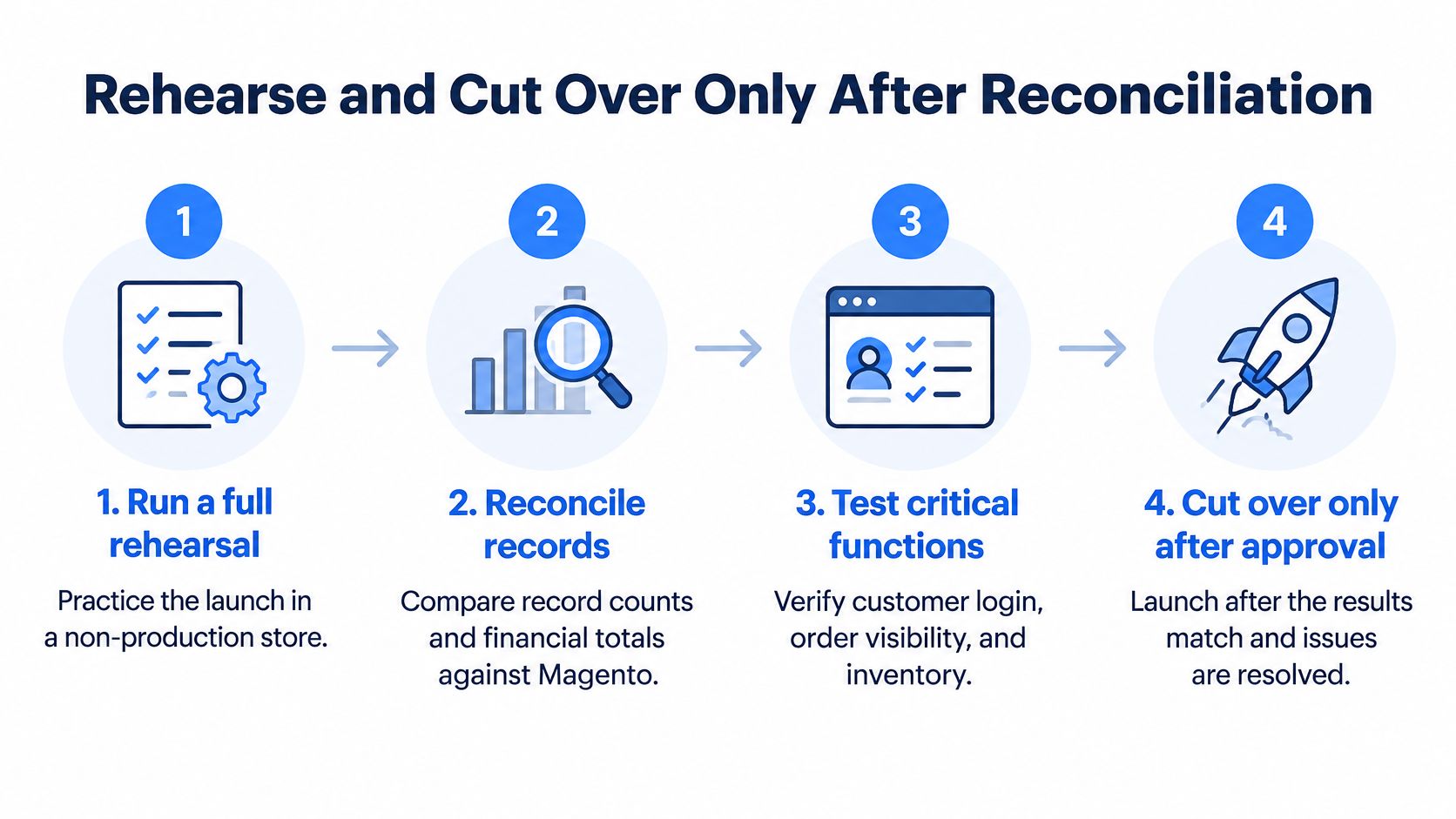
A calm launch is a rehearsed launch. Don't let the first full import be the one that goes live.
<a id="follow-the-cutover-sequence"></a>
Follow the cutover sequence
- Run a full rehearsal in a non-production store. Import products, customers, and historical orders in dependency order so orders can reference real products and profiles.
- Reconcile against Magento. Compare record counts and financial totals, investigate every variance, and keep an exception list with an owner for each unresolved row.
- Test critical functions end to end. Check customer login and reactivation, order visibility, inventory, tax, fulfillment, ERP, PIM, and CRM synchronization, webhooks, checkout payments, and transactional emails.
- Schedule a short delta import window. Freeze catalog and order changes, import only what changed since rehearsal, and recheck totals before you proceed.
- Validate a rollback snapshot. Confirm you can restore the previous state or revert the launch decision if a critical integration fails.
- Switch over and verify search basics. Submit the new sitemap, verify robots.txt and Search Console ownership, and confirm redirects resolve on the live domain.
- Monitor daily for at least 90 days. Compare organic clicks, indexed pages, crawl errors, revenue, and conversion by landing page against your pre launch baseline.
For large catalogs, use staged or bulk processing imports because API limits can constrain throughput. Trying to force everything through in one window creates partial failures that are hard to reconcile.
If you're migrating in phases, repeat steps 1 to 7 for each market. Start with the market whose B2B and payment workflows carry the lowest risk, learn from its reconciliation exceptions, then apply those fixes before the next market moves.
Go or no go rule: Launch only when every reconciliation check passes, redirect validation is clean, and a named owner has signed off each exception.
Before committing dates, get a readiness check on the current stack. We offer a Shopify Migration Readiness Assessment with eight questions that takes about two minutes, providing a scoped view of data, integrations, SEO risk, and a realistic timeline. We also offer Shopify Plus migration services from any platform, including a Migration Assessment for the current stack, which is useful when B2B, ERP, or multi market complexity makes the timeline hard to judge internally.
If you're planning Migrating from Magento to Shopify and want the identity, B2B, redirect, and reconciliation risks scoped before you commit to a launch date, United Victory Technologies can assess your current stack and map a phased path to Shopify or Shopify Plus. Visit United Victory Technologies to start with the readiness assessment and get a realistic view of your data, integrations, SEO risk, and timeline.