
Squarespace to Shopify Migration Playbook
Execute a flawless squarespace to shopify migration. Learn how to export assets, map SEO redirects, preserve customer history, and rebuild your theme.
Most Squarespace to Shopify advice gets the problem backwards. It treats migration like a file transfer plus a fresh theme, when the actual work is preserving customer identity, order context, and SEO equity while changing the operating model beneath the storefront.
That matters because these platforms grew up in different eras for different jobs. Squarespace went live in April 2004, after Anthony Casalena founded it in 2003, and it launched with 478 websites. Shopify arrived later, in 2006, and its roots were in building an online snowboard store. That history explains the difference in mindset, Squarespace started as a broader site-building and content-management tool, while Shopify was built around merchant commerce and storefront operations Squarespace statistics.
The scale gap reinforces that distinction. Shopify processed $292.3 billion in GMV in 2024, up from $235.9 billion in 2023, while independent tracking identified about 6.97 million live Shopify websites and 6.68 million historical sites. Squarespace, by contrast, reported $1.01 billion in total revenue for 2023 and about 4.6 million subscriptions. Those figures don't prove one platform is “better,” but they do explain why a migration should be judged on catalog complexity, transaction volume, integrations, and international requirements, not just visual polish Shopify vs Squarespace statistics.
Table of Contents
- Why Replatforming Is an Operational Shift
- Preserving Customer Identity and Order History
- Executing a Flawless SEO Redirect Strategy
- Redesigning Merchandising for Native Commerce
- Benchmarking Checkout and Post-Launch Performance
- Finalizing Your Migration Readiness Plan
<a id="why-replatforming-is-an-operational-shift"></a>
Why Replatforming Is an Operational Shift
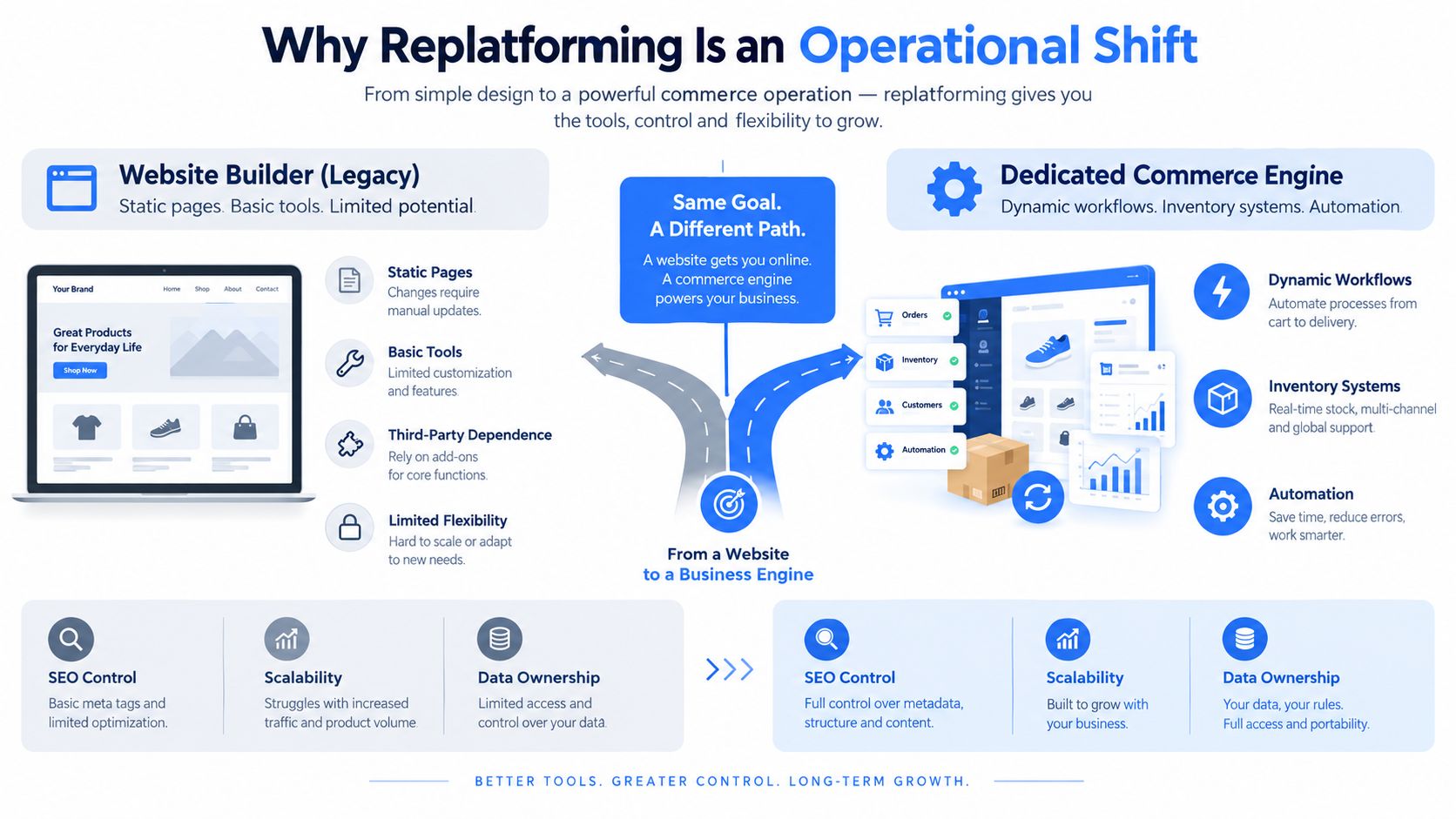
The biggest mistake in a Squarespace to Shopify project is treating it like a design refresh. The actual work is operational. A commerce-first platform changes how you structure the catalog, route fulfillment, read analytics, and connect marketing automation to revenue.
Practical rule: If the migration brief starts with theme selection, it's already too narrow.
A merchant with 3,000 SKUs across three markets cannot lift and shift a storefront cleanly. Variant logic, pricing rules, local currencies, and merchandising rules all have to be redesigned so the store still sells the right way after launch. That is where a migration stops being a cosmetic project and becomes a business systems change.
Squarespace's commerce growth shows why the move can be bigger than a template swap. By 2020 and 2021, it was handling meaningful commerce volume, but a business still has to translate content pages, products, customer records, orders, navigation, analytics, and SEO structures into a more commerce-centered model. Squarespace statistics
That shift also changes the budget conversation. A migration is usually priced around data handling, QA, and launch control, not just visual work. For a practical reference point on scope and cost planning, see this Shopify migration cost overview.
<a id="preserving-customer-identity-and-order-history"></a>
Preserving Customer Identity and Order History
A clean catalog import can still fail if the support team loses the story behind each customer. That story sits in the link between profiles, historical orders, refunds, fulfillment events, consent status, and account access, and that is where migrations usually get messy.
<a id="csv-exports-do-not-preserve-context"></a>
CSV exports do not preserve context
Shopify's migration guidance makes the limitation plain, some data will not move cleanly through CSV, and merchants need manual copying or other import routes for the rest Shopify migration from Squarespace. An independent audit of what breaks in Squarespace-to-Shopify migrations points to the same gaps, especially around customer accounts, order history, subscription or membership bindings, and form submissions an independent audit of what breaks in Squarespace-to-Shopify migrations.
That is the hidden trap. Teams often celebrate when product counts match, then discover that a returning buyer is not recognized by loyalty tooling, service agents cannot see older refunds, or marketing permissions need separate validation. Customer passwords can't be exported Shopify customer import limits, so account continuity has to be built around a reset or recovery flow instead of assumed.
A better checklist is relationship-based, not row-based:
- Customer records: Verify names, emails, addresses, tags, and account linkage.
- Historical orders: Reconcile sample orders against refunds, fulfillment, and status history.
- Consent and permissions: Confirm that opt-in states match what marketing systems expect.
- Duplicate profiles: Clean up repeated customer entries before launch.
- Account recovery: Trigger a deliberate password-reset or activation sequence for existing shoppers.
A migration works when support can answer a customer-history question on day one without opening the old platform.
The reason this matters is commercial, not just technical. A retailer can absorb a few missing fields, but not missing context that affects repeat purchase, subscription servicing, or customer trust. The standard is whether the new Shopify store preserves revenue-critical history well enough that the service desk, CRM, and marketing stack still behave as expected.
<a id="executing-a-flawless-seo-redirect-strategy"></a>
Executing a Flawless SEO Redirect Strategy
SEO continuity on a migration like this is not a creative exercise. It is a controlled URL-change project, and it starts with inventory, not redirect rules.
<a id="map-first-then-move"></a>
Map first, then move
Crawl every indexable Squarespace URL first, including product pages, collections, blog posts, images, canonicals, metadata, and any page that earns organic traffic or conversions. Then build a one-to-one source-to-target map so each old URL points to the closest Shopify destination, with slugs preserved where practical. For the crawl-and-map step, use Google's URL-change checklist alongside the migration discipline outlined in the Wix to Shopify migration guide.
From there, set up server-side permanent redirects, ideally 301 or 308, before launch. Google states that permanent redirects do not cause PageRank loss, and it recommends keeping redirects in place for at least one year Google's guidance on permanent redirects and PageRank. That matters because redirect chains, homepage catch-alls, missing blog mappings, and a staging site left noindex are common reasons traffic drops after a move.
The launch checklist should stay mechanical:
- Audit old URLs: Confirm the source list is complete.
- Map destinations: Match each URL to the closest Shopify path.
- Test status codes: Verify the old URL resolves cleanly to the final destination.
- Monitor after launch: Check crawl errors, indexing, organic landing pages, and revenue for several weeks.
Don't trust the redirect spreadsheet until you have clicked the ugly edge cases, old blog posts, discontinued products, and legacy collection pages that used to rank.
A launch acceptance test should sample every redirect class and verify the final destination, canonical URL, sitemap inclusion, mobile rendering, structured data, and analytics attribution. The standard is simple. Search engines should reach the right page, and customers should not lose the path to the products that already mattered.
<a id="redesigning-merchandising-for-native-commerce"></a>
Redesigning Merchandising for Native Commerce
Copying a Squarespace storefront pixel for pixel usually wastes time. Shopify works better when merchandising is rebuilt around commerce operations, not around the habits of a page builder.
<a id="keep-the-revenue-logic-rebuild-the-presentation"></a>
Keep the revenue logic, rebuild the presentation
Product pages, collection pages, filters, and navigation should carry over the selling logic. The visual system around them should change if the old layout depended on fragile custom code or manual work that Shopify can handle more cleanly through its native theme structure and app model Shopify theme architecture and app replacement guidance. Squarespace-specific blocks, custom CSS, injected code, memberships, bookings, and reviews usually need reconstruction rather than a direct copy.
Variant structure needs special care. Shopify still depends on deliberate mapping of option values into a tighter product model, so merchandising decisions have to respect how shoppers choose size, color, bundle, or format.
The right question is not whether every old block can be recreated. It is whether each element still helps the store sell. Some pieces deserve to stay because they support buying behavior or brand recognition. Others should be rebuilt with Shopify-native sections, filters, or templates that are easier to maintain and less brittle on mobile.
A practical merchandising review usually sorts assets into three groups:
- Preserve: Core product messaging, top-selling collections, high-performing blog content, and navigation patterns customers already use.
- Replace: Legacy blocks that depend on custom code, awkward bundle logic, or manual merchandising work.
- Retire: Features that only survived because the old platform made a compromise feel permanent.
Shopify's broader commerce stack also changes the options around markets, B2B, and app-based workflows. If the old store relied on workarounds for regional pricing or operational segmentation, this is the moment to design those paths properly instead of carrying the constraint forward.
A technically faithful migration can still underperform commercially. Cleaner product templates, clearer navigation, and a more native checkout flow often win because they reduce friction where shoppers make decisions.
<a id="benchmarking-checkout-and-post-launch-performance"></a>
Benchmarking Checkout and Post-Launch Performance
A migration is not done when the storefront is live. It is done when the new store holds revenue under real traffic, on real devices, and through real checkout behavior.
<a id="establish-the-baseline-before-cutover"></a>
Establish the baseline before cutover
Before launch, capture the legacy store's sessions, organic landing-page clicks, add-to-cart rate, checkout initiation, purchase conversion, revenue per session, mobile speed, and checkout error rates. Then measure Shopify against the same definitions by device, market, template, and traffic source. If the measurement changes, the comparison is not useful.
Checkout friction can wipe out technical gains fast. Baymard reports a global average cart-abandonment rate of about 70.19%, says about 17% of U.S. online shoppers abandoned an order because checkout was too long or complicated, and finds that only about 35% of sites deliver a decent-or-better checkout experience, all in the same checkout usability research Baymard checkout usability research. Those findings belong in QA, not in a vanity report.
Use production-like orders to test the paths that fail most often. Guest checkout should work without account friction. Discount codes need to apply cleanly and keep totals intact. Tax and shipping logic should show up early and match what shoppers expect. Inventory should reserve correctly when the order is placed. Payment methods should match the gateways your actual customers use. Confirmation emails need to land and render properly. Refund and ERP handoffs should send the right data to finance and operations.
If mobile checkout has not been tested with real addresses, real discounts, and a real payment method, it has not been tested.
The first few weeks after launch deserve tight, repetitive review. Compare Shopify performance by traffic source, device, and market, then fix the step that is leaking first. That is the only reliable way to see whether the migration improved conversion or merely kept the old funnel under a new interface.
<a id="finalizing-your-migration-readiness-plan"></a>
Finalizing Your Migration Readiness Plan
A solid readiness plan brings three things into alignment: data integrity, SEO preservation, and store experience. If any one of those is weak, the launch can feel successful internally while damaging revenue externally.
The final review should be practical, not ceremonial. Confirm that product, customer, and order data are reconciled; redirect maps are complete; analytics is tracking the same way it did before; and every critical integration still talks to the right system. Then verify customer communications, especially account recovery, abandoned cart flows, and post-purchase emails, because those messages carry a lot of the day-one experience.
A readiness checklist should also force trade-off decisions. If a legacy feature creates maintenance cost or mobile drag, decide whether it gets preserved, rebuilt, or retired. If a regional selling rule is still handled manually, decide whether Shopify's native setup or an app-supported workflow is the cleaner path. That decision-making is what turns a migration from a copy project into an operating-model upgrade.
The smartest teams treat launch as a controlled handoff between old and new systems, not a leap of faith. That means the business owners, not just the developers, sign off on the final state.
For a more structured launch checklist, this Shopify migration readiness guide is a useful companion when you're aligning stakeholders, integrations, and go-live criteria.
If you want a migration plan that protects SEO equity, preserves customer history, and rebuilds merchandising for how Shopify works, United Victory Technologies can help you scope the move before you touch production. Visit United Victory Technologies to discuss a migration readiness review, redirect strategy, and launch plan built around revenue continuity.