
WooCommerce vs Shopify: Which Platform Fits Your Brand
WooCommerce vs Shopify compared on three-year cost, security, speed, scalability and migration risk, with a verdict for each type of DTC and B2B brand.
The most popular advice about WooCommerce vs Shopify is also the least useful: choose WooCommerce to save money and Shopify to make life easier. That compares a software license with an operating model. It doesn't tell an ecommerce leader what the business will spend, which workflows will need rebuilding, or who will fix an order that never reaches the warehouse.
A better decision starts with fully loaded cost, operational ownership and business-process fit. Cheap software can require expensive maintenance. Managed infrastructure can reduce technical work while introducing app subscriptions, payment-related costs and constraints on custom behavior. Neither platform wins until those trade-offs are applied to your business.
Table of Contents
- WooCommerce and Shopify Side by Side
- What WooCommerce and Shopify Cost Over Three Years
- Speed, Uptime and Security Responsibilities
- Customization, Integrations and Who Controls the Code
- Scaling Catalogs, Markets and B2B Pricing
- How to Migrate from WooCommerce to Shopify Safely
- Choose the Platform That Fits Your Situation
<a id="woocommerce-and-shopify-side-by-side"></a>
WooCommerce and Shopify Side by Side
WooCommerce is a WordPress plugin that the merchant hosts and maintains, while Shopify is a hosted commerce platform that runs the infrastructure for the merchant. That distinction matters more than whether both platforms offer product pages, discount codes or a blog.
WooCommerce and Shopify headline differences
| Criterion | WooCommerce | Shopify |
|---|---|---|
| Platform model | WordPress plugin on merchant-selected hosting | Hosted commerce platform, or SaaS |
| Core software cost | Free open-source core; hosting, extensions and developers paid separately | Monthly subscription plus app fees, with transaction fees when an applicable third-party gateway is used |
| Hosting and security patching | Merchant or implementation partner responsibility | Included at the platform level |
| Code access | Full access to WordPress and PHP code, database and checkout templates | Themes, Liquid, apps, Shopify Functions and checkout extensibility on Plus |
| Scaling approach | Hosting architecture, caching and tuning determine capacity | Managed infrastructure with no servers for the merchant to size |
| Market share, all websites, W3Techs, October 2026 | 7.8% | 5.3% |
| Share of detected ecommerce systems, W3Techs, October 2026 | 47.5% | 32.3% |
| Best fit | Deep WordPress integration and unusual custom logic | Operational simplicity and managed multi-market growth |
The market-share rows reflect W3Techs' October 2026 comparison: WooCommerce accounts for 7.8% of all websites against Shopify's 5.3%, and 47.5% of detected ecommerce systems against Shopify's 32.3%. These denominators measure installation reach, not revenue, conversion rate, enterprise capability or operational performance.
WooCommerce benefits from its connection to WordPress. Shopify represents a different decision: merchants selecting a hosted commerce environment. A larger installed base doesn't establish which model will handle your catalog, integrations or release process better.
The deciding difference is ownership: WooCommerce gives your team more control over the stack. Shopify takes more infrastructure work out of your team's hands.
If your shortlist includes another hosted platform, the BigCommerce vs Shopify comparison provides a separate assessment of that choice. Don't collapse every platform evaluation into open source versus hosted software.
The most important table row is operating responsibility. Match it against your actual technical capacity, including coverage during holidays, failed deployments and peak trading periods, not just the developer available for the initial build.
<a id="what-woocommerce-and-shopify-cost-over-three-years"></a>
What WooCommerce and Shopify Cost Over Three Years
Most cost comparisons put Shopify's subscription beside WooCommerce's free core and stop too soon. Neither number includes everything required to keep a functioning business online.
Build your comparison around cash expenditure and paid working time. Include hosting, premium extensions, security tooling, maintenance, developer work, incident recovery, payment processing and the expense of preserving business-specific workflows. Keep platform costs separate from costs that both options would incur anyway.
<a id="build-a-comparable-cost-model"></a>
Build a comparable cost model
Use this structure for each platform:
Three-year ownership cost = implementation and migration + recurring platform and infrastructure costs + extensions and apps + payment costs + internal and external labor + incident recovery.
Don't treat market adoption as evidence of affordability. W3Techs' ecommerce history tracks technology usage, not merchant labor costs, gateway contracts or integration maintenance. Your cost model needs those inputs from your own accounts and delivery team.
Three-year cost drivers by business scenario
| Scenario | WooCommerce cost drivers | Shopify cost drivers | Usually cheaper when |
|---|---|---|---|
| Small DTC brand with low order volume | Hosting, a few paid extensions, occasional developer fixes | Monthly plan, theme, a few apps | WooCommerce when existing WordPress skills cover routine work without substantial extra labor |
| Established mid-market brand | Managed hosting, caching, security tools, release testing, plugin conflict fixes | Plan tier, apps, payment gateway mix, theme development | Whichever has the lower combined payment cost and staffing requirement |
| Complex B2B or multi-region merchant | Custom development, ERP and PIM upkeep, staging and monitoring | Plus tier, Functions, integrations and apps | Shopify when avoided operating labor exceeds additional platform fees and required workflows fit |
These are decision rules, not price quotations. A small store without technical support can reverse the first result. A complex merchant whose custom workflows require extensive rebuilding can reverse the last.
<a id="test-the-assumptions-that-can-change-the-result"></a>
Test the assumptions that can change the result
For Shopify, model your actual gateway mix. Retaining a third-party gateway can introduce an additional platform charge alongside processing costs, so don't assume the advertised subscription represents your payment-related expenditure.
For WooCommerce, attach labor to plugin ownership. Compatibility testing, failed updates and regression checks consume paid capacity even when an extension's license looks inexpensive.
Use actual order volume, average order value, payment methods, ERP/PIM connections and monthly technical hours. Run both an expected case and a higher-maintenance case, without presenting speculative downtime losses as guaranteed savings.
Then apply a practical test: do WooCommerce's monthly maintenance hours, priced at your team's real rate, exceed the monthly difference in platform and app fees? If they do, its free core isn't delivering the cost advantage you thought you were buying.
<a id="speed-uptime-and-security-responsibilities"></a>
Speed, Uptime and Security Responsibilities
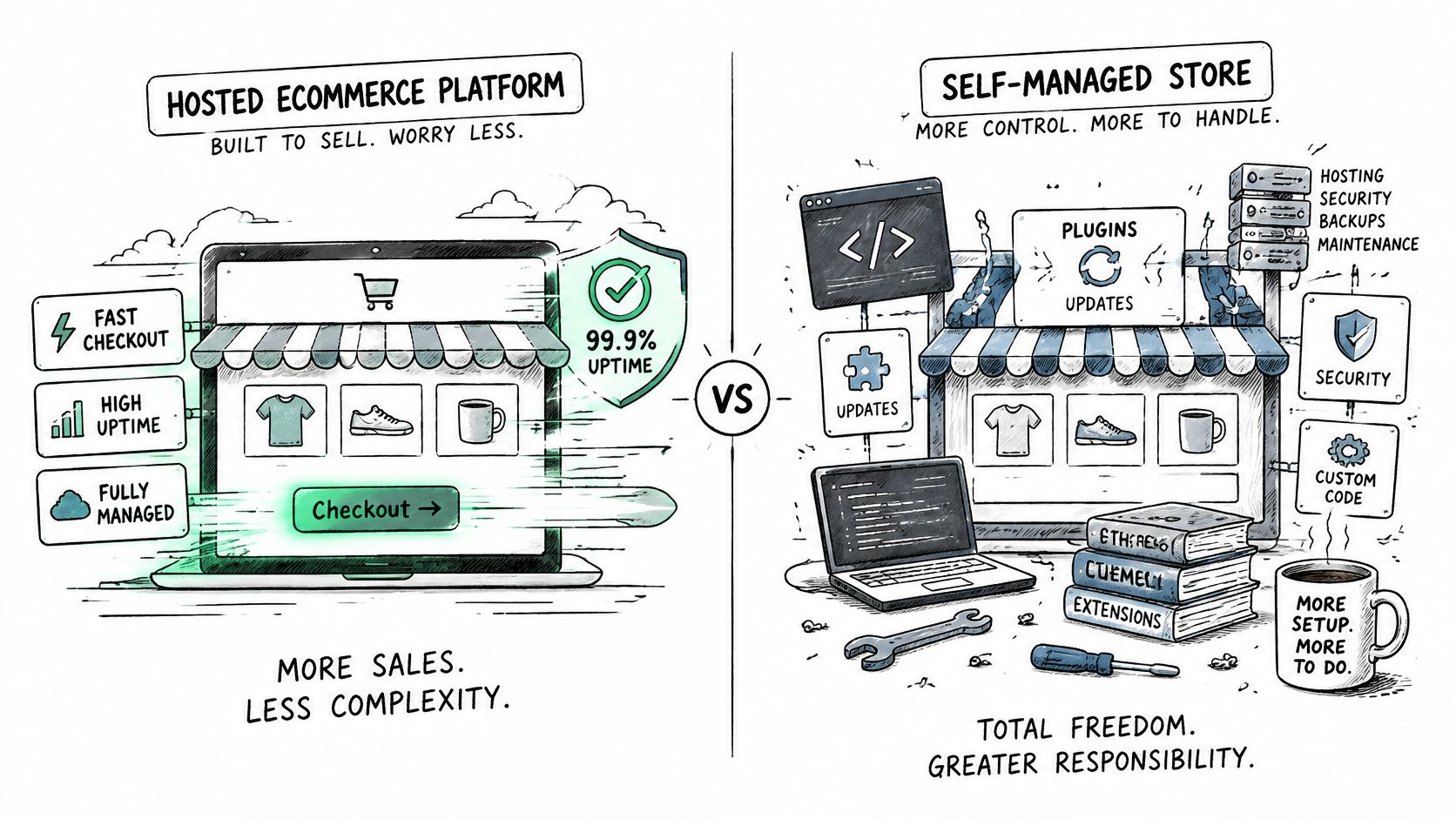
In its vendor-published comparison using Chrome UX Report data, Shopify reports that 93% of Shopify stores meet its defined fast threshold against 34% of WooCommerce stores, with storefront rendering approximately 2.4 times faster on average and server response up to 3.9 times faster. These are ecosystem benchmarks, not guarantees for an individual implementation.
Speed benchmark for WooCommerce and Shopify stores
| Metric | WooCommerce | Shopify |
|---|---|---|
| Stores meeting the fast threshold | 34% | 93% |
| Storefront rendering speed, average | Comparison baseline | About 2.4 times faster |
| Server response speed | Comparison baseline | Up to 3.9 times faster |
A well-engineered WooCommerce deployment can narrow the gap. An overloaded Shopify theme can still create a poor customer experience, particularly when developers add unnecessary scripts and apps.
<a id="measure-customer-experience-rather-than-a-score"></a>
Measure customer experience rather than a score
For WooCommerce, inspect hosting capacity, PHP and database tuning, object caching, page caching, image optimization, theme complexity and extension quality. Test uncached journeys such as cart and checkout separately from cached category pages.
Establish a mobile baseline for LCP, INP, CLS and TTFB using field measurements where available. Segment by page type and market, then set acceptance criteria before approving a rebuild. A strong synthetic PageSpeed result isn't enough if real shoppers encounter slow product interactions.
<a id="assign-responsibility-before-an-incident"></a>
Assign responsibility before an incident
SelectHub's architecture comparison identifies Shopify's bundled infrastructure, SSL, security patching, backups and CDN delivery, while WooCommerce places hosting, updates, compatibility and security operations with the merchant or implementation partner. That distinction reduces infrastructure responsibility on Shopify, but it doesn't remove responsibility for staff permissions, custom apps or business-data recovery.
For WooCommerce, schedule core and plugin updates, configure a web application firewall and test backup restoration. Define payment-compliance scope around the actual checkout and gateway implementation rather than assuming a plugin settles it.
Before launch, document:
- Patching ownership: Name the person who assesses vulnerabilities and the response window they must meet.
- Recovery ownership: Identify who restores the store, where recoverable copies live and how restoration is tested.
- Capacity ownership: Assign responsibility for peak-load testing, alerts and escalation.
Don't infer an uptime commitment from a speed benchmark. Review contractual service terms separately, and test your own recovery procedure.
<a id="customization-integrations-and-who-controls-the-code"></a>
Customization, Integrations and Who Controls the Code
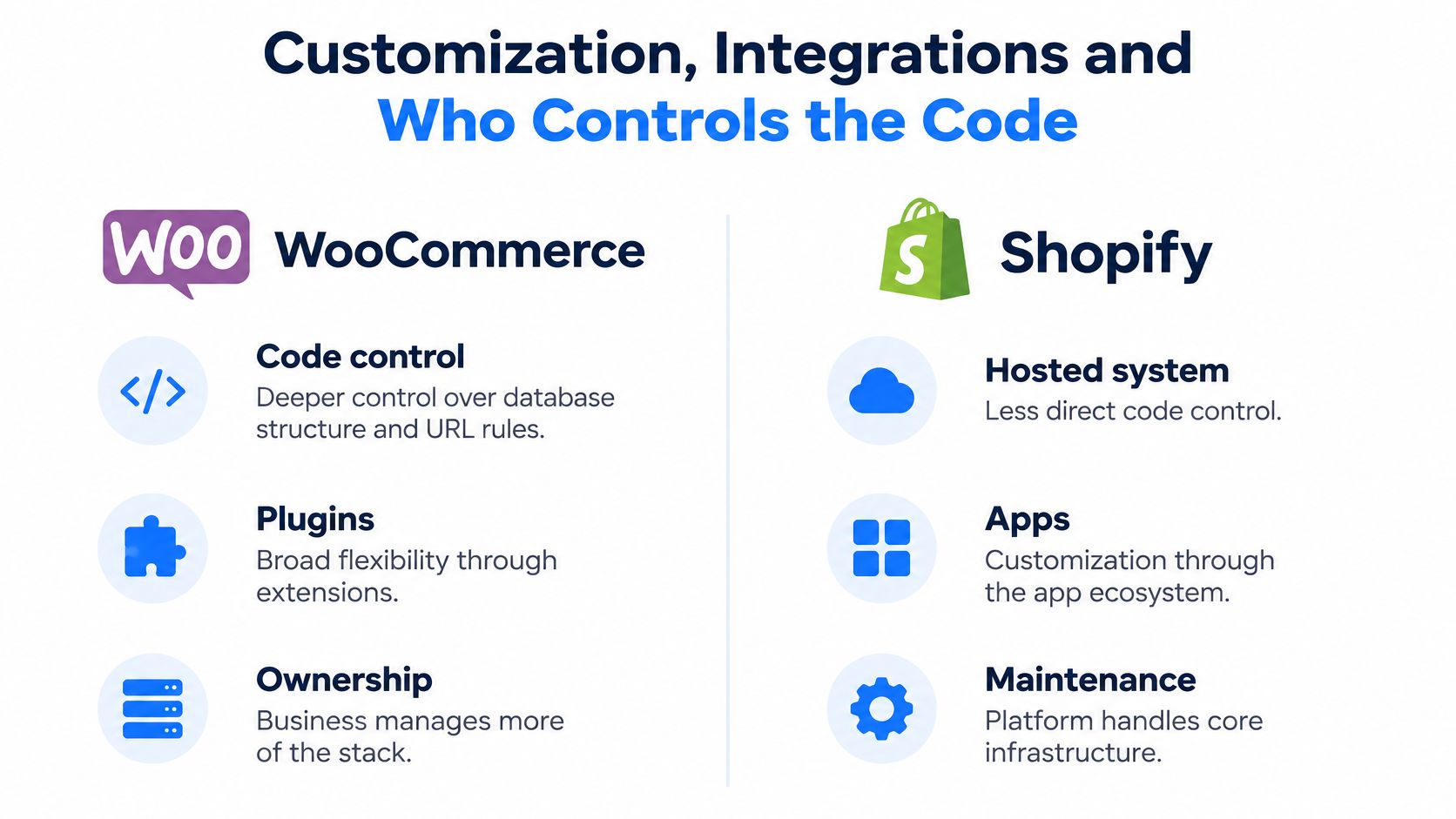
How much code control does your business need? The useful distinction isn't whether developers can customize a storefront. It's whether they can implement your required behavior at the correct point in the transaction, without an unmaintainable workaround.
WooCommerce offers direct control over database structure, URL rules, checkout templates, payment gateways and application code. Shopify provides a more bounded extension model through themes, apps, APIs and supported customization points.
<a id="a-content-led-dtc-brand"></a>
A content-led DTC brand
Say a brand runs buying guides, editorial landing pages and custom WordPress content types alongside its store. Keeping WooCommerce may preserve valuable publishing workflows and avoid rebuilding relationships between content and products.
Shopify's Online Store 2.0 sections support editable storefront layouts, but moving platforms still requires a content-model decision. Don't assume a page that looks similar gives editors the same capabilities.
The practical question is whether WordPress is merely familiar or genuinely integral to how the company acquires and serves customers. Familiarity alone isn't a compelling reason to retain a costly stack; a productive, differentiated publishing system can be.
<a id="a-catalog-brand-with-complex-pricing"></a>
A catalog brand with complex pricing
Now consider a merchant whose prices depend on account, quantity, product configuration and approval status. Before choosing a platform, specify where each rule must apply: product page, cart, checkout, order creation or ERP invoicing.
On Shopify, developers can use Functions, checkout extensibility on Plus, and custom apps using the Admin and Storefront APIs. Webhooks and GraphQL support integration work, but a supported API doesn't automatically make a business rule straightforward.
At United Victory Technologies, we develop configurators, bundles, pricing engines and approval workflows. Those capabilities require design and development, not a platform subscription.
Practical rule: A successful integration isn't just one that sends data. Someone must own retries, reconciliation and the correction of rejected records.
For either platform, define duplicate-event handling, failed webhook retries, inventory conflicts and the person responsible when an ERP sync fails during trading hours. Clarify which system owns each field so competing updates don't overwrite valid information.
List the three custom behaviors you cannot launch without. Test them with realistic transactions, then prefer the platform that satisfies them natively or through the smallest maintainable extension.
<a id="scaling-catalogs-markets-and-b2b-pricing"></a>
Scaling Catalogs, Markets and B2B Pricing
Growth exposes different weaknesses depending on what grows. More products stress catalog operations. More countries introduce pricing, language and tax decisions. More trade customers complicate permissions and negotiated terms.
Treat each as a separate architecture question. A platform that handles storefront traffic can still leave your operations team waiting for an inventory import or manually correcting account prices.
<a id="catalog-size-and-transaction-pressure"></a>
Catalog size and transaction pressure
Count products and variants separately, then test representative imports, searches, bulk edits and inventory updates. Include ERP sync traffic rather than testing the storefront in isolation.
On Shopify, managed capacity doesn't eliminate application design. API rate limits, queued jobs and app dependencies still need planning, especially when several systems update the same catalog.
On WooCommerce, assess whether your architecture needs stronger hosting, load balancing, a separate database, persistent object caching or CDN delivery. Introduce these components to solve measured bottlenecks, not because a large-store checklist says you should.
<a id="markets-and-account-specific-commerce"></a>
Markets and account-specific commerce
For international expansion, evaluate Shopify Markets, multi-currency and multilingual setups against your actual regional requirements. Regional brands may also require expansion stores, which introduces decisions about shared catalogs, content ownership and integration routing.
For B2B, investigate company accounts, price lists and buying workflows rather than accepting a generic claim that wholesale is supported. The guide to what Shopify Plus is for provides context for assessing its B2B and enterprise role.
WooCommerce lets merchants assemble translation, currency, tax and B2B functionality through extensions and custom code. Test those components together: a price rule that works domestically may behave differently after currency conversion or customer-specific tax treatment.
Use an operating-capacity check before committing:
- Catalog scope: Record SKUs, variants, attributes and update frequency.
- Market scope: List currencies, languages, tax requirements and regional catalog differences.
- Peak demand: Define expected orders per minute and simultaneous integration workloads.
- B2B scope: Count price lists, account roles and approval paths.
Test against your planned business horizon, not only today's traffic. Simple setups need redesign when teams start adding manual exceptions to keep pricing, stock and regional orders consistent. That's the point to schedule an architecture review, before a trading event turns those exceptions into an operational crisis.
<a id="how-to-migrate-from-woocommerce-to-shopify-safely"></a>
How to Migrate from WooCommerce to Shopify Safely
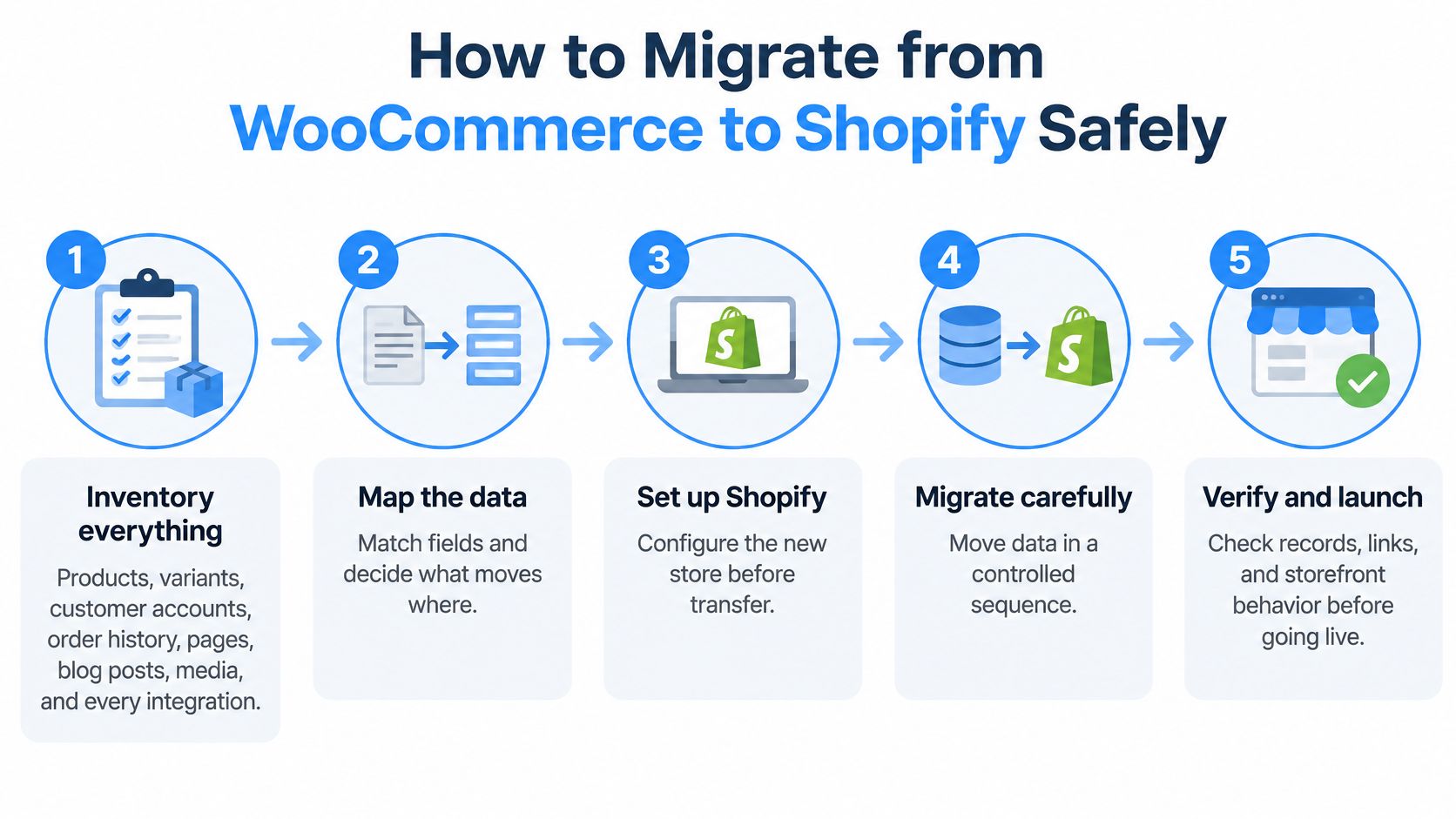
Treat migration as a change to business processes, not a bulk product upload. The central question is what must remain true after the move: customers can buy, orders reach fulfillment, finance can reconcile payments and search visitors reach relevant pages.
A process-based assessment must cover SEO continuity, customer identity, integrations, checkout behavior and post-launch ownership, rather than merely confirming feature availability. W3Techs' platform comparison provides adoption context, but it cannot establish whether your specific workflows will transfer safely.
<a id="prepare-the-transfer-and-acceptance-tests"></a>
Prepare the transfer and acceptance tests
Inventory everything. Export products, variants, customers, orders, pages, blog posts and media, then record every integration and custom workflow. Include subscriptions, account-specific pricing and tax exceptions so the team doesn't discover business-critical dependencies after launch.
Map the data model. Match WooCommerce fields to Shopify products, variants, metafields and customer records, then validate representative samples before bulk transfer. Test customer-account activation separately, and don't assume existing credentials or extension-specific records will transfer unchanged.
Build the redirect map. Combine a site crawl with indexed landing pages, analytics and search-performance exports to identify URLs that matter. Map product, category, blog and relevant filtered URLs to suitable destinations, avoiding blanket redirects to the homepage.
Rebuild the storefront deliberately. Use Shopify's section-based architecture rather than copying legacy templates. Preserve useful content and buying behavior while giving merchandising teams editable sections they can maintain.
<a id="prove-operational-readiness"></a>
Prove operational readiness
Rebuild integrations and test failures. Validate order export, inventory updates, tax calculations, refunds and fulfillment status changes. Deliberately test rejected ERP orders, delayed webhooks and repeated events, then confirm retries don't create duplicates.
Run launch acceptance testing. Check redirects, canonicals, checkout, payments and tracking in the prelaunch environment. Record Core Web Vitals and reconcile migrated records against source exports, investigating missing relationships as well as mismatched totals.
Launch with a recovery plan. Define the cutover sequence, final data synchronization, rollback triggers and treatment of orders placed after launch. Monitor crawl errors, organic landing pages, payment failures and checkout completion daily during the initial launch period, with named escalation owners.
Our WooCommerce to Shopify migration service covers the move away from plugin, hosting and infrastructure security-patch management. Our developers map source-platform data models onto Shopify's structure, but app maintenance and integration ownership still need explicit assignments.
In one United Victory Technologies migration for a B2B and DTC industrial client, checkout completion increased by 27% and releases became 3 times faster. That's a specific case outcome, not a forecast for another merchant.
For a Shopify-to-WooCommerce move, retain the inventory, mapping and redirect discipline, then add hosting, caching, security and patching readiness before cutover. Whichever direction you choose, finish with the same question: who owns each unresolved risk after launch?
<a id="choose-the-platform-that-fits-your-situation"></a>
Choose the Platform That Fits Your Situation
Pick the platform whose operating burden your team can carry for the next three years, not the one with the lowest headline price.
The strongest choice usually follows your organization's constraints, not its preferred technology. Use these situations to narrow the decision without treating them as universal verdicts.
- Content-led DTC brand with in-house WordPress developers: WooCommerce is a strong candidate when editorial workflows and custom content relationships are central to the business. Retaining it makes sense if the team can maintain the commerce stack sustainably.
- DTC brand prioritizing fast launches and less infrastructure work: Shopify is the stronger starting point when standard commerce workflows fit and the team wants to concentrate on merchandising, acquisition and customer experience.
- Mid-market brand with ERP, PIM and regional operations: Evaluate Shopify Plus when its B2B, international and extension capabilities meet your requirements. Don't select it until representative integration and regional workflows pass acceptance testing.
- Business with unusual checkout logic: Prototype the must-have behaviors on both platforms. A theoretical capability isn't enough if the implementation creates fragile dependencies.
- Existing WooCommerce store with costly plugin sprawl: Run a migration-readiness assessment before commissioning another rebuild. Distinguish features customers need from plugins that merely preserve historical implementation choices.
<a id="make-the-decision-measurable"></a>
Make the decision measurable
Build the ownership-cost model using your order volume, payment mix and paid staffing hours. Establish a speed and security baseline before authorizing changes, so you can evaluate the outcome against evidence rather than impressions.
Finally, create a migration-risk register with an owner, acceptance test and recovery action for each material risk. If the team can't assign ownership, the project isn't ready, regardless of which platform looks better in a demonstration.
United Victory Technologies offers WooCommerce-to-Shopify migration, integration development and ongoing optimization, with enterprise clients able to talk to a Shopify Expert. Visit United Victory Technologies to discuss your current workflows, operating costs and migration requirements before committing to a platform change.