
BigCommerce vs Shopify: Cost, Scale and Migration Compared
BigCommerce vs Shopify compared on cost, scalability, integrations, B2B, performance and migration risk, with a clear verdict for each merchant type.
The popular advice to choose Shopify for simplicity and BigCommerce for built-in features is too shallow for an established retailer. A platform can look easier to operate yet cost more once payment routing, account-specific pricing, and integration maintenance enter the calculation. It can also offer better features and still leave you worse off if a migration breaks revenue-producing pages or order flows.
A useful BigCommerce vs Shopify comparison starts with your operating model, not a feature count. Treat the decision as an architecture investment: calculate the cost of running it, test the workflows that could constrain growth, and define how you'll prove the move preserved revenue.
Table of Contents
- Side-by-Side Comparison and Quick Verdict
- Total Cost by Merchant Scenario
- Integration Limits That Decide Scale
- B2B Requirements and When Plus Becomes Necessary
- Storefront Speed Depends on the Build, Not the Backend
- How to Protect Revenue During a Platform Move
- Pick the Platform That Fits Your Operating Model
<a id="side-by-side-comparison-and-quick-verdict"></a>
Side-by-Side Comparison and Quick Verdict
Shopify leads on aggregate transaction scale and offers a deeper app ecosystem, while BigCommerce deserves consideration when request quotas, B2B workflows, or payment flexibility better match your operation. Shopify Plus adds integration headroom, but that doesn't make it the automatic choice for every complex merchant.
For entry pricing, Shopify's platform comparison lists 2026 starting prices of $29 per month billed annually for Shopify and $29 per month annually or $39 monthly for BigCommerce. Those prices establish the entry point, not the budget for a mid-market implementation.
<a id="bigcommerce-vs-shopify-scorecard-on-core-criteria"></a>
BigCommerce vs Shopify scorecard on core criteria
| Criterion | BigCommerce | Shopify and Shopify Plus | How to read it |
|---|---|---|---|
| Starting price | Annual and monthly entry plans | Annual entry plan | Compare the tier your requirements actually need |
| 2025 GMV | About $31.7 billion, up 12.3% | $378.4 billion, up 29% | Scale indicator only; definitions differ and GMV isn't platform revenue |
| API governance | Request quotas over time | Cost-based GraphQL throttling, with greater capacity on Plus | Requests and query-cost points aren't interchangeable |
| Storefront speed | Benchmark the proposed theme and app stack | Stronger aggregate result in Shopify's comparison | An aggregate result doesn't predict your finished store |
| Migration path | Data export, import, redirects, and integration rebuilding | Equivalent workstreams, with Plus tooling and agency support where appropriate | Execution quality determines continuity |
The 2025 GMV figures in the scorecard come from the full-year platform-volume comparison, which reports approximately $31.7 billion for BigCommerce, up 12.3%, and $378.4 billion for Shopify, up 29%. Shopify includes participating apps and channels and reports net of refunds; BigCommerce counts completed checkouts on a gross basis before refunds or discounts.
GMV isn't platform revenue, merchant profitability, or proof that your specific catalog will work well. It shows aggregate transaction activity. A large platform can still require an expensive workaround for your quoting process, and a smaller platform can still support your operational needs.
<a id="read-the-table-through-your-largest-risk"></a>
Read the table through your largest risk
Find the criterion that could cause the most expensive failure. For an inventory-intensive retailer, that might be synchronization. For a wholesale distributor, it might be buyer-specific pricing. For an internationally established brand, payment arrangements and regional storefront administration may carry more weight than launch convenience.
If Salesforce Commerce Cloud is also on your shortlist, our Salesforce vs Shopify comparison provides another operating-model comparison rather than a reason to widen the shortlist indefinitely.
Before choosing a column, answer these questions:
- Catalog and geography: How many SKUs, variants, regions, and localized storefronts must you operate?
- Connected systems: Which systems must exchange catalog, inventory, customer, and order records?
- B2B dependence: Is account-specific pricing a convenience, or a requirement for accepting an order?
<a id="total-cost-by-merchant-scenario"></a>
Total Cost by Merchant Scenario
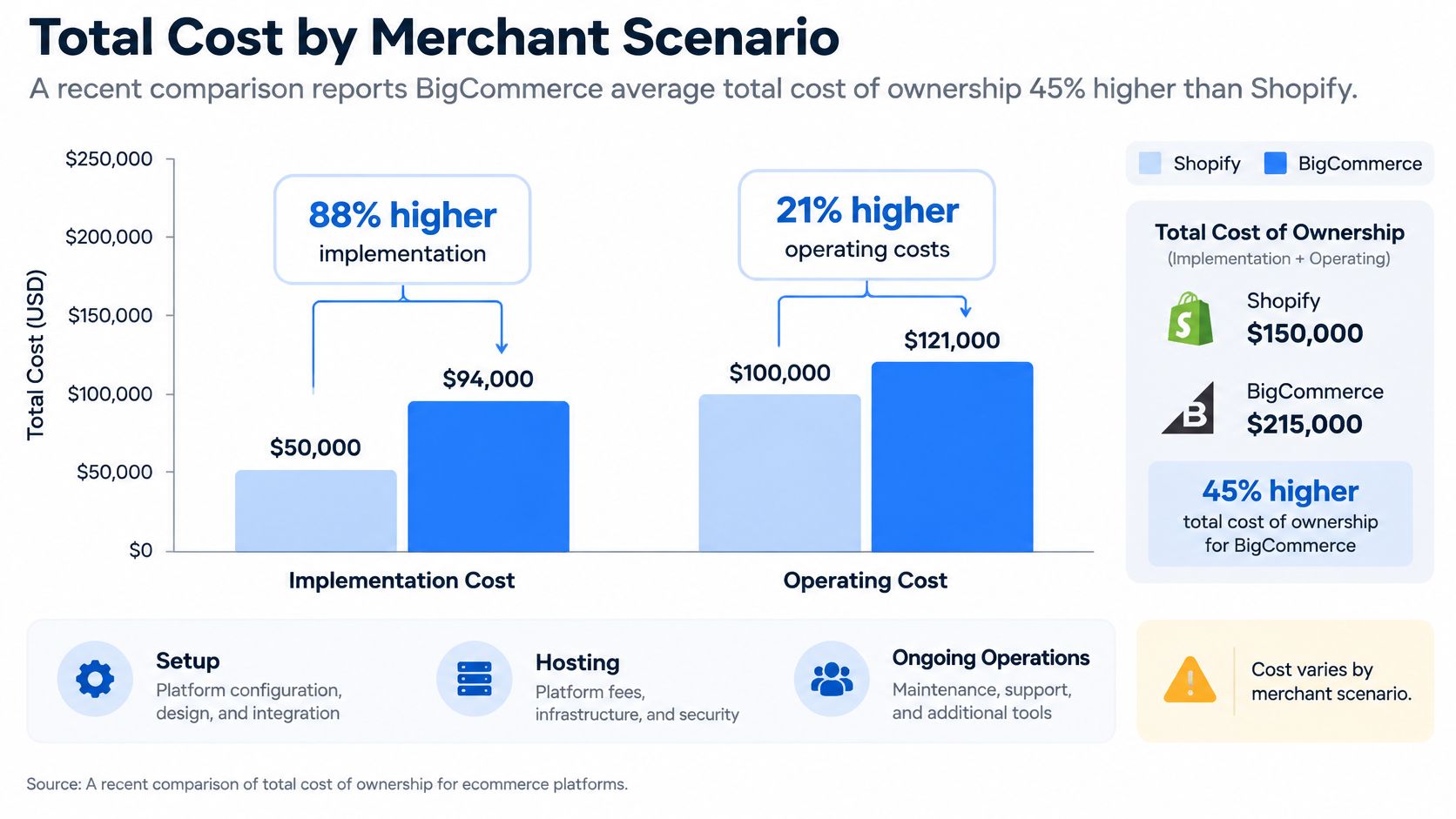
A vendor-funded cost comparison isn't a merchant-specific budget. Shopify's enterprise platform comparison reports BigCommerce's average total cost of ownership as 45% higher, including 88% higher implementation costs and 21% higher operating costs, but the underlying study was commissioned by Shopify.
That doesn't make the findings worthless. It does mean you shouldn't assume the same cost relationship applies to a distributor with negotiated pricing, a global processor agreement, or an existing integration team.
<a id="build-a-five-year-cost-worksheet"></a>
Build a five-year cost worksheet
Give finance and engineering the same worksheet. For each platform, separate one-time implementation costs, recurring operating costs, and future change costs.
Include these line items:
- Platform contracts: Subscription, required edition, additional storefronts, and contractual upgrades.
- Payments: Processing charges, applicable platform surcharges, currency handling, and your actual processor mix.
- Applications: Required subscriptions, usage charges, and overlapping functionality.
- Build and migration: Theme development, data transformation, SEO work, checkout requirements, and testing.
- Integration ownership: Middleware, monitoring, maintenance, incident handling, and API changes.
- Future change: Adding a market, replacing an ERP, introducing subscriptions, or changing account-pricing rules.
Shopify Plus licence pricing isn't established by the cited pricing evidence. Use a written Shopify Plus quote rather than an estimate, and request equivalent contractual detail for the proposed BigCommerce configuration.
<a id="cost-drivers-and-break-even-tests-by-merchant-scenario"></a>
Cost drivers and break-even tests by merchant scenario
| Scenario | Main cost driver | What to model first | Break-even test |
|---|---|---|---|
| DTC merchant on Shopify Payments | Plan fee, paid apps, and processing | Required tier and app count | Monthly cost at current order volume |
| Global merchant with third-party processors | Processor setup, currency handling, and integration upkeep | Processor fees by market | Five-year total with and without Plus features |
| B2B and B2C retailer with account pricing | Custom B2B development versus native features | Quoting, net terms, and approvals | Custom development against feature licensing |
| Multi-brand business with several storefronts | Storefront count and shared catalog synchronization | Storefront structure and sync frequency | Cost per storefront and annual maintenance effort |
For the DTC merchant, Shopify may offer an economical route if the required app stack remains manageable. Test the point at which additional subscriptions or a higher tier outweigh savings elsewhere.
For the global merchant, model payment volume by market rather than applying a blended domestic rate. Calculate the eligible payment volume at which a difference in effective fees exceeds the competing platform's fixed-cost premium.
For the hybrid retailer, BigCommerce can be cheaper if its contracted native capabilities replace bespoke quoting or account-management development. Compare complete workflows, including exception handling, rather than matching feature labels.
For the multi-brand business, include duplicated merchandising work and shared-catalog maintenance. A lower storefront fee can be a false saving if operators must repeatedly correct inconsistent product records.
Budget rule: Choose the less expensive operating architecture, not the less expensive subscription.
<a id="integration-limits-that-decide-scale"></a>
Integration Limits That Decide Scale
BigCommerce and Shopify don't budget API usage in the same units. BigCommerce governs requests through quotas over time; Shopify's GraphQL model assigns cost according to the query's requested fields and complexity.
The Rework platform comparison reports the following limits. Treat them as architecture inputs to confirm for your proposed contract, not as directly comparable throughput guarantees.
<a id="api-limits-by-platform-and-tier"></a>
API limits by platform and tier
| Platform and tier | Governance model | Reported limit | Design implication |
|---|---|---|---|
| BigCommerce lower commercial tiers | Request quota per hour | About 20,000 calls per hour | Batch updates and cache appropriate reads |
| BigCommerce higher tier | Request quota per hour | About 60,000 calls per hour | Keep full synchronization away from selling peaks |
| BigCommerce enterprise | Negotiated contract | Set in the contract | Obtain written limits before designing |
| Shopify standard plan | Cost-based GraphQL throttling | 100 points per second | Request only fields the integration needs |
| Shopify Advanced | Cost-based GraphQL throttling | 200 points per second | Use delta synchronization |
| Shopify Plus | Cost-based GraphQL throttling | 1,000 points per second | Combine added capacity with queues and retries |
A request might retrieve a small object or participate in a much larger synchronization task. A GraphQL query can request several related fields, but its cost changes with complexity. Converting hourly requests into requests per second won't establish which platform can finish your workload.
<a id="test-the-workload-then-design-for-recovery"></a>
Test the workload, then design for recovery
Ask engineering to capture changed SKUs per hour, inventory-event frequency, order arrival patterns, and concurrent writes. Include promotional peaks, warehouse adjustments, and backlog recovery after an outage.
Build the integration around these practices:
- Delta-based catalog synchronization: Send changed records instead of repeatedly importing the complete catalog.
- Webhook-first handling: Use events to initiate order and inventory processing rather than continuously polling for everything.
- Queues and retries: Preserve failed work and retry it without blocking unrelated updates.
- Idempotent writes: Use stable identifiers so replaying a message doesn't create duplicate orders or records.
- Pagination: Read large datasets in controlled portions and retain progress markers.
- Separate update streams: Don't let slower product-description updates delay time-sensitive stock changes.
Shopify Plus offers substantially more headroom within Shopify's stated cost model. BigCommerce's request quotas may be easier to predict for integrations with consistent request shapes, but neither model eliminates the need to measure backlog age and recovery time.
The deciding question is operational: can your agency redesign the integration for GraphQL and event-driven workflows, or does the proposal assume existing connectors will transfer unchanged? Require a workload test and an ownership plan before accepting an integration estimate.
<a id="b2b-requirements-and-when-plus-becomes-necessary"></a>
B2B Requirements and When Plus Becomes Necessary
B2B merchants should write the requirements before comparing editions. A platform demonstration can show a price list while leaving unanswered whether the correct buyer sees it, whether approvals apply, and whether the ERP remains the pricing authority.
Use a workflow checklist rather than a general request for B2B functionality:
- Company accounts: Multiple buyers, roles, locations, and purchasing permissions.
- Account-specific merchandising: Customer price lists, negotiated catalogs, and restricted products.
- Credit controls: Net terms, credit limits, and the process for handling blocked accounts.
- Quoting: Quote creation, approval, revision, and conversion into an order.
- Repeat purchasing: Reorder lists, bulk entry, and purchasing from known product codes.
- Account-aware integration: ERP or PIM synchronization that preserves customer-specific price and stock rules.
<a id="establish-the-trigger-for-plus"></a>
Establish the trigger for Plus
Plus becomes necessary when a confirmed requirement or capacity need cannot be delivered acceptably on the proposed lower tier. Don't treat wholesale revenue alone as the trigger, and don't assume every B2B workflow requires the same edition.
Our Shopify Plus services include checkout extensibility, B2B, Shopify Functions, and expansion stores. Those capabilities are relevant when DTC and wholesale share an operation but require different purchasing behavior. Our explanation of what Shopify Plus is for can help frame that scope.
For BigCommerce, obtain written confirmation of which capabilities are native in the quoted tier or B2B edition. Mark every remaining requirement as an application dependency, custom build, or unsupported workflow. Apply the same classification to Shopify.
<a id="test-a-hybrid-checkout-not-isolated-features"></a>
Test a hybrid checkout, not isolated features
Say a retailer accepts immediate payment from consumers but lets approved trade buyers submit purchase orders. A trade buyer might also need a negotiated price, an internal approval, and an ERP credit check before fulfillment.
Run that complete journey in the proposed configuration. Check whether a changed price or credit status reaches the storefront correctly, and whether staff can explain and resolve a rejected order without developer intervention.
A native feature is valuable only if it handles the business rule, its exceptions, and the staff workflow around it.
If several critical checklist items require custom code, price the complete build against each platform's native feature set. Include maintenance and regression testing, not just the initial development estimate.
<a id="storefront-speed-depends-on-the-build-not-the-backend"></a>
Storefront Speed Depends on the Build, Not the Backend
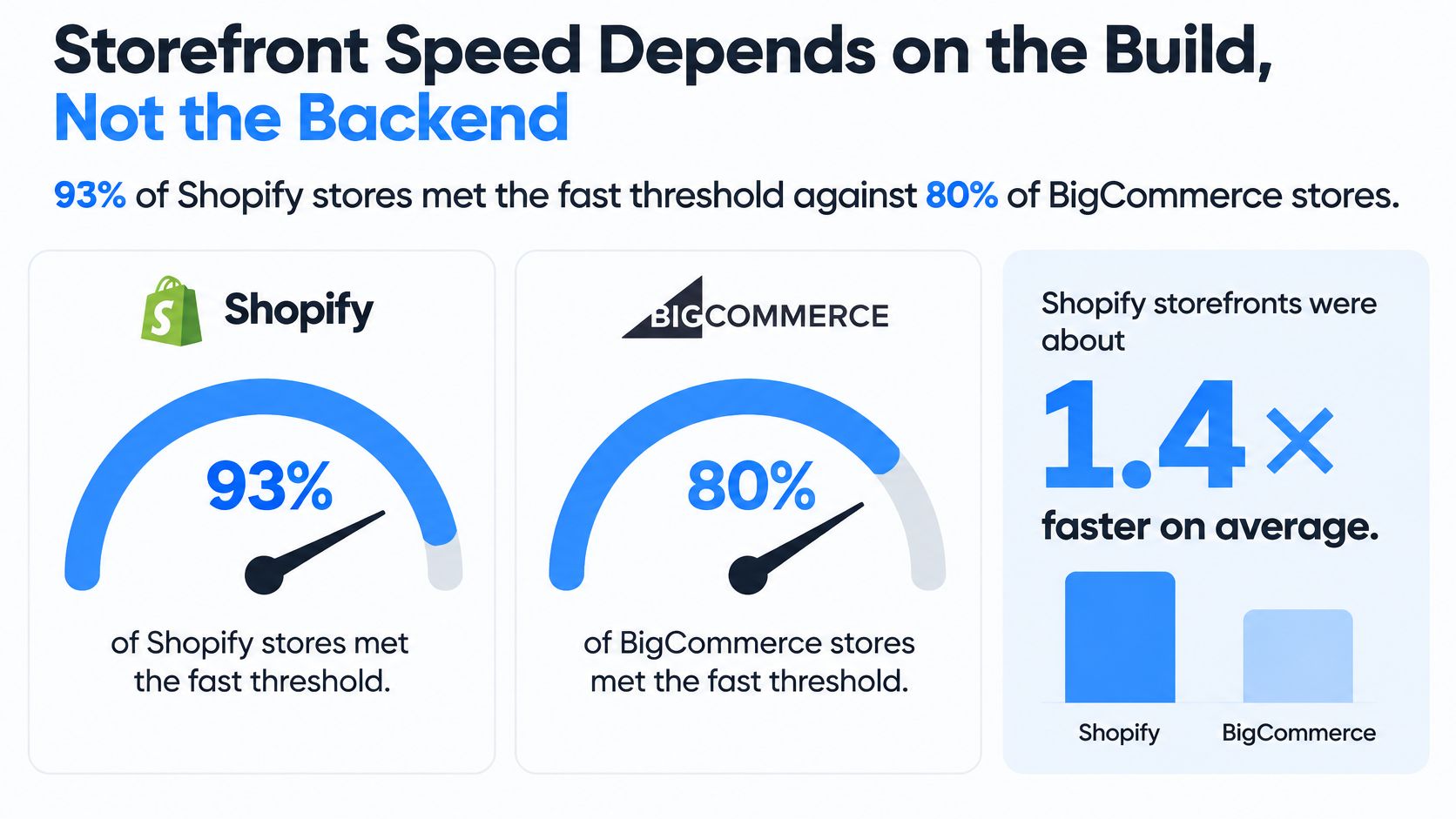
In its analysis of Google Chrome User Experience Report field data, Shopify reports that 93% of Shopify stores met its defined fast threshold, compared with 80% of BigCommerce stores. That is a useful directional finding, but it's vendor-published aggregate evidence, not a guarantee for your migration.
The comparison combines stores with different themes, catalogs, app stacks, geographic audiences, and implementation quality. It doesn't isolate the backend as the sole cause of the performance difference.
<a id="benchmark-the-store-shoppers-will-actually-use"></a>
Benchmark the store shoppers will actually use
Build representative product, collection, search, and editorial templates on both shortlisted configurations. Use realistic images, variant selectors, navigation, and merchandising content. An empty demonstration theme doesn't represent the purchasing experience you're funding.
Then add the tools your operation needs:
- Measurement: Analytics, advertising tags, and consent management.
- Discovery: Search, filtering, recommendations, and personalization.
- Trust: Reviews, ratings, and supporting product content.
- Purchasing: Subscription selectors, bundles, configurators, and other required interactions.
Measure after each addition so developers can identify which dependency causes a regression. Record Largest Contentful Paint, Interaction to Next Paint, Cumulative Layout Shift, and time to first byte, rather than compressing every issue into a single speed score.
<a id="separate-diagnosis-from-acceptance"></a>
Separate diagnosis from acceptance
Use browser performance tools and controlled lab tests to diagnose problems during development. Collect field measurements from representative traffic when available, because real devices, networks, and buyer behavior can expose problems a development machine won't show.
Give each metric a practical interpretation. Largest Contentful Paint helps identify delayed primary content; Interaction to Next Paint highlights slow responses to actions; Cumulative Layout Shift reveals unexpected movement. Time to first byte helps distinguish an early response delay from rendering and script problems later in the page lifecycle.
A migration also changes how images, redirects, and mobile layouts behave. Assign those decisions during implementation, not to an unspecified optimization phase after launch.
The acceptance test is the finished mobile storefront with the app stack, evaluated against Core Web Vitals requirements and your purchasing journeys. A platform's average result is a reason to investigate, not permission to skip that test.
<a id="how-to-protect-revenue-during-a-platform-move"></a>
How to Protect Revenue During a Platform Move
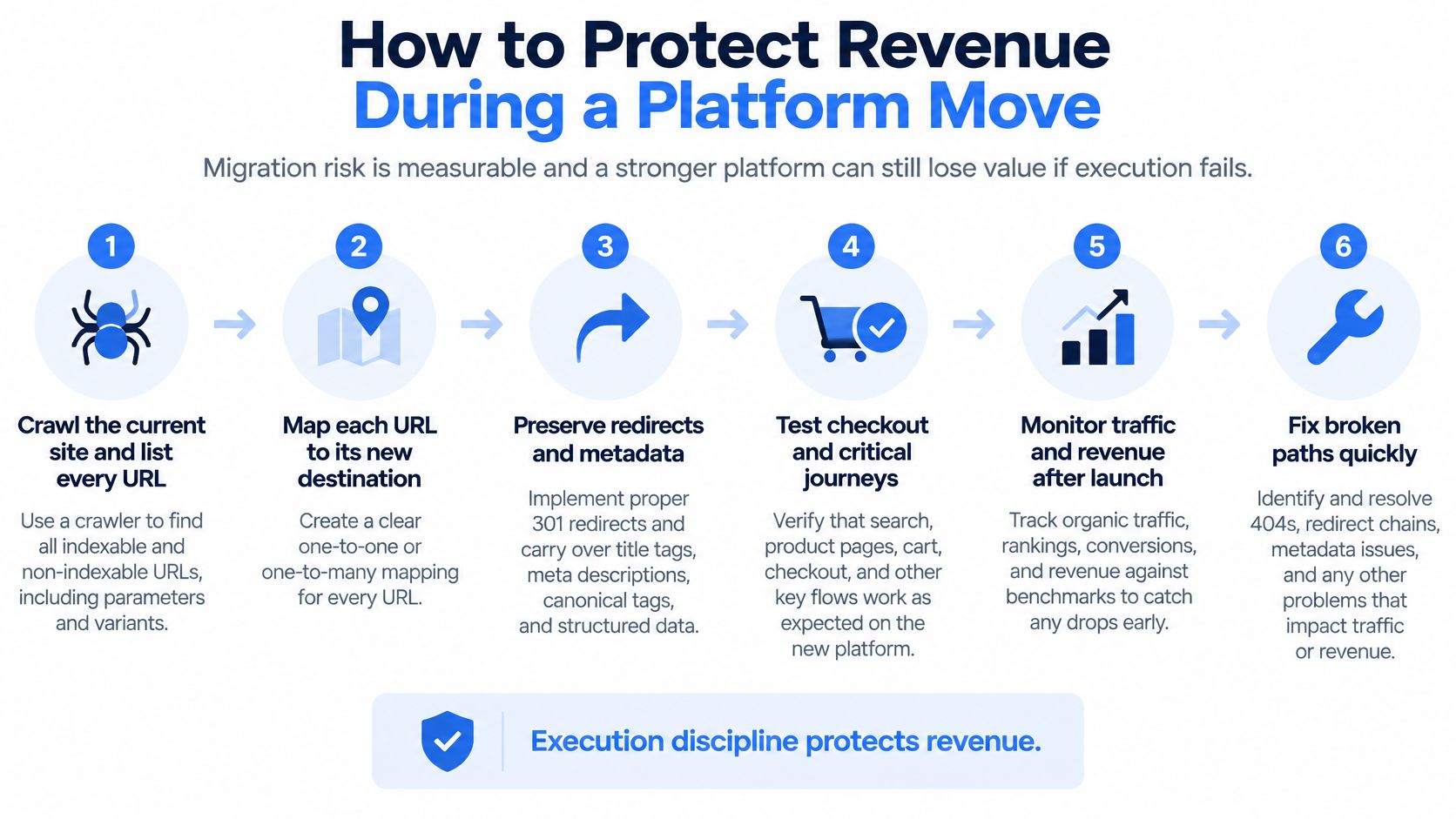
Migration risk is measurable. A stronger platform can still leave the merchant worse off if product URLs disappear, customer records lose necessary attributes, or warehouse events stop reaching the order system.
A2Z Dev Center's migration guide gives cost estimates ranging from a few thousand dollars for small stores to more than $50,000 for complex implementations. That range is context, not a usable mid-market quote: catalog complexity, historical records, URL coverage, and integration dependencies determine the actual scope.
<a id="put-evidence-behind-each-launch-control"></a>
Put evidence behind each launch control
Crawl and inventory the current site. Combine a crawler such as Screaming Frog with sitemap, analytics, and search-performance exports. Include international properties, historical editorial content, and valuable pages that internal navigation no longer exposes.
Map redirects before cutover. Give each retiring URL an appropriate destination using permanent redirects. Measure matched URLs against the source inventory, then test destination relevance, chains, loops, and missing pages.
Reconcile business records. Compare products, variants, customers, and required order history between systems. Validate relationships and field values, not just record counts; a variant attached to the wrong product is still a failed migration.
Rebuild and replay operational events. Test ERP, CRM, and PIM flows with representative payloads. Include cancellations, refunds, partial fulfillment, stock adjustments, and failed-message recovery.
Capture commercial baselines. Record organic landing-page performance, checkout completion, and revenue attribution before launch. Verify that the new analytics configuration measures equivalent events.
Monitor and assign remediation. Schedule post-launch reviews of indexation, redirect failures, conversion, and record reconciliation. Give each exception an owner and escalation path.
<a id="prove-continuity-beyond-launch-day"></a>
Prove continuity beyond launch day
International retailers need market-specific checks for currencies, taxes, languages, localized content, and domains. A successful domestic checkout doesn't validate every regional buying journey.
We offer BigCommerce-to-Shopify migration for merchants seeking Shopify's deeper app ecosystem, checkout, and international tooling. Our Shopify Migration Readiness Assessment uses eight questions and takes about two minutes, providing a scoped view of data, integrations, SEO risk, and a realistic timeline.
Launch gate: Don't approve cutover because the new storefront looks complete. Approve it when critical journeys and reconciliation checks pass.
Use scheduled reviews over the early post-launch period to test continuity. Stable indexation, near-zero redirect errors, and conversion at or above the comparable baseline are encouraging evidence, but also reconcile actual orders and revenue. Account for seasonality, campaigns, and tracking changes before declaring that the migration preserved commercial performance.
<a id="pick-the-platform-that-fits-your-operating-model"></a>
Pick the Platform That Fits Your Operating Model
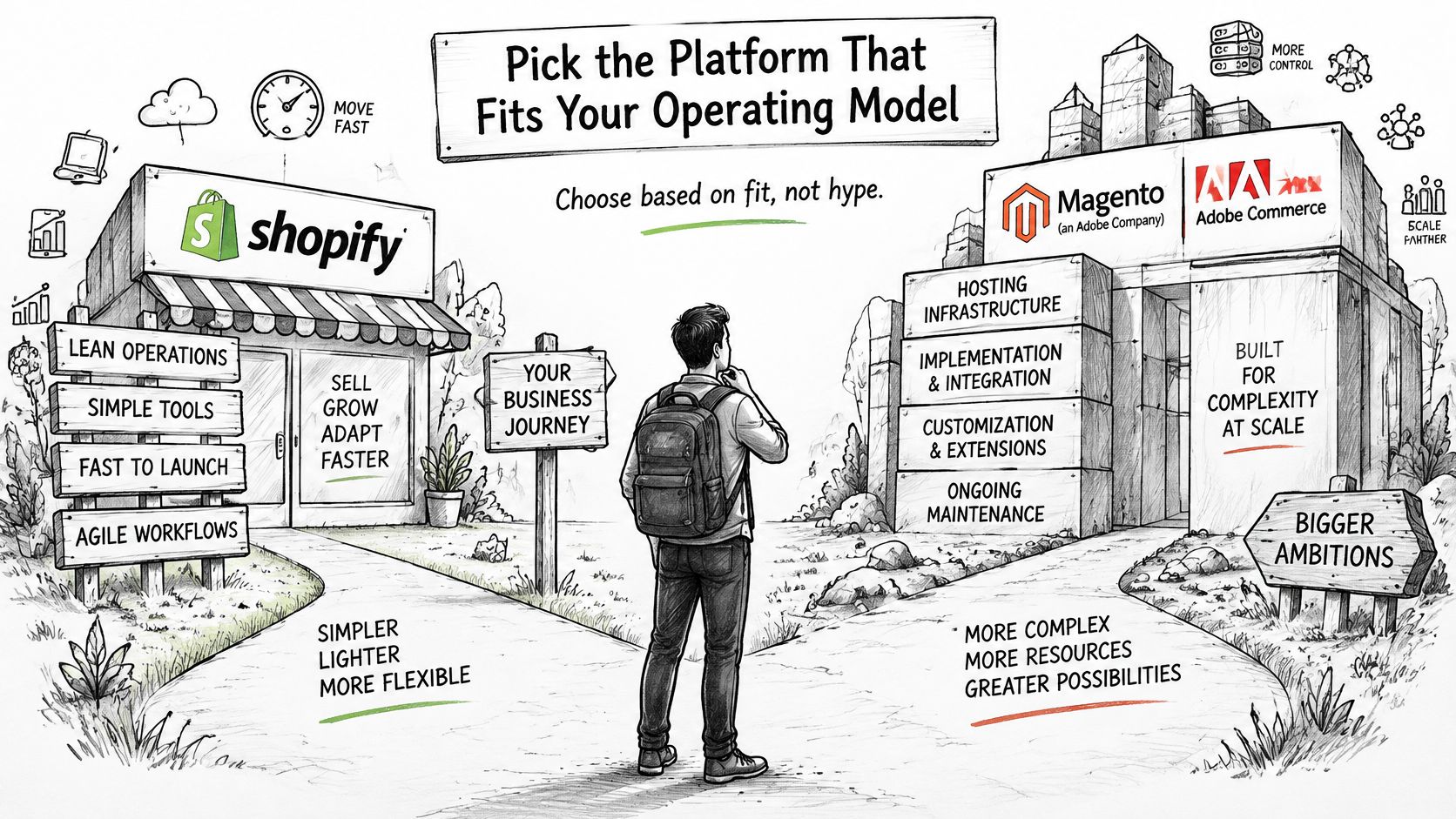
Choose the platform that removes expensive operational constraints without creating more expensive dependencies. That conclusion is less convenient than naming a universal winner, but it gives finance, engineering, and ecommerce leaders a decision they can defend.
For a merchant leaving Magento or Adobe Commerce, Shopify Plus belongs on the shortlist when the objective is to reduce infrastructure and upgrade responsibility. The condition is architectural fit: required catalog behavior, buyer journeys, and connected systems must work within the proposed Shopify design without recreating the legacy stack through custom applications.
<a id="match-the-recommendation-to-the-merchant"></a>
Match the recommendation to the merchant
B2B-heavy retailers should keep both platforms under consideration. Ask each implementation team to demonstrate the hardest account-pricing and quoting journey. Prefer the configuration that meets it with a clear ownership model and fewer fragile exceptions, whether that is BigCommerce's contracted B2B setup or Shopify Plus.
Global, multi-brand merchants should prioritize commercial structure. Existing processor agreements, regional administration, and shared-catalog governance can change the result. Evaluate the proposed operating organization, not just the customer-facing storefront.
DTC brands leaving WooCommerce or site builders can reasonably lean toward Shopify when their objective is a managed commerce operation with a broad choice of applications and checkout tooling. Before committing, verify that essential functionality doesn't require a collection of overlapping apps that different vendors maintain.
Our specialization is Shopify, so our role isn't to claim that every merchant should migrate. It's to establish whether the proposed Shopify architecture can meet the requirements and justify the transition. Enterprise clients can talk to a Shopify Expert to examine that fit.
<a id="make-the-decision-in-a-defensible-order"></a>
Make the decision in a defensible order
- Document the operation. List SKU and variant structure, regions, connected systems, and essential B2B journeys.
- Run the cost worksheet. Model the closest merchant scenarios using actual contracts and implementation scope.
- Confirm the proposed tier. Obtain written answers on B2B capabilities, API governance, storefront arrangements, and required add-ons.
- Scope acceptance before signing off. Include the mobile speed benchmark, migration controls, operational testing, and post-launch ownership.
The right BigCommerce vs Shopify decision isn't the platform with the longest feature list. It's the configuration your team can operate, change, and migrate to with a measurable business case.
United Victory Technologies offers Shopify and Shopify Plus migrations, architecture, integrations, and post-launch optimization for established ecommerce brands. Visit United Victory Technologies to start a Migration Readiness Assessment or talk to a Shopify Expert about your cost model, B2B requirements, and revenue-continuity risks.