
Migrate Shopify to BigCommerce: A Step-by-Step Guide
Migrate Shopify to BigCommerce without losing SEO, data or integrations. Map objects, test imports, redirect URLs and launch safely.
The advice you'll see first is to export Shopify, import CSVs into BigCommerce, paste a redirect sheet, and flip DNS. That sequence is how stores launch with a full catalog and broken pricing, search, and accounts.
A matching import count is not a working store. Shopify options, customer groups, metafields, and discount rules are different objects on the other side. Totals can agree while checkout and merchandising do not.
In 2024, 90% of large businesses that had recently migrated ecommerce platforms reported improved sales and revenue, according to the commercetools State of eCommerce report. Those gains show up when the new store can still price, fulfill, and rank. They don't show up because a spreadsheet imported cleanly.
I would run a migrate Shopify to BigCommerce project as schema reconciliation plus operational testing. Freeze a baseline, map every object, prove the totals in a sandbox, and only then change the domain.
Table of Contents
- Set Up Accounts, Plan and Timeline
- Map Every Shopify Object Before You Export
- How to Run the Data Migration Step by Step
- Redirect and Preserve Your Search Rankings
- Rebuild the Theme, Apps and Checkout Logic
- Confirm Your Readiness Before You Switch
- Test, Launch and Track the Cutover
<a id="set-up-accounts-plan-and-timeline"></a>
Set Up Accounts, Plan and Timeline
Start with access and owners, not product files. Budget a paid BigCommerce plan before URL work, because redirect management isn't on a free tier. Open a staging store, a sandbox account for each payment gateway, and scoped API tokens for the Catalog, Orders, and Customers APIs.
Export a full Shopify snapshot now. Pull products, customers, orders, pages, existing redirects, sitemaps, and the installed app list. That file is the baseline. Later edits on the live store are deltas, not a new source of truth.
Name one owner for DNS, redirects, payments, tax, and ERP sync, and write down who signs each go or no-go.
Practical rule: Slipped dates usually trace to an unnamed owner or a payment sandbox nobody has logged into.
Run four phases, and end each with a written checkpoint. Weeks one and two cover mapping and sandbox setup. Weeks three to six cover repeated test imports and the theme. Week seven is a dress rehearsal with delta capture. Cut over in the lowest-order window you can find.
If platform fit is still open, weigh catalog complexity and checkout needs in our BigCommerce vs Shopify comparison, not brand preference.
<a id="map-every-shopify-object-before-you-export"></a>
Map Every Shopify Object Before You Export
A clean import can still be an operational failure. Catalogs, customer profiles, and order histories are schema problems, because these records rarely fit the destination as they sit in Shopify. Staged loads, automated checks, and production-like integration tests exist for exactly that reason.
Mark every row direct, transform, redesign, or keep external before anyone exports a file. That mark is the readiness map. It decides which objects carry over unchanged, which need written field rules, and which get rebuilt or retired. Do the marking on the object list, not inside the import tool. A row marked "direct" that needed a transform is the defect you meet after launch.
<a id="shopify-objects-and-their-bigcommerce-migration-method"></a>
Shopify objects and their BigCommerce migration method
| Object | Migration method | Watch for |
|---|---|---|
| Products and variants | Transform | Map options to BigCommerce options and variant combinations; keep SKUs stable |
| Customers and groups | Import, then reset | Plan a password reset flow; map customer groups to price lists or tags |
| Orders | Import as history | Use for support and reporting; keep legacy fields out of the storefront |
| Pages and blog posts | Recreate | Excluded from the migration application; rebuild via API or manually |
| Discounts and promotions | Rebuild | Rules rarely map one-to-one; retest every code and stacking case |
| Metafields and custom fields | Transform or redesign | Map each field to a BigCommerce custom field or drop it |
| Media and product images | Re-upload | New image URLs; update alt text and internal references |
| ERP, PIM, OMS, CRM | Keep external | Re-point connections and test order and inventory sync |
<a id="where-the-row-count-lies"></a>
Where the row count lies
Products and variants need a stable key before export. Shopify option names and variant SKUs have to become BigCommerce option sets and variant combinations. If two options share a label and you don't lock the SKU, the sandbox will show the right product count and the wrong purchasable combinations. Reconcile at the variant level, not the product level.
Customers export with profiles, groups, and consent flags. Passwords don't arrive in a usable form, so plan a reset flow and say so in the launch email. Map groups onto price lists or customer tags, or B2B pricing effectively becomes retail.
Orders are support and reporting history. Don't force every legacy field into the storefront. A service agent needs the Shopify order number and the original total. The theme doesn't.
Discounts, metafields, and apps are where "direct" is almost always the wrong mark. Promotion stacking, modifier fields, and search facets get rebuilt and retested, and a code that validates on its own can still fail against a second rule on a real cart. ERP, PIM, OMS, and CRM logic stays in those systems. You re-point the connection and prove that an order and an inventory change still sync.
A finished import is still unfinished if pricing, faceted search, or account workflows were never exercised.
<a id="how-to-run-the-data-migration-step-by-step"></a>
How to Run the Data Migration Step by Step
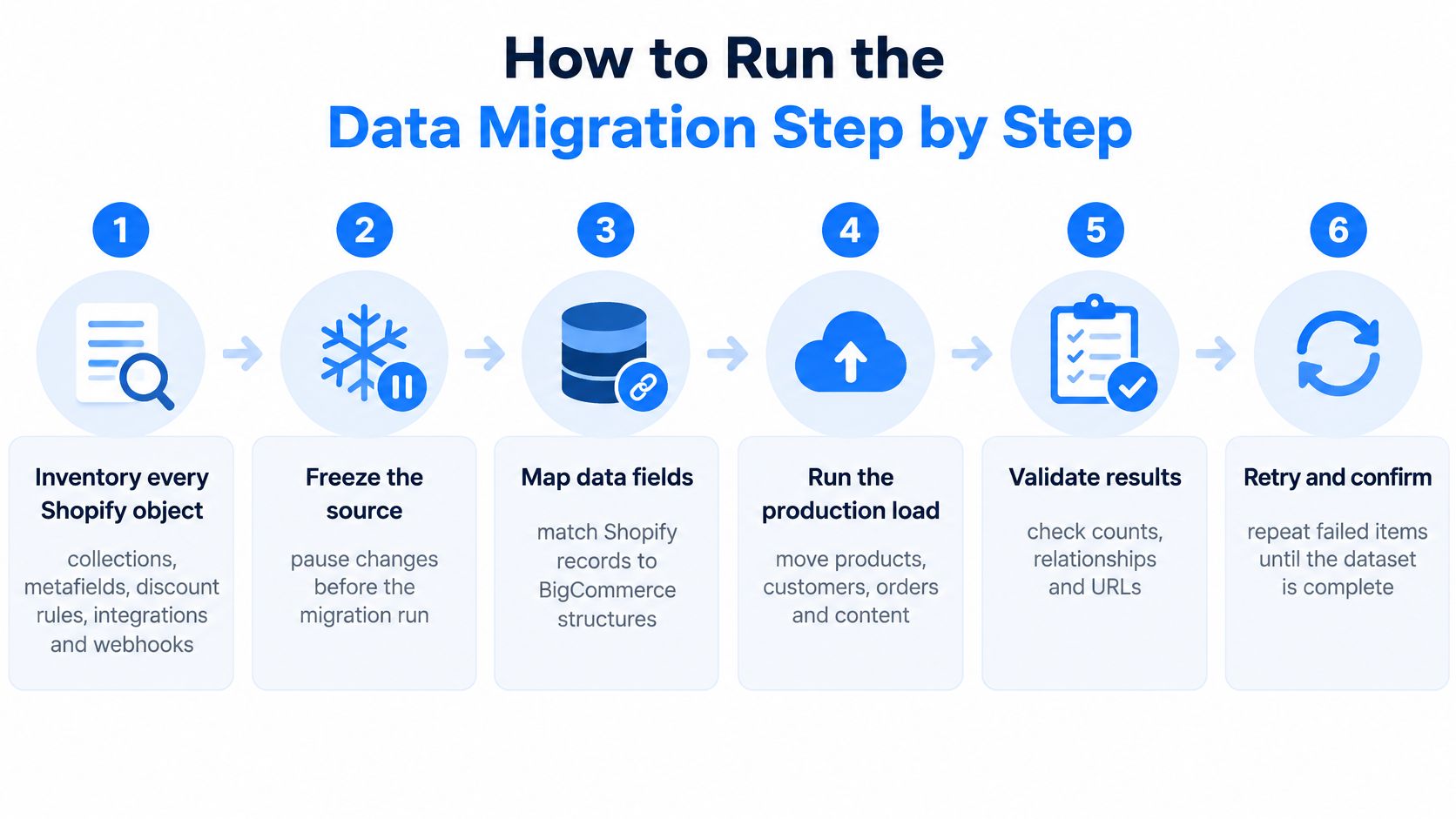
Treat the load as a pipeline you can run twice, not a one-time CSV drop. BigCommerce's catalog migration guidance asks you to validate before import, run small batches, read error logs, and use the Catalog, Orders, and Customers APIs when native import isn't enough. The migration application supports up to 500,000 combined product, customer, and order records. Pages and blog posts are outside that workflow.
<a id="the-production-run"></a>
The production run
- Inventory the source. List products, variants, collections, customers, orders, pages, blogs, media, metafields, discount rules, integrations, and webhooks. Anything missing from this list won't be in the error log later, because it was never queued.
- Freeze or define the delta. Pause nonessential Shopify edits, or agree the timestamp you'll replay. Export products, customers, and orders as CSV, SQL, or API payloads, and keep Shopify IDs as the reconciliation key.
- Map fields on a sheet. One Shopify field, one BigCommerce entity, one transform note. Stable IDs are what let you prove a row later, not a visual check of the homepage.
- Transform and dedupe. Match customers on email. Match orders on the Shopify order number. Duplicate emails become duplicate accounts that support can't merge on launch day.
- Validate, then load a small sandbox batch. Read the error log line by line. A skipped variant relationship won't show up in a storefront click-through.
- Reconcile counts and money. Compare record counts, order totals by month, and inventory by SKU with the Shopify snapshot. If a month's revenue doesn't match, stop. Don't "fix it in the theme."
- Scale only after the batch is clean. Past the application's combined record ceiling, or wherever native import drops fields, use queue-based workers on the Catalog, Orders, and Customers APIs.
- Load the final delta and audit. After cutover, hunt missing orders and duplicate customers. Visual QA won't find them.
<a id="when-the-api-pushes-back"></a>
When the API pushes back
BigCommerce returns HTTP 429 when quotas are exceeded. The reset-time response header is the retry clock. Use exponential backoff so workers wait for that header instead of hammering the endpoint. Silent omissions, malformed variant trees, and half-imported order history are the failures a homepage review never catches.
Totals have to reconcile before anyone trusts the import. A green progress bar is not a sign-off.
<a id="redirect-and-preserve-your-search-rankings"></a>
Redirect and Preserve Your Search Rankings
A flat redirect spreadsheet is not an SEO plan. It covers the obvious product and category URLs and ignores the rest of what Google already crawls. BigCommerce's Shopify data migration guidance is clear that recreated pages need redirects and that the feature requires a paid plan. Confirm the plan, then load and test the map on staging. A map that was never requested against the staging host is a guess.
Filtered navigation, parameter URLs, CMS pages, blog posts, image assets, internal links, XML sitemaps, robots.txt, canonicals, structured data, and backlinked URLs with no exact twin each need a decision. Copying every URL one-to-one keeps thin and duplicate architecture. Sometimes the stronger move is to retire a URL on purpose.
<a id="redirect-action-for-each-non-equivalent-url-type"></a>
Redirect action for each non-equivalent URL type
| URL type | Action | Decide by |
|---|---|---|
| Product or category with an exact new equivalent | 301 redirect | Same product or same search intent |
| Filtered and parameter URLs | Consolidate into the canonical category | Low search value and duplicate content |
| Blog posts and CMS pages | 301 to the recreated page | Whether the content was rebuilt at a new path |
| Image and asset URLs | Redirect or keep stable paths | Whether the asset has backlinks or ranks in image search |
| Discontinued products with no equivalent | 410 Gone or closest category | Whether the URL has backlinks; a 410 is deliberate, not an error |
| Pages with backlinks but no destination | 301 to the closest useful page | Link equity versus relevance |
<a id="four-outcomes-then-a-baseline"></a>
Four outcomes, then a baseline
For any URL that isn't a clean twin, pick one outcome. Send a 301 to the closest useful page. Consolidate several weak URLs into one canonical. Return a deliberate 410 when the page should leave the index. Keep the original page only when you recreated it and the path still earns its place.
Before the move, export indexed URLs, organic landing pages, rankings, backlinks, crawl errors, and revenue by landing page. Keep the Shopify store live while BigCommerce is built. Block crawlers on staging. At launch, open the live store, update robots.txt, and submit the new sitemap.
Compare that baseline at 24 hours, 7 days, 28 days, and 90 days. A single bad day isn't a verdict. A landing page that still has no destination after a week is.
Our Shopify SEO guide is the checklist for the equity you're trying not to drop, especially internal links and landing-page revenue.
Every old URL that gets traffic or links needs a named destination or a deliberate 410 before launch. "We'll add it if Search Console complains" is how rankings leak for a month.
<a id="rebuild-the-theme-apps-and-checkout-logic"></a>
Rebuild the Theme, Apps and Checkout Logic
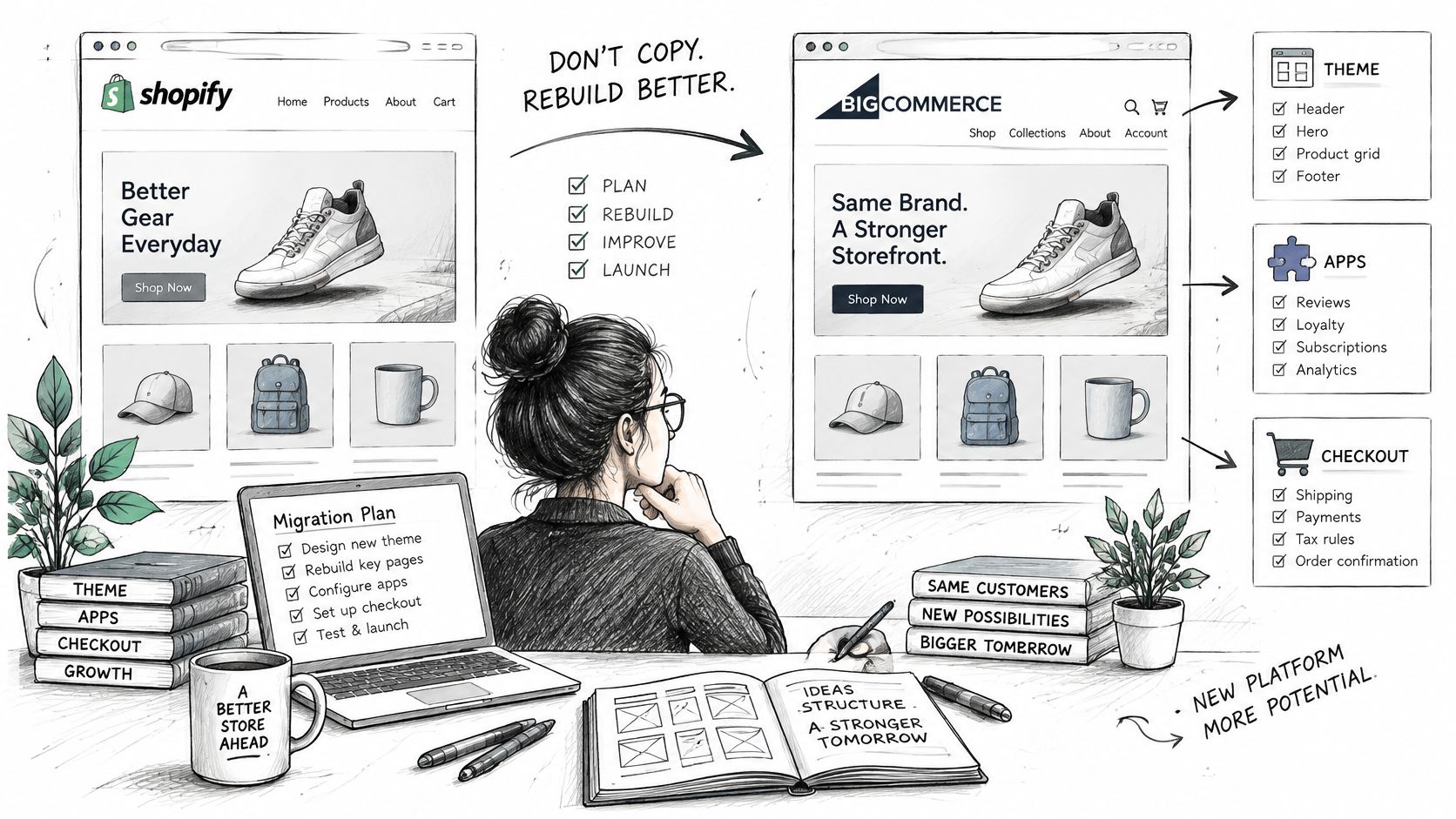
The storefront is rebuilt. It isn't copied. Shopify's section-based themes don't land as BigCommerce templates, and a pixel match of the old homepage usually fights the new framework. Rebuild the templates that take the order: category, product with variant selectors, search, cart, and checkout. Leave decorative sections until those five convert.
<a id="apps-by-job-not-by-name"></a>
Apps by job, not by name
Inventory every Shopify app by what it does, then mark one fate.
- Native BigCommerce feature: reviews, basic search, or tax that the platform already covers. Retire the app.
- BigCommerce app: loyalty, subscriptions, or email where a maintained app exists. Install it on staging and replay a real customer.
- Custom integration: anything tied to your ERP, a proprietary bundle, or a checkout script. Budget build time here, not in the theme polish.
- Retirement: an app nobody has opened in six months. Don't port dead weight.
<a id="checkout-markets-and-measurement"></a>
Checkout, markets, and measurement
Rebuild payment methods, shipping rules, tax, and any custom checkout logic, then run each through the sandbox gateway. If you sell across markets, set price lists, currency, and language before launch. A domestic test order won't reveal a missing EU tax rule.
Re-implement analytics tags, server-side events, and conversion goals so week one can be compared with the Shopify baseline. Without that wiring, a conversion dip is an argument instead of a number.
Run at least one order per payment method, per shipping zone, and per discount type. Stack a code on a sale price. Fail that case on staging, not on a customer.
A layout that matched Shopify and a checkout that hasn't cleared a sandbox payment is the expensive version of "it looks done." Pair the new templates with a conversion rate optimization audit so you're judging the funnel, not the hero image.
<a id="confirm-your-readiness-before-you-switch"></a>
Confirm Your Readiness Before You Switch
Don't switch because the theme looks finished. Switch only when five checks all pass. If one fails, delay. A late launch costs less than a week of missing orders or a month of unfixed 404s.
Shopify's reported merchant GMV was $378.441 billion in 2025, against BigCommerce merchant GMV of $31.696 billion that year, per the platform financial comparison published by Taylor Sicard. Those figures don't predict your store. They do mean you're leaving a very large transaction network, so the revenue you already have has to be measured, not assumed. Your Shopify results sit in SEO authority, customer data, and integration logic.
<a id="the-five-go-or-no-go-checks"></a>
The five go or no-go checks
- Totals match. Record counts and monetary totals reconcile in the sandbox and again after the final delta, including order totals by month and inventory by SKU.
- Redirects cover equity. Every URL that earned traffic or links has a 301, a consolidation target, or a deliberate 410, and the map has been requested on staging.
- Money and systems pass live tests. Payments, tax, shipping, and ERP or PIM sync succeed on real sandbox orders, one per method and zone.
- The baseline is saved. Indexed URLs, landing pages, rankings, backlinks, crawl errors, and revenue by landing page are exported and stored where the team can open them on day one.
- Rollback has a name. Someone is assigned to revert DNS, and someone else reconciles orders placed during the cutover window.
Add a business check beside the technical ones. BigCommerce has to support your catalog depth, international setup, B2B price lists, and checkout rules. Some Shopify-only apps have no twin. If a required workflow has no native feature, app, or custom build, that is a no-go, not a post-launch ticket.
Keep the Shopify store readable for at least 90 days. Support will need historical orders that you chose not to surface on the new storefront.
The decision rule is binary. Five passes, you launch. Any failure, you wait.
<a id="test-launch-and-track-the-cutover"></a>
Test, Launch and Track the Cutover
Launch day is a short checklist with owners, not a celebration. Work it in order, and don't skip ahead because the homepage looks right.
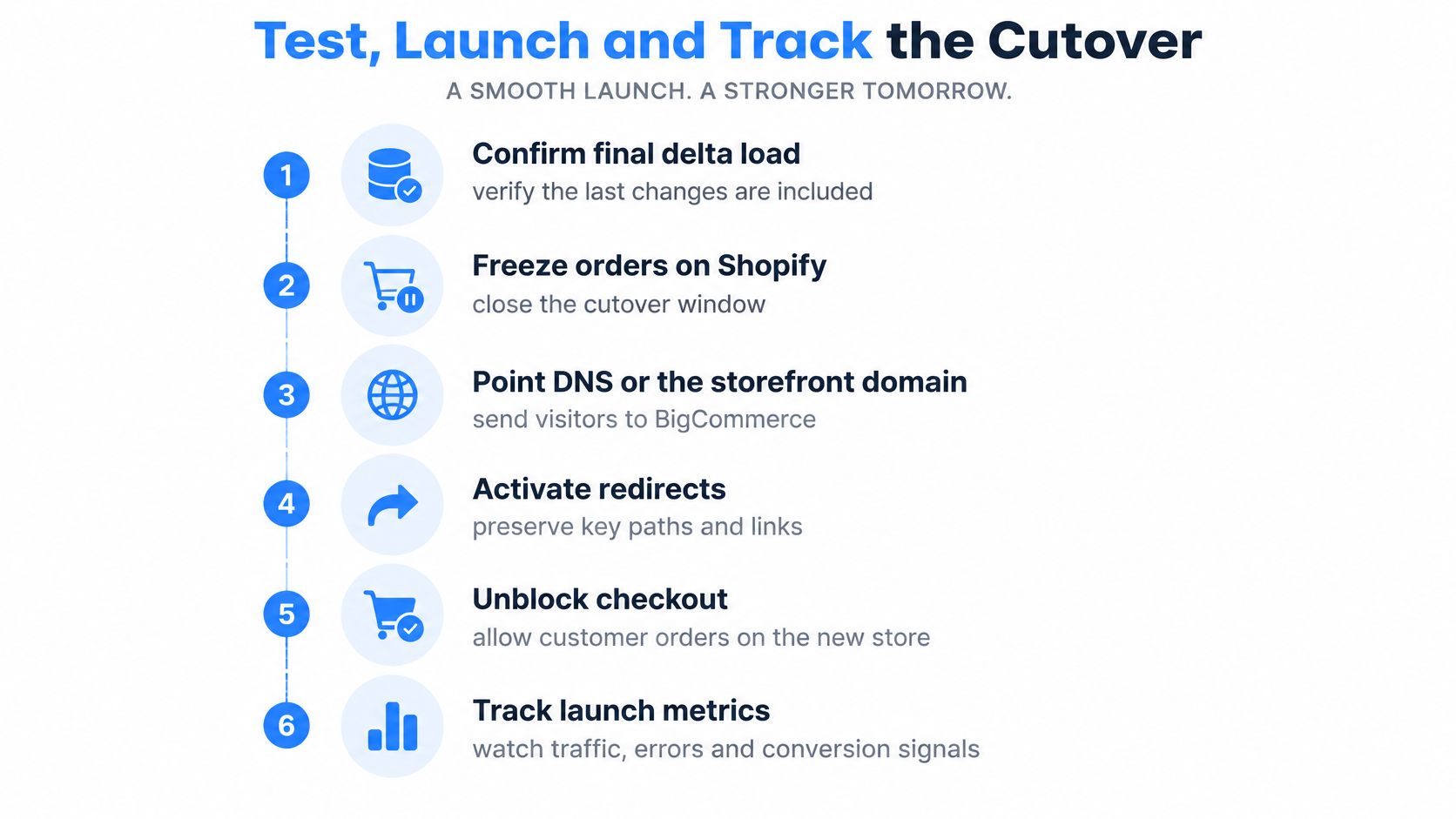
- Confirm the final delta. The last products, customers, and orders since the freeze are in BigCommerce, and the month totals still match.
- Freeze Shopify orders for the cutover window so new sales aren't split across two checkouts with no owner.
- Point DNS or the storefront domain only after that freeze. Keep Shopify live and read-only so you can revert.
- Activate redirects, unblock robots.txt, and submit sitemaps in the same hour. A domain change without the map is how equity walks away.
- Place live test orders. Verify payments, tax, confirmation emails, webhooks, and ERP sync before you tell customers the store is open.
- Watch the first signals. 404 count, checkout completion, and order sync are same-day problems. Rankings are not.
<a id="post-launch-checkpoints-and-the-action-for-each"></a>
Post-launch checkpoints and the action for each
| Timepoint | What to compare | Action if it slips |
|---|---|---|
| 24 hours | Crawl errors, 404 count, checkout completion | Fix missing redirects and broken checkout paths the same day |
| 7 days | Organic landing pages, indexed URLs, order sync gaps | Add redirects for lost URLs; reconcile orders with the ERP |
| 28 days | Rankings and organic revenue by landing page | Adjust or consolidate pages that lost ground |
| 90 days | Conversion rate, average order value, total revenue | Compare with baseline and decide on content and UX changes |
A rankings dip in the first weeks is common. Judge the trend at 28 days, not on a single Tuesday. A jump in 404s or a drop in checkout completion is not common, and it gets a same-day fix.
<a id="when-to-roll-back"></a>
When to roll back
Revert DNS to Shopify if live payments fail, tax is wrong on real orders, or the ERP stops receiving orders and you can't patch it inside the cutover window. A soft ranking slide is not a rollback. A checkout that can't take money is.
Rollback isn't free. Orders placed on BigCommerce during the window have to be reconciled by hand against Shopify, inventory, and the ERP. That's the cost you accepted when you named an owner. If you can't name that person on launch morning, you aren't ready to switch.
If your catalog, redirects, or integrations are too tangled for an in-house cutover, United Victory Technologies runs structured ecommerce migrations that protect product data, order history, and search equity, then stays on for development and optimization after launch. We also scope Shopify and Shopify Plus moves when a stack no longer fits, including a readiness view of data, SEO risk, and timeline. Talk with United Victory Technologies before you freeze the store.