
Magento 2 Data Migration: Step-by-Step Guide for 2026
Magento 2 data migration explained: choose a method, run the steps, keep SKUs and SEO intact, and validate totals before cutover.
The most popular advice about Magento 2 data migration is to install a migration tool, transfer the database, and fix whatever looks wrong afterward. That's the wrong acceptance standard. A store can contain all its orders and still show the wrong tax totals, hide configurable-product options, or send the same order to fulfillment again.
Adobe describes a structured process with Settings, Data, and Delta modes, plus integrity checks, record transfers, volume checks, and resumable progress in its migration architecture documentation. Those controls establish that the transfer ran. Your team still has to prove that accounting, customer service, merchandising, and fulfillment can operate correctly, especially for orders placed during the final switch.
Table of Contents
- Choose the Right Migration Path for Your Store
- Keep SKUs, Variants and Relationships Intact
- How to Run a Magento 2 Data Migration Step by Step
- Protect URLs, Redirects and Rankings
- Reconcile Data Before Cutover
- Fix the Most Common Migration Failures
- Confirm the Cutover Plan Before You Switch Stores
<a id="choose-the-right-migration-path-for-your-store"></a>
Choose the Right Migration Path for Your Store
Version compatibility is the first gate, not an installation detail. Adobe's Data Migration Tool installation documentation requires the tool release to match the destination application exactly: Magento 2.2.0 requires tool 2.2.0, with supported origins covering Magento Open Source 1.6.x through 1.9.x and Adobe Commerce 1.11.x through 1.14.x. These are compatibility examples, not recommendations to install those historical destination releases.
Start by identifying which project you're running: a legacy Magento store moving to Magento 2 or Adobe Commerce, an existing Magento 2 store moving to fresh infrastructure, or Magento moving to another platform such as Shopify. The official Data Migration Tool isn't a universal database mover for all those paths.
<a id="match-the-method-to-the-destination"></a>
Match the method to the destination
Migration methods compared by fit and trade-off
| Method | Best fit | Main trade-off |
|---|---|---|
| Adobe Data Migration Tool | Magento 1 to Magento 2 or Adobe Commerce, including order history | Tool version must match Magento exactly; extension tables need mapping rules |
| Native CSV import/export | Fresh build on the same platform, moving products, customers, and stock | Orders, delta changes, and extension data aren't covered |
| Third-party migration extension | Mid-size stores with a known, supported extension list | Confirm support for the exact release and custom entities |
| Custom ETL scripts or API jobs | Unusual catalog structures or ERP-driven data | Highest control, with substantial build and maintenance responsibility |
| Managed migration service | Multi-market or B2B stores without spare in-house capacity | Scope and extension count drive cost and scheduling |
A server relocation may call for a coordinated application, database, and file deployment rather than an entity-by-entity import. A fresh build, however, usually needs explicit mapping because the destination's identifiers and configuration may differ.
For a platform change, use a destination-specific plan such as this Magento-to-Shopify migration guide. Don't assume Magento relationships, customer credentials, or order states have equivalent destination fields.
Before selecting a method, confirm:
- Source identity: Record the edition, release, database structure, and installed modules.
- Custom ownership: List every extension that creates tables or stores business-critical attributes.
- Live changes: Decide whether orders and customer updates created during the move must transfer.
- Separate assets: Plan the media copy independently from database migration.
Treat themes, extensions, custom code, and data as separate workstreams. A transferred configuration doesn't rebuild a storefront or replace an incompatible module.
<a id="keep-skus-variants-and-relationships-intact"></a>
Keep SKUs, Variants and Relationships Intact
Say a configurable product's child SKUs were renamed during catalog cleanup, but the import still references their old values. The product records arrive, yet shoppers can't select a size. Adding the missing relationship mapping fixes the issue; importing the same broken references again doesn't.
The dangerous boundary is transformation, where an old identifier, format, or relationship becomes something different. Adobe's migration configuration documentation describes the Map Step's comparison of source and destination tables, including extension-created structures. Compatible structures can transfer directly; renamed fields and incompatible formats need mapping rules or custom handlers.
<a id="make-entity-decisions-explicit"></a>
Make entity decisions explicit
Inventory each module and custom entity, then assign a decision: migrate, transform, replace, or retire. Record its owner, destination, transformation rule, and acceptance check rather than leaving those choices inside an engineer's script.
Entity mapping decisions and what breaks
| Entity | Typical decision | What breaks if ignored |
|---|---|---|
| Configurable products and child SKUs | Migrate, with a transform if SKUs change | Parent loses selectable options |
| Tier prices and group prices | Transform customer group IDs | Wrong price shown to wholesale customers |
| Tax rules and rates | Transform to new rate zones | Historical interpretation or new checkout totals drift |
| URL keys across store views | Migrate, then deduplicate within the correct scope | URL collisions and incorrect destinations |
| Customer groups and attribute sets | Transform IDs and attribute mapping | Pricing, visibility, or attribute rules apply incorrectly |
| Extension-created tables | Migrate, transform, or retire per module | Orphaned records and failed relationship checks |
Check the relationships, not just the entities. A wholesale price attached to an existing but incorrect customer group can pass a foreign-key check and still be commercially wrong. Likewise, a custom attribute can exist while its options, labels, or attribute-set membership are missing.
For tax mapping, preserve historical order amounts rather than recalculating old transactions using current rules. Test destination checkout calculations separately against the intended market configuration.
<a id="normalize-timestamps-deliberately"></a>
Normalize timestamps deliberately
Timezone settings aren't transferred automatically. Establish whether each source timestamp is already stored in UTC before applying any conversion, then compare historical order and customer events using the same display timezone.
Practical rule: Keep identifiers stable during migration whenever possible. If cleanup is necessary, maintain an explicit old-to-new crosswalk and test every dependent relationship.
Finish catalog acceptance by selecting variants, checking customer-group prices, searching custom attributes, and opening media on the storefront. Database presence alone won't reveal those failures.
<a id="how-to-run-a-magento-2-data-migration-step-by-step"></a>
How to Run a Magento 2 Data Migration Step by Step
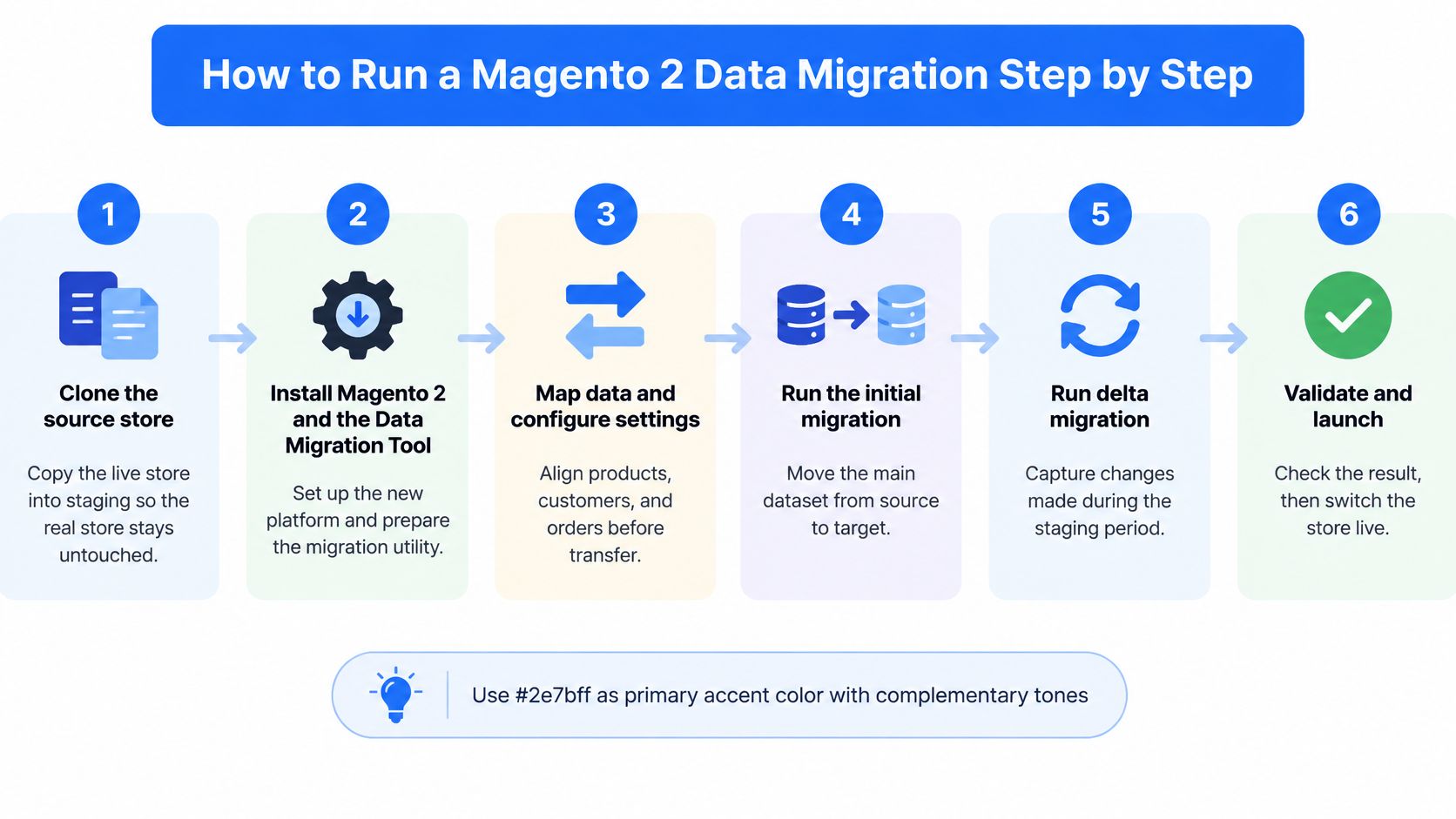
A Data mode run that exits without errors is not a finished migration. Acceptance is a business reconciliation: catalog counts, money, inventory, and the orders that still land while the old store is taking payment. Use a rehearsal-first sequence based on Adobe's migration planning guidance. Keep the destination storefront and administration unchanged during transfer so target-side edits do not create conflicting records.
The sequence below separates environment preparation, initial transfer, synchronization, and release.
<a id="prepare-and-transfer"></a>
Prepare and transfer
Clone the source into staging. Copy the database, application dependencies, configuration, and media needed for a representative rehearsal. Disable outbound payment actions, customer emails, and fulfillment integrations so testing cannot trigger live operations.
Install the destination and matching migration tool. Pin released packages in deployment configuration rather than letting an install pick a different release. Confirm required destination modules are installed before you compare schemas.
Configure database access and the encryption key. Use restricted credentials and protect any configuration that holds secrets. Validate encrypted-data handling before the bulk transfer. An incorrect key can leave migrated values present and unusable.
Run Settings mode. Transfer system configuration and website settings, then inspect the website and store-view structure. Replace environment-specific endpoints and credentials on purpose. Staging must not call production payment, tax, or fulfillment services.
Copy media separately. Move legacy media into
pub/media, keeping the paths catalog and CMS content expect. Check file permissions and that a product image loads. Directory size is not delivery.Run Data mode. Perform the bulk transfer and keep its logs with the rehearsal record. Investigate integrity failures before you continue. Suppressing a field so the command finishes only hides a broken record.
Run Delta mode. Capture supported changes such as new customers, orders, reviews, and profile updates while the legacy store stays open. Test the extension-owned writes this business uses. Delta does not include every custom table by default.
<a id="rehearse-and-release"></a>
Rehearse and release
Repeat the full rehearsal after each fix. Restore a known baseline and apply the corrected configuration the same way every time. If a custom attribute changed data type, add a mapping or handler, then check both the stored value and what the storefront shows.
Run the approved cutover, including the live-order window. Freeze non-order admin edits first. Checkout can stay open until the write-stop, so name who captures orders placed between the last Delta pass and the switch: a short checkout hold, or a manual import of those last orders, payments, and stock decrements. After that final sync is reconciled, stop Delta mode, enable destination cron, reindex inventory, and warm caches.
Reconcile, then smoke-test. Match order totals, tax collected, and inventory quantities to the source for the cutover window, not only row counts. Then place a test order and follow it through catalog navigation, variant selection, checkout, customer login, and each integration. It should reach the intended downstream system once.
Integrity checks, table-by-table transfer, and volume checks are evidence. They do not grant launch approval. That comes after the business totals agree and the last live orders are accounted for.
Rehearsal runs come before a production window. A production window is the wrong place to discover a missing mapping.
If the destination is not Magento, keep the rehearsal and the reconciliation. Replace the Magento modes with that platform's import model. A Shopify-to-BigCommerce migration workflow is built around the destination's objects, not a copied Magento command sequence.
<a id="protect-urls-redirects-and-rankings"></a>
Protect URLs, Redirects and Rankings
Consider a store that changes nested category paths into flat URLs. The migration team builds redirects from category IDs, but never exports the actual public paths. The categories exist after launch, while customers arriving through old search results reach missing pages.
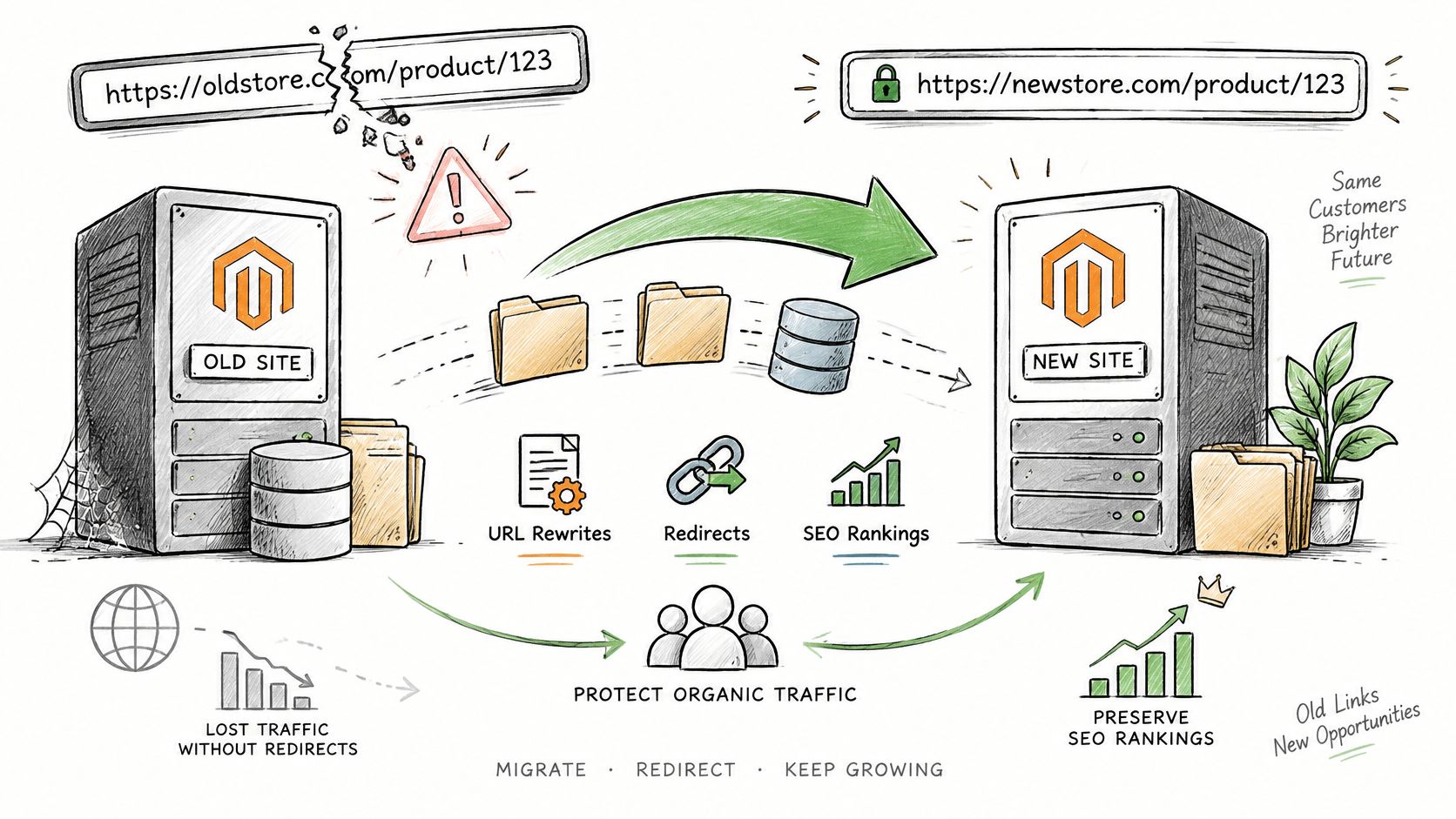
URL acceptance needs its own evidence. A database transfer can preserve products without preserving the addresses customers and search engines use to reach them.
<a id="build-the-map-from-public-urls"></a>
Build the map from public URLs
Export source URL rewrites, category paths, product paths, CMS pages, and custom rewrites. Add URLs from analytics landing-page exports, the source sitemap, and a crawl so the map isn't limited to records one subsystem happens to contain.
Pair each old URL with its intended destination. Preserve an existing address where practical; when it must change, use a permanent redirect directly to the relevant working page rather than sending unrelated pages to the homepage.
- Preserve page signals: Transfer meta titles, descriptions, canonical behavior, and localized annotations with their store-view assignments.
- Check destinations: Confirm that redirected pages are indexable, relevant, and not themselves redirects.
- Protect market relationships: Validate reciprocal hreflang annotations and language destinations rather than copying labels without testing their targets.
- Document exclusions: Give intentionally retired content an explicit disposition instead of leaving unexplained gaps.
<a id="crawl-before-approval"></a>
Crawl before approval
Prioritize organic landing pages and revenue-bearing categories, but don't use that priority list as a substitute for checking the complete redirect map. Test the public-facing response after web-server, application, and caching rules are applied.
Check for redirect chains, loops, missing destinations, accidental noindex directives, and canonicals pointing to the old site. Regenerate the XML sitemap from the destination's intended indexable URLs and submit it through Search Console.
Record URL coverage as a signed acceptance row, including the tested export, unresolved exceptions, and SEO owner. After launch, review Search Console indexing reports alongside landing-page traffic and server errors, with special attention to localized categories.
Keep useful historical redirects in place rather than deleting them when launch monitoring ends. External links, bookmarks, and older search results can continue sending customers to those addresses.
<a id="reconcile-data-before-cutover"></a>
Reconcile Data Before Cutover
Matching row counts can hide incorrect business data. Customers may belong to the wrong website, translated attributes may be empty, or an ERP identifier may point to another entity. None of those problems necessarily changes the overall count.
Adobe's technical migration specification describes structural checks, transfers, progress tracking, and volume validation. Build an additional acceptance layer around the business meanings those checks don't establish.
<a id="define-the-acceptance-sheet-before-importing"></a>
Define the acceptance sheet before importing
Define invariants, the counts, totals, relationships, and states that must remain equivalent. Compare frozen source and destination datasets at the same synchronization boundary, grouped by website, store view, status, and currency.
Reconciliation checks and tolerances
| Check | What to compare | Tolerance |
|---|---|---|
| Order count per website and store view | Orders by store view and status | Exact match for the agreed scope |
| Grand totals by currency | Sum of order grand totals per currency | Exact match for preserved amounts; separately approved rounding rule for intentional conversions |
| Customer and address count | Customers and addresses per website | Exact match after documented exclusions |
| Invoices and credit memos | Totals and counts, linked to orders | Exact match |
| Stock quantities | Quantity per SKU and source | Exact match for SKUs in scope at the frozen boundary |
| Media references | Images referenced by products and CMS pages | No missing referenced files |
Don't introduce currency conversion merely because the new storefront uses a different display currency. Preserve historical transaction currency and amounts wherever the destination model permits it; document any unavoidable transformation with accounting.
<a id="test-meaning-and-repeatability"></a>
Test meaning and repeatability
Sample high-value orders and edge cases, including partial refunds, multiple invoices, credit memos, cancellations, and on-hold states. Compare line amounts, discounts, shipping, tax, payment references, and customer-visible history, then verify their ERP or accounting representation.
Test customer login using controlled accounts, including password compatibility or the approved reset journey. Check consent status and website assignment without exposing customer credentials in reconciliation evidence.
Rehearse repeat execution from a known staging state to establish idempotency. Verify that the chosen recovery process doesn't duplicate customers, addresses, orders, or downstream events.
Accept a discrepancy only when its cause, business effect, owner, and approval are recorded. Cosmetic differences may be acceptable; unexplained financial differences, inaccessible accounts, missing orders, and duplicate fulfillment risks should block launch.
A clean tool exit is technical evidence. Business acceptance requires proof that the destination produces the intended operational outcomes.
<a id="fix-the-most-common-migration-failures"></a>
Fix the Most Common Migration Failures
If the order count is short after cutover, don't immediately rerun the entire migration. First establish which orders are absent, when they were created, whether synchronization captured them, and whether downstream systems have already processed them.
Rerun when data is intact but incomplete. Fix mapping when records fail consistently in the same way. Repeating a faulty transformation usually reproduces the defect and can make cleanup harder.
<a id="diagnose-by-symptom"></a>
Diagnose by symptom
| Symptom | What to investigate | Recovery action |
|---|---|---|
| Order count is short | Final delta checkpoint, change capture, errors, and queue state | Reconcile missing identifiers, then replay the verified incomplete work |
| Customers duplicate after import | Identity matching and website scope | Correct the identity rule and merge only after checking linked records |
| Historical orders show the wrong currency | Website-scope currency mapping and preserved transaction fields | Correct the transformation and repair the affected scope |
| Category pages return 404 | Category hierarchy, store assignment, and generated rewrites | Repair the hierarchy or rewrites, then reindex and crawl |
| Old product URLs return 404 | Missing or incorrectly deployed redirect map | Deploy approved permanent redirects and retest destinations |
| Timestamps shift by hours | Source storage convention and timezone transformation | Remove incorrect conversion or apply the verified normalization |
Cron deserves a separate check. Disabled destination cron can leave scheduled work unfinished, but enabling it doesn't prove missing source orders were imported. Inspect the migration checkpoint and scheduled-job logs independently.
For duplicate customers, email plus website scope is a useful investigation key, not automatic permission to delete records. Check addresses, orders, consent history, and external identifiers before choosing the surviving account.
<a id="recover-from-a-controlled-baseline"></a>
Recover from a controlled baseline
Never experiment with a production rerun first. Reproduce the failure from the staging rehearsal snapshot, apply the proposed repair, and prove that both reconciliation and duplicate-prevention checks pass.
Before production recovery, capture a fresh production backup and define which current writes must be preserved. Don't restore a staging database over a live destination containing new orders.
- Bound the repair: Name the affected entities, store views, and synchronization interval.
- Control side effects: Pause outbound fulfillment and customer notifications where replay could trigger them.
- Verify completion: Reconcile repaired records and downstream acknowledgments before reopening queues.
Choose the smallest reliable repair. A complete reload is appropriate only when its dependencies, current transactions, and rollback path are understood.
<a id="confirm-the-cutover-plan-before-you-switch-stores"></a>
Confirm the Cutover Plan Before You Switch Stores
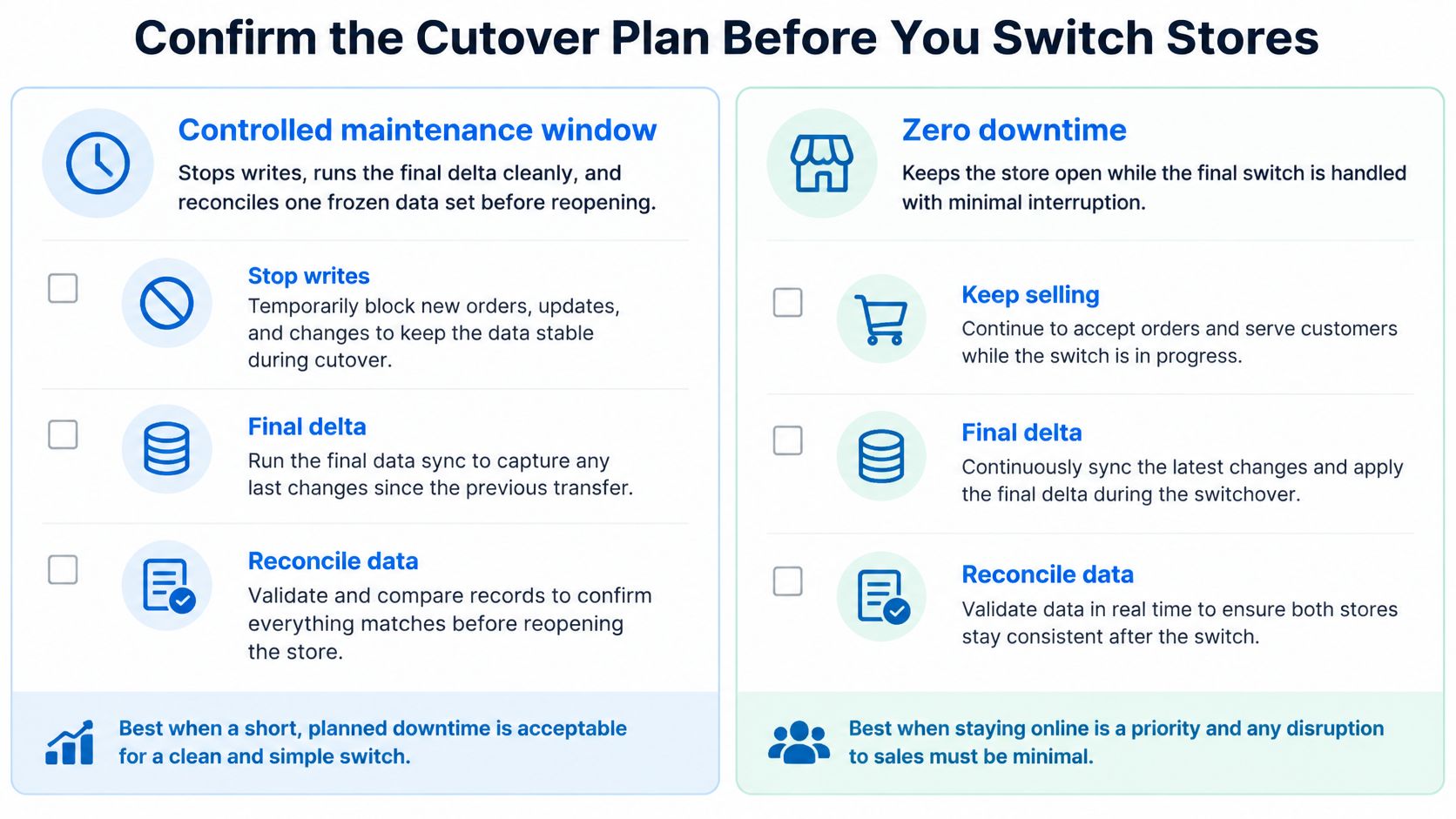
A controlled maintenance window stops writes, completes the final synchronization, and reconciles a frozen dataset before reopening. It interrupts selling, but gives the team a clear boundary for deciding which system owns each transaction.
A zero-downtime approach keeps selling while the switch happens. It can protect immediate revenue, but requires stronger ownership and reconciliation controls for concurrent orders, payment updates, refunds, and customer changes. Adobe's Delta migration documentation establishes the change-transfer mechanism, not a complete business operating model for that interval.
<a id="assign-ownership-to-the-live-order-window"></a>
Assign ownership to the live-order window
Choose a strategy using the maximum acceptable order gap, observed synchronization latency, payment and refund reconciliation status, support readiness, and a tested rollback point. Define measurable thresholds from the rehearsal rather than promising uninterrupted operation without evidence.
Record the final source transaction boundary and maintain a ledger of orders accepted around it. Lock or pause the source fulfillment queue at the agreed point, then release orders only through the designated authoritative system after checking external fulfillment identifiers.
Payment callbacks and refunds also need an owner during the switch. Specify where they arrive, how updates reach the destination, and who resolves a mismatch before an order is dispatched.
Carry forward privacy requests and consent changes made during migration, including requests that remove data. Apply data minimization with operational and legal review so obsolete fields aren't copied just because they exist.
<a id="make-launch-approval-explicit"></a>
Make launch approval explicit
Execute the approved freeze, final delta, checkpoint verification, cron activation, indexing, cache warming, and smoke-test runbook. Establish a post-launch monitoring rota covering order reconciliation, payment exceptions, integrations, and customer-support incidents, with clear escalation ownership.
Include storefront performance in release acceptance. A Core Web Vitals audit complements data checks by identifying customer-facing performance issues that a successful import won't detect.
Use a named owner for every go/no-go decision:
- Finance owner: Payments, refunds, and monetary reconciliation approved.
- Data lead: Reconciliation sheet signed, with critical discrepancies resolved.
- Technical lead: Rollback tested and current transaction preservation confirmed.
- Operations lead: Fulfillment authority and queue release approved.
- Support lead: Customer-access guidance and incident handling briefed.
- Release manager: Monitoring rota, escalation route, and launch decision recorded.
A finished tool run is not launch approval.
Your next step is a full staging dry run with a signed reconciliation sheet before booking the production window.
Our migration process at United Victory Technologies protects data, SEO, integrations, customer experience, and revenue when moving Magento or Adobe Commerce stores to Shopify. Our Shopify Migration Readiness Assessment uses eight questions, takes about two minutes, and provides a scoped view of data, integrations, SEO risk, and a realistic timeline. Visit United Victory Technologies to assess your migration scope before committing to a cutover date.